C1924F Instruction Book
4
4
3 Video / AUDIO (L / R)
To connect to a DVD player, Digital Set-Top-Box, or other AV devices with
composite (AV) video and audio output sockets.
7 USB
Allows the insertion of a USB storage device to play video, audio, photo and text
Media mode) and record DTV programmes on to a USB storage device.
Allows the insertion of a Common Access Module.9 CI(Common Interface) Slot
8 Mini YPbPr
To connect to a DVD player, Digital Set-Top-Box, or other AV devices with
component (YPbPr) video and audio output sockets.
2 Digital Audio Out Digital output to audio system.
1 Headphone out To connect to the earphones.
6 HDMI IN
blu-ray disc player or AV receiver.
To connect to a High-D
D) signal output device, such as a set-top box,
Socket Description
4 DVB-S2 To connect a Satellite signal.
5 TV Aerial To connect to the aerial socket on the wall with the RF coaxial cable.
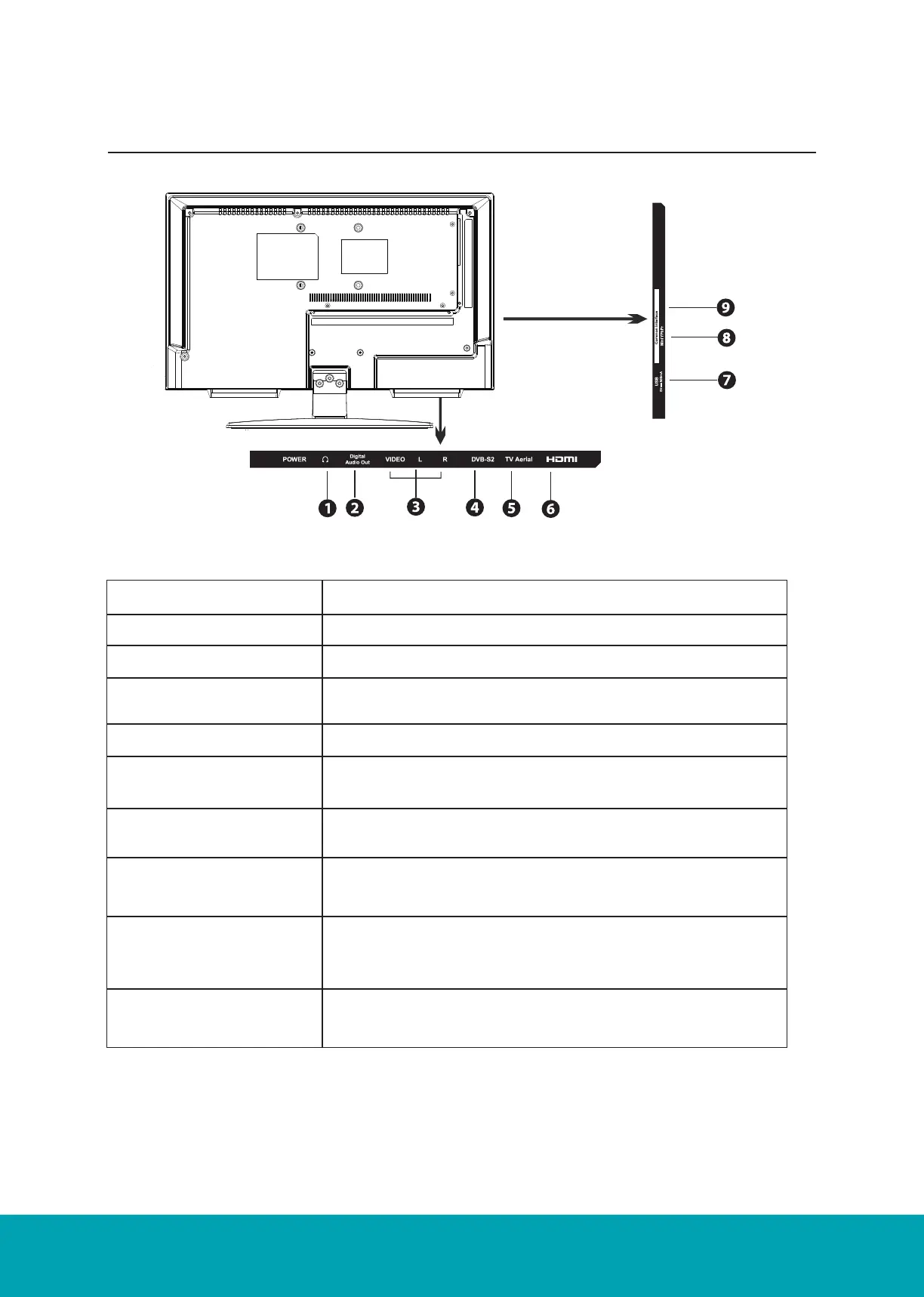
Rear View and Sockets
Socket Description
1. Headphone out To connect to the earphones.
2. Digital Audio Out Digital output to audio system
3. Video / AUDIO (L / R) To connect to a DVD player, Digital Set-Top-Box, or other AV
devices with composite (AV) video and audio output sockets.
4. DVB-S2 To connect a Satellite signal.
5. TV Aerial To connect to the aerial socket on the wall with the RF coaxial
cable
6. HDMI IN To connect to a High-Definition (HD) signal output device, such
as a set-top box, blu-ray disc player or AV receiver.
7. USB Allows the insertion of a USB storage device to play video,
audio, photo and text files (Media mode) and record DTV pro-
grammes on to a USB storage device.
8. Mini YPbPr To connect to a DVD player, Digital Set-Top-Box, or other AV
devices with component (YPbPr) video and audio output sock-
ets.
9. CI(Common Interface)
Slot
Allows the insertion of a Common Access Module.



 To Next Page