5
Remote control:
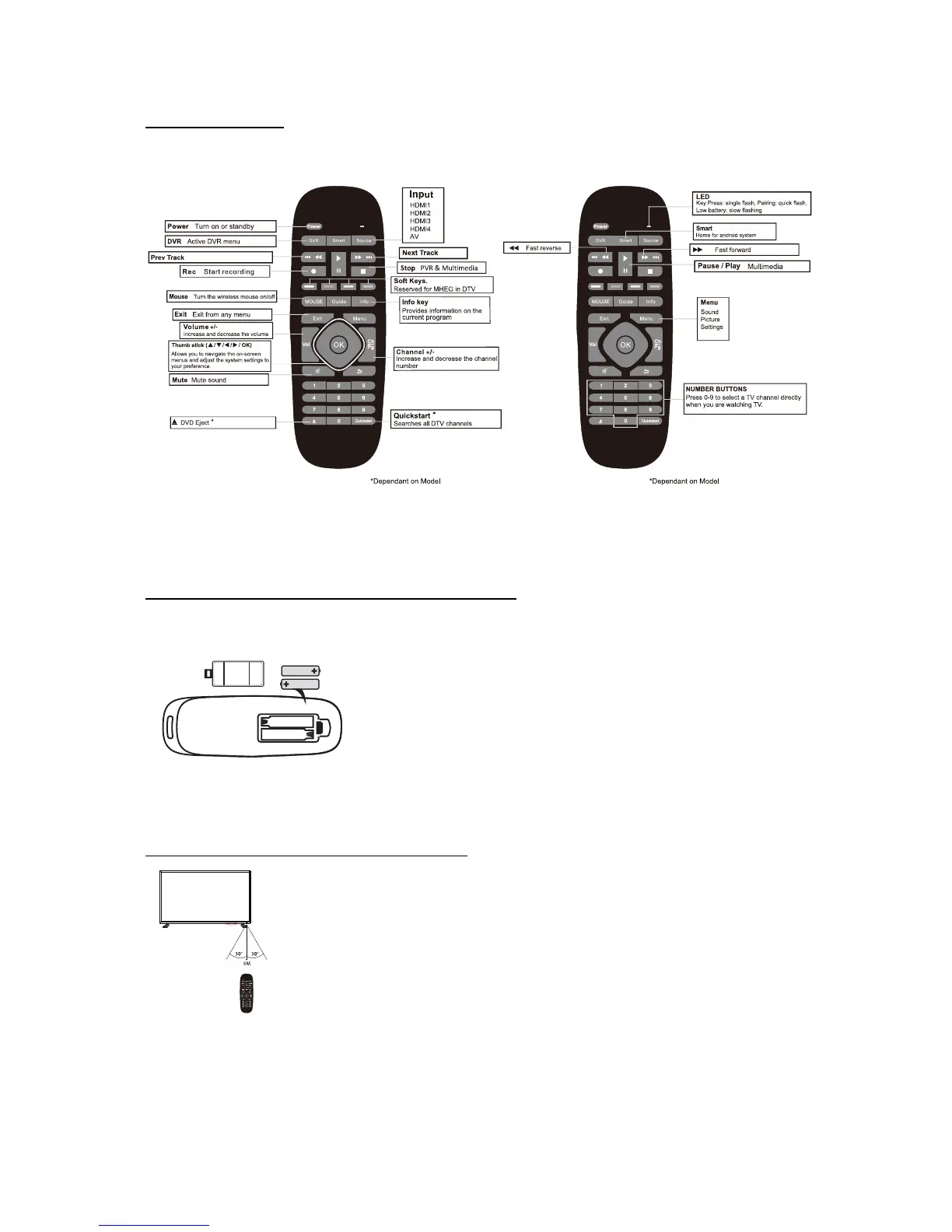
Dependant on the model some keys will have no function
The sensivity of the mouse cursor can be adjusted by pressing and holding the OK key and using the Volume
+/- keys to regulate the sensivity (Fast/Slow). During this procedure the mouse cursor must be acvated. The
Mouse cursor is turned on and off by pressing he Mouse key.
Installing Baeries into the Remote Control
Plug in the TV and wait for the TV to power on and show a picture on the screen before inserng the
baeries. This enables the wireless remote control to pair correctly with the TV.
1. Insert 2 x 1.5V AAA baeries making sure to match the (+) and (-) ends of the baeries with the (+)
and (-) ends shown in the baerie compartment.
2. Close the baerie compartment cover.
The Remote-Control Operaon Range
1. 5 Meters is the normal distance recommended between the Remote control and the TV IR sensor and
within 60° in front of the TV (See diagram). The operang distance may vary depending on the
brightness of the room.



 To Next Page