9
Display Channel Informaon and various opons in TV mode
1. Press the INFO key once on the remote control to see the channel informaon
2. Press the INFO key twice on the remote control to see extended channel informaon
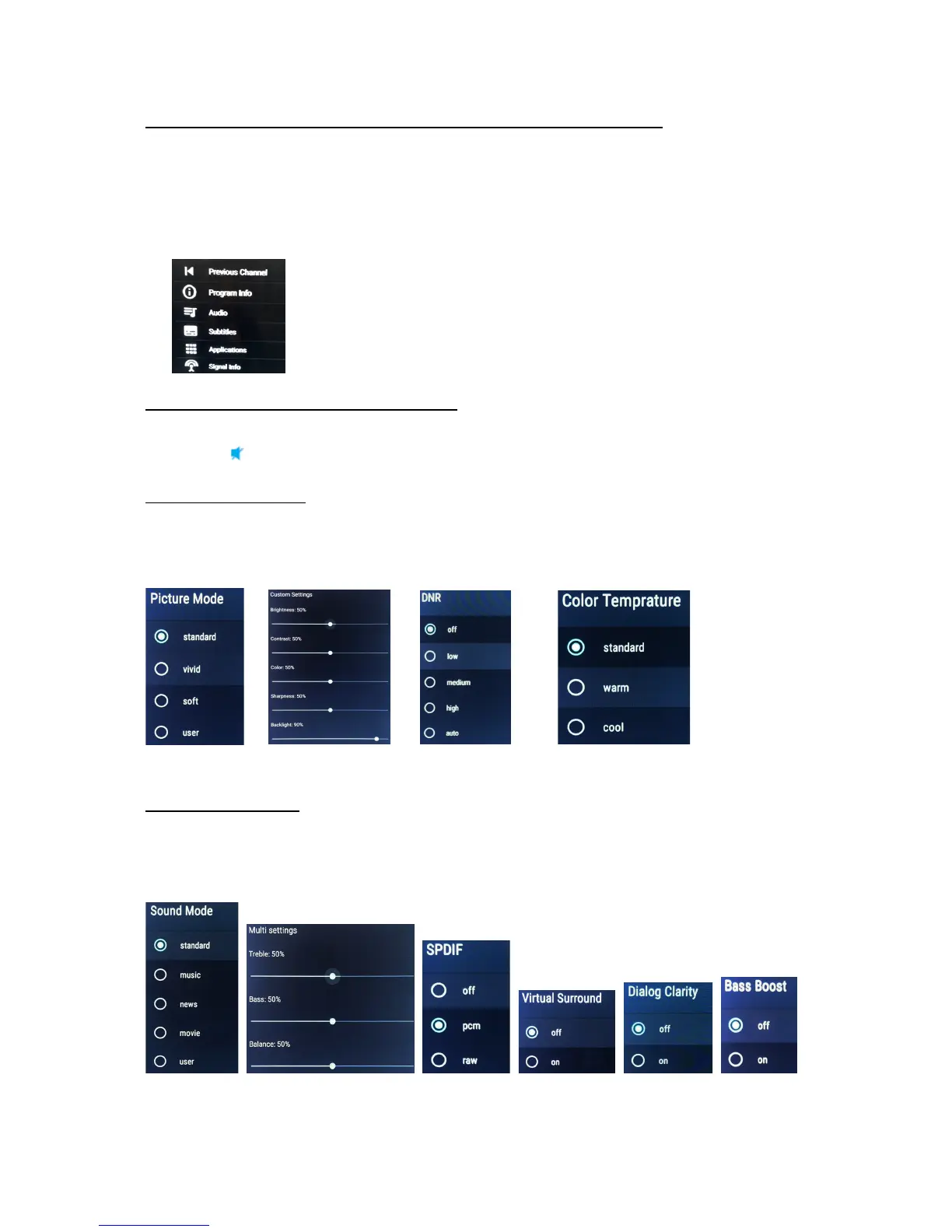
3. Press the le side on the Thumb sck navigaon keys, a menu will appear on the right side of the screen
displaying various opons including how to turn on Subtles and TV signal (quality and strength)
informaon, see below image
Volume adjustment and Audio Mute
1. Press the VOL up/down key on the remote control. The VOL up also turns off the mute funcon
2. Press the
key on the remote control to turn on and off the mute funcon
TV Picture Sengs
Press the Menu key on the remote control and select PICTURE. Opons for Picture mode, Custom Sengs,
Colour Temperature and Noise Reducon (DNR) will be available. See below images for opons available.
Press the EXIT key on the remote control to close menus
TV Sound Sengs
Press the Menu key on the remote control and select SOUND. Opons for Sound mode, Mul Sengs, SPDIF,
Virtual Sound, Dialog Clarity and Bass boost will be available. See below images for opons available. Press
the EXIT key on the remote control to close menus



 To Next Page