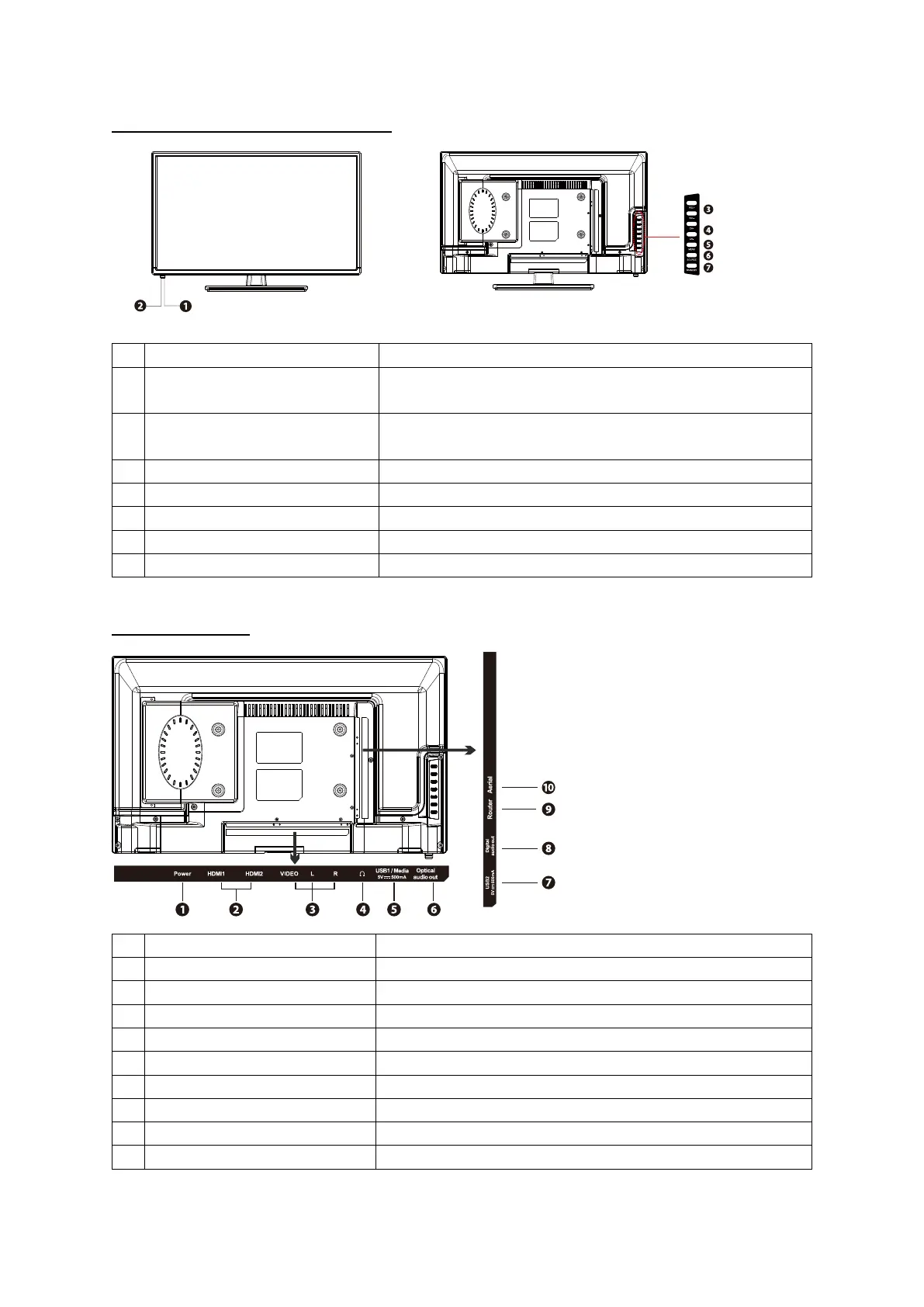
Front / Side view TV bu�on controls
ITEM DESCRIPTION
1 POWER LED Illuminates Green when the TV is turned on.
Illuminates Red when the TV is in Standby.
2 IR (Infrared Receiver) Receives IR Signals from the remote control.
Do not block the sensor.
3 VOL+/- Adjusts the Volume
4 CH+/- Selects channels
5 MENU Displays the on screen display
6 SOURCE Select from NETGEM/HDMI1/HDMI2/AV/USB
7 STANDBY Turns the Television ON and OFF
Rear view sockets
SOCKET DESCRIPTION
1 HDMI INPUTS Connect to external devices via HDMI cable
2 AV Connect to external devices via AV cables
3 HEADPHONE Connect to Headphones
4 USB Connect to a USB storage device and play media files
5 OPTICAL AUDIO OUTPUT Digital audio output to sound system
6 USB For service and maintenance use only
7 COAX AUDIO OUTPUT Digital audio output to sound system
8 RJ45 (ETHERNET) Connect to the internet
9 TV Aerial Connect to the domes�c aerial socket
3



 To Next Page