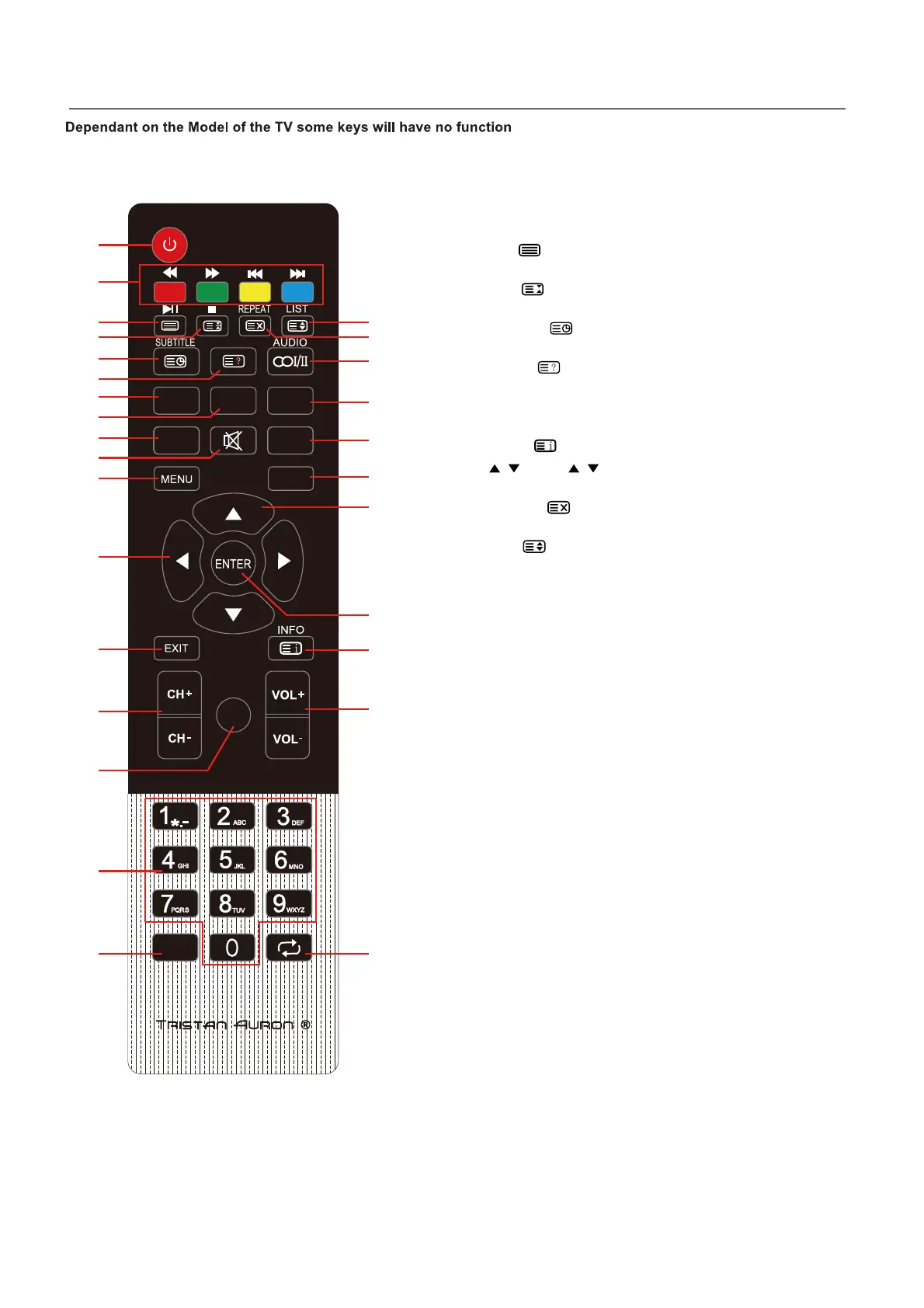
Remote Control
4
PICTURE
S
SOURCE
OUND
REC T-SHIFT
-/--
ASPECT
EPG
♥
1
3
5
4
2
6
7
8
9
11
12
13
14
16
17 18
19
20
23
22
24
25
26
27
28
21
15
10
NOTE:
♦ All pictures in this manual are examples, only for reference, actual product may differ
from the pictures.
♦ The buttons not mentioned here are not used.
Definition of the buttons on remote control:
Teletext Function:
20. INDEX :Go to the index page.
6. REVEAL : Reveal or conceal hidden text for
quizzes etc.
4. HOLD : Retain the current teletext page and
again to cancel the function.
3. TEXT : Switch between teletext on,
mix and teletext off.
28 SIZE : Switch between zooming to the upper
half, lower half and in full.
5. SUBTITLE : Switch between secondary
pages by entering the four digit number.
27. CANCEL :Cancel the teletext but not to exit
teletext, press again to show teletext.
16. NUMBER BUTTONS: Key in the alphanumeric
digits to go to the designated page directly.
22. / : Press / to scroll to the next / previous
page.
2. COLOR BUTTONS: Teletext Button.


 To Next Page