9
3.1 Structure of the control panel
The user can control the operation of the printer with the control panel.
1
2
Ready
6
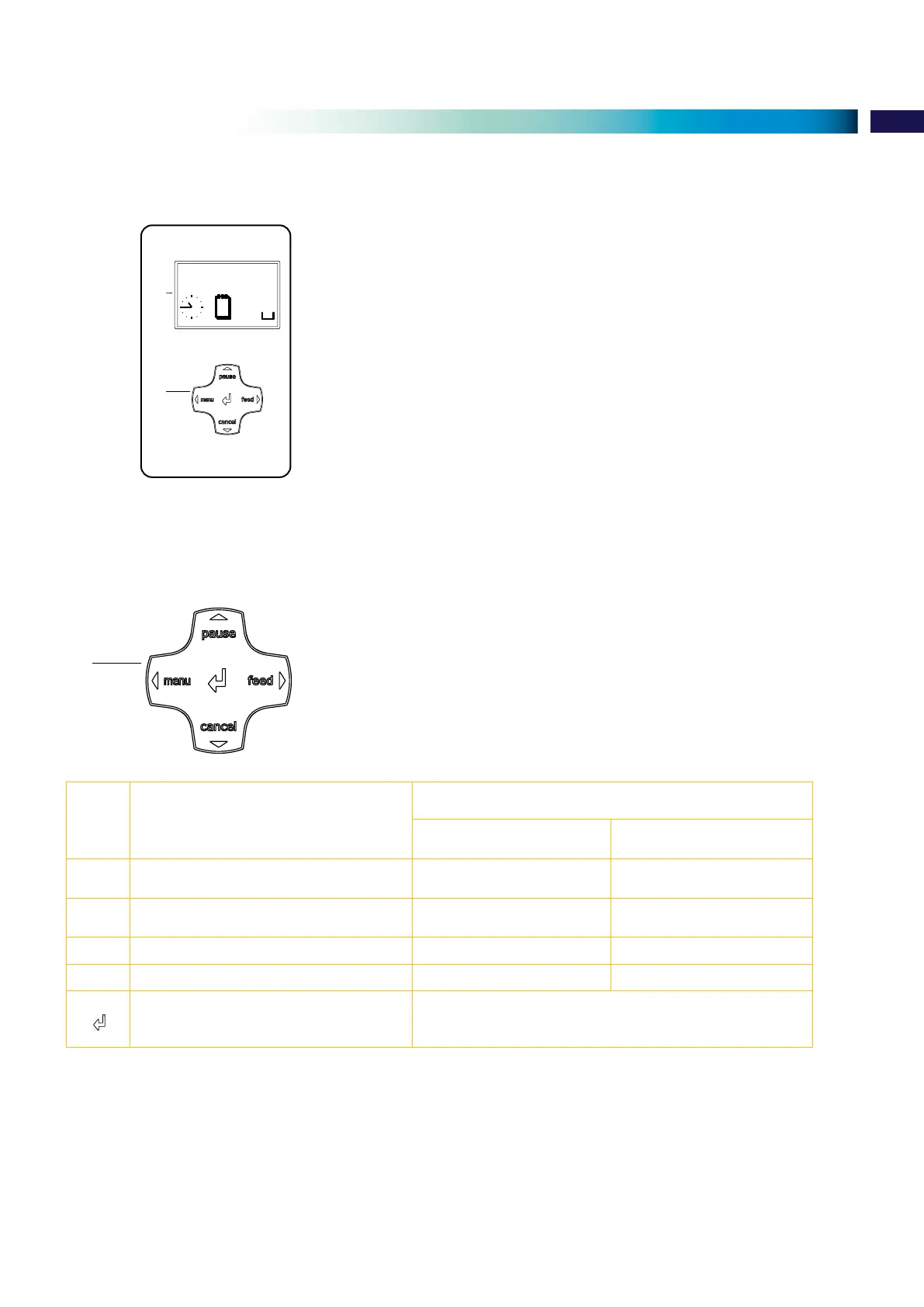
The control panel consists of a graphic display (1) and the navigator pad (2) with ve
integrated keys.
The graphic display indicates the current status of the printer and the print job,
indicates faults and shows the printer settings in the menu.
Fig. 5 Control panel
3.1.1 Key functions
The navigator pad (2) allows access to menus for perameter setting.
2
Fig. 6 Navigator pad
Keys Menu Parameter setting
Parameter choice Numeric value
Return from a submenu - Increase the number at the
cursor position
Jump into a submenu - Decrease the number at the
cursor position
|
Menu option to the left left Cursor shift to the left
Menu option to the right right Cursor shift to the right
Start of a selected menu option
Hold 2 s: Leaving the ofine menu
Conrmation of the selected value
Hold 2 s: Abort without changing the value
Table 2 Key functions
3.1.1 Setting the different language
As default the display is set the ENGLISH language.
To set a different language, make use of the navigator pad and select:
Menu >
Setup > Local settings > Country >
... Language >
3 Control panel


 To Next Page