Need help?
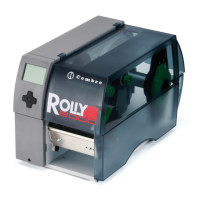
Do you have a question about the Cembre ROLLY 2000 and is the answer not in the manual?
Details manual notation, symbols, and common instructions.
Clarifies the device's purpose and defines improper usage.
Essential safety warnings for operation, electrical, and environmental hazards.
Guidelines for device disposal and environmental impact.
Visual identification and description of printer components.
Lists and describes all available ports and connectors on the printer.
Procedures for unboxing, checking, and placing the printer.
Steps to safely turn on the printer after initial setup.
Explains the display and navigator pad interface elements.
Details the specific actions of the navigator pad keys.
Guide to changing the printer's display language settings.
Interpretation of symbols displayed to indicate printer status.
Descriptions of various printer operational states and their meanings.
Specific key functions relevant during active printing operations.
Instructions for preparing and loading label rolls.
Steps for fitting or removing adapters for label roll cores.
Correct positioning of the label roll on the printer's retainer.
Guide for inserting the label strip into the printhead path.
Crucial adjustment for accurate label gap or mark detection.
Setting the print head for optimal print quality and longevity.
Procedure for installing or replacing the ink ribbon.
Fine-tuning the ribbon path to prevent creases.
General guidance and safety for printer cleaning.
Steps to clean the print roller to ensure proper media movement.
Essential maintenance for printhead clarity and lifespan.
Instructions for cleaning the label sensor to maintain accuracy.
Identifies the three types of error states the printer can enter.
Lists frequent problems and their resolution steps.
Detailed list of error messages and corresponding actions.
Further error messages and their corrective measures.
Dimensions and parameters for various label and continuous media.
Key measurements and clearances related to the printer's physical size.
Guidelines for the dimensions and placement of reflex marks.
Guidelines for the dimensions and placement of cut-out marks.
Conditions and duration of the product warranty.
Instructions on how to send the printer for service.
Information on available additional accessories for the printer.

 To Next Page
 General