DATALOGGER HYGRO THERMOMETER
10
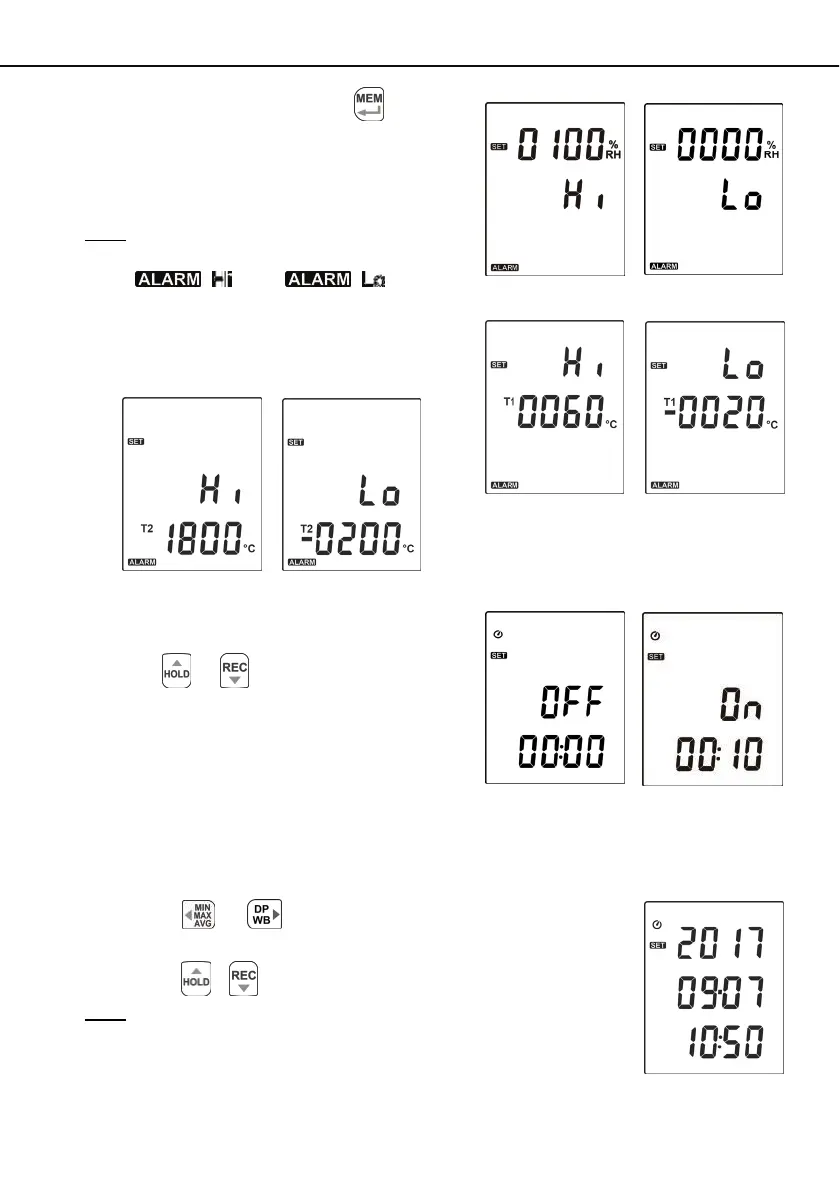
(2) When setting on mode, press the
button to
set Hi and Lo limit.
( RH alarm setting see Fig.16 and Fig.17 )
( T1 alarm setting see Fig.18 and Fig.19 )
( T2 alarm setting see Fig.20 and Fig.21 )
Note:
When measuring value over alarm point, the symbol will
blink “
” or “
” on the
LCD.
The beeper will make “ beep-beep-beep ” sound.
The Lo alarm set cannot be greater than Hi alarm
set.
7.3.7 Set Auto Power Off Time:
Press the
or button to select auto power
off option 10, 30 minutes, 1, 2, 4, 8 hours, or off.
(see Fig.22 or Fig.23)
7.3.8 Set System Clock:
The unit is built-in a clock so that the data logger function can also record the data and time along
with the measurement value.
(1) Press the
or button to select year, date, or time.
(see Fig.24)
(2) Press the
/ button to increase/ decrease value.
Note:
Check the clock setting after replacing batteries. If necessary, reset
system clock.
Fig.16
Fig.17
Fig.18
Fig.19
Fig.20
Fig.21
Fig.22
Fig.23
Fig.24


 To Next Page