Wait!
- When pausing, the internal projector will move down vertically in order
to prevent burns and injury.
(When the mode is executed again, the set strength will be restored.)
- When 5 minutes have passed after pausing, the product will turn off
automatically.
Wait!
- When pausing, the internal projector will move down vertically in order
to prevent burns and injury.
(When the mode is executed again, the set strength will be restored.)
- When 5 minutes have passed after pausing, the product will turn off
automatically.
30
31
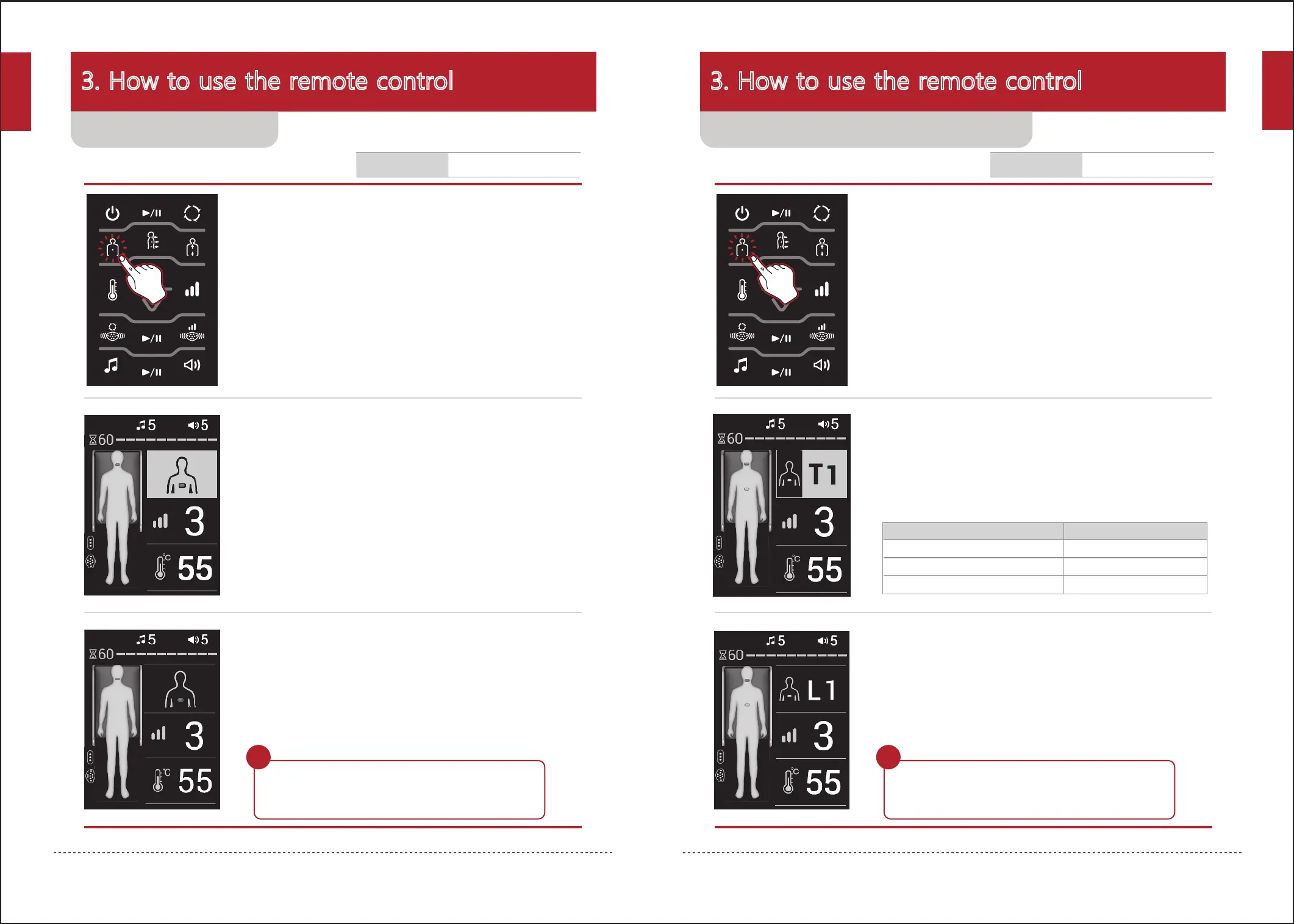
3. When body shape sensing ends, the manual master
mode will begin. Maintain correct posture.
- The time remaining will be displayed at the top of the human body icon.
- If the remote control is operated while using the product, the time
remaining will be initialized.
- When 5 minutes have passed after setting the position, the internal
projector will move automatically in order to prevent burns.
- When 60 minutes have passed after operating the remote control,
the remote control will turn off automatically and the mode will end.
2. Move the internal projector to the desired position
using the up/down button.
1. Turn on the remote control, check the current status
and press the manual mode button twice.
3. The manual mode will begin at the designated
position. Maintain correct posture.
- The time remaining will be displayed at the top of the human body icon.
- If the remote control is operated while using the product, the time
remaining will be initialized.
- When 5 minutes have passed after setting the position, the internal
projector will move automatically in order to prevent burns.
- When 60 minutes have passed after operating the remote control,
the remote control will turn off automatically and the mode will end.
2. Move the internal projector to the desired position
using the up/down button.
1. Turn on the remote control, check the current status
and press the manual mode button.
3. How to use the remote control 3. How to use the remote control
속도 삭제
내장음악 5 / 볼륨 5
수동 모드: 번호 T1 표시
강도 3
온도 55
3구도자 / 복부 진동 도자
- The selected position will be displayed in green.
Neck area(cervical spine)
Back area(thoracic vertebrae)
Waist area(lumbar vertebrae)
Position Screen display (24 segments)
C1~7
T1~12
L1~5
Approximately 60 minutes.
Duration for mode
Approximately 60 minutes.
Duration for mode
Using manual mode (master mode)Using manual mode
English
English


 To Next Page