26
Door Control
Control Panel Setup
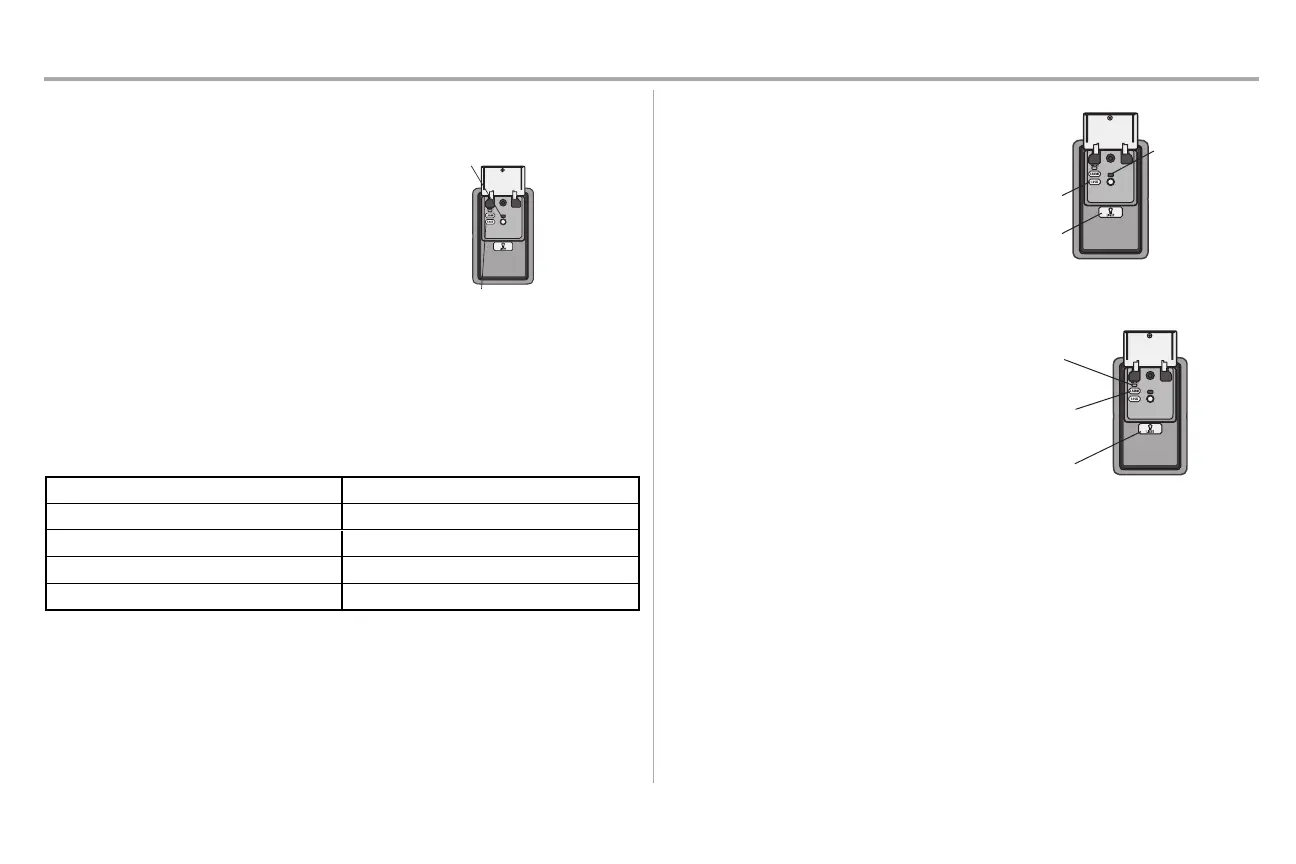
LOCK
NOTE: Your remote controls will NOT work when
LOCK mode is active however your keyless entry
will still allow access to your garage.
Activate: Pressand hold the LOCK button for 2
seconds. The command LED will flash aslong as
the lockfeature is activated and your handheld
remote control will not operate your door atthis
time.
Deactivate: Press and hold the LOCK button again
for 2 seconds. The command LED will stop flashing
and normal operation will resume.
LIGHT
To change the amount of time the garage door opener lights will stay on:
Press and hold the LOCK button until the garage door opener lights flash.* The time interval is indicated
by the number of flashes.
Number of timesgarage door opener lightsflash Time the garage door opener lightstays on
1 1 1/2 Minutes
2 2 1/2 Minutes
3 3 1/2 Minutes
4 4 1/2 Minutes
To cycle through the time intervals repeatthe step above.
* Approximately 10 seconds
LIGHT FEATURE (Default is Active)
Deactivate:
Press and hold the LIGHTbutton until the garage
door opener lightsturn on, then offagain.*
Activate:
Startwith the garage door opener lights on. Press
and hold the LIGHT button until the garage door
opener lightsturn off, then on again.*
NOTE: If the command LED is continuously
blinking, the LOCK feature needs to be deactivated.
LOCK Button
LIGHT
Button
Command LED
MAINTENANCE ALERT SYSTEM (MAS):
Activate/Deactivate
Press and hold the LEARNbutton. Then press the
LIGHT button. The service LED will flash the status;
Active is 2 flashes and deactivated is 3 flashes.
LEARN
Button
LIGHT
Button
Service
LED





 To Next Page