WARNING
31
UP (Open)
DOWN (Close)
PROGRAMMING BUTTONS
The programming buttons are located on the left side panel of the garage door opener and are used to
program the travel. While programming, the UP and DOWN buttons can be used to move the door as
needed.
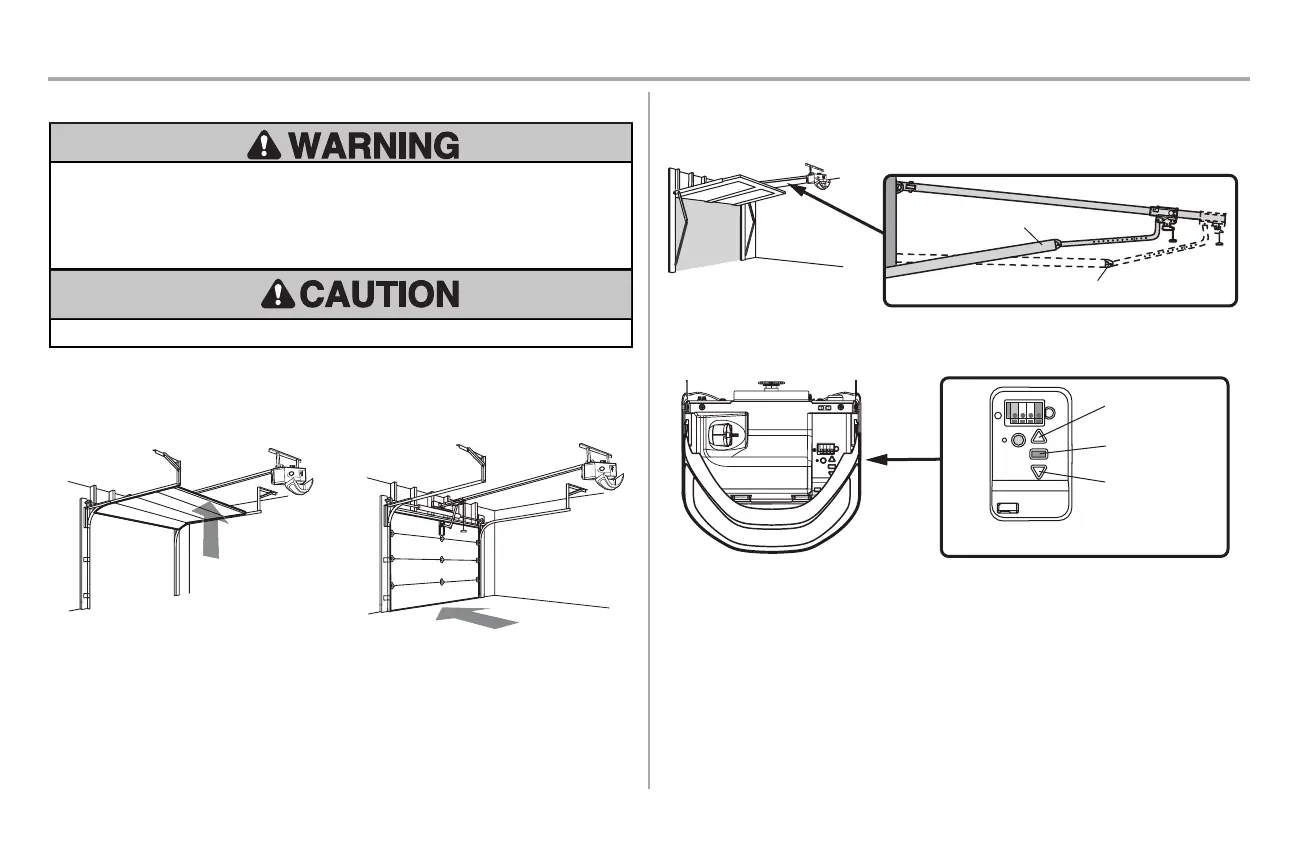
ONE-PIECE DOORS ONLY
When setting the UP travel for a one-piece door ensure that the door does not slant backwards when
fully open (UP). If the door is slanted backwards this will cause unnecessary bucking and/or jerking
when the door is opening or closing.
Correct
Incorrect
PROGRAMMING BUTTONS
UP Button
DOWN Button
Adjustment Button
Adjustments
Introduction
Your garage door opener is designed with electronic controls to make setup and adjustments easy.
Without a properly installed safety reversal system, persons (particularly small children) could be
SERIOUSLY INJURED or KILLED by a closing garage door.
Incorrect adjustment of garage door travel limits will interfere with proper operation of safety
reversal system.
After ANY adjustments are made, the safety reversal system MUST be tested. Door MUST
reverse on contact with 1-1/2” (3.8 cm) high object (or 2x4 laid at) on oor.
To prevent damage to vehicles, be sure fully open door provides adequate clearance.







 To Next Page