23
Installation
STEP 13 Install the Protector System
®
(continued)
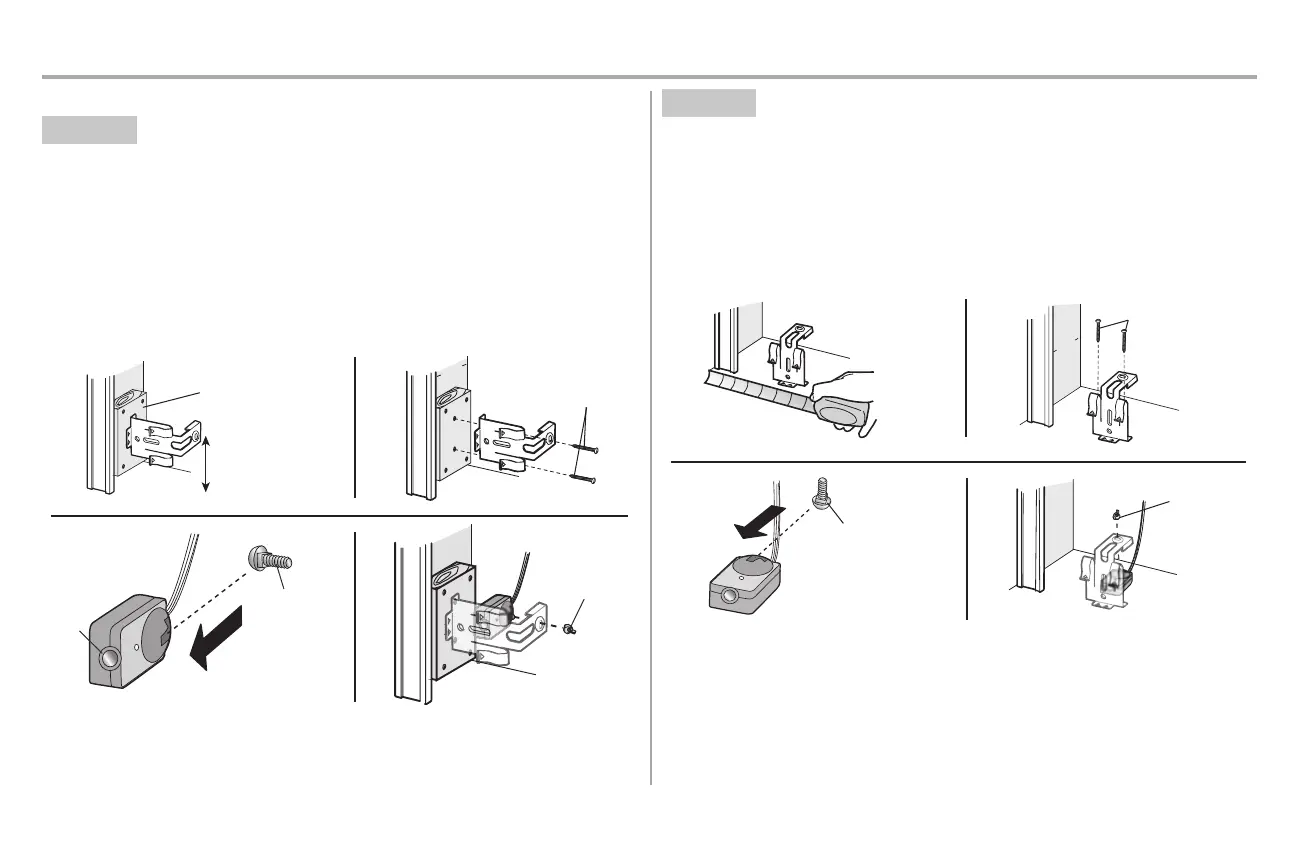
OPTION B WALL INSTALLATION
If additional clearance is needed an extension bracket (not provided) or wood blocks can be used. Make
sure each brackethas the same amount ofclearance so they will align correctly.
1. Position the sensor bracket against the wall with the curved arms facing the door. Make sure
there isenough clearance for the beam to be unobstructed.Mark holes.
2. Drill 3/16 inch pilotholes for each sensor bracket and attach the sensor brackets to the wall using
lag screws(not provided).
3. Slide the carriage boltinto the slot on each sensor.
4. Insert the bolt through the hole in the sensor bracketand attach with the wing nut. The lenses on
both sensors should point toward each other. Make sure the lensis not obstructed by the sensor
bracket.
(Not provided)
No more than
6 inches (15 cm)
1
2
Inside
G
arage
Wall
(Not provided)
Lens
Carriage Bolt
1/4"-20x1/2"
Wing Nut
1/4"-20
3
4
OPTION C FLOOR INSTALLATION
Use an extension bracket(not provided) or wood blockto raise the sensor bracketif needed.
1. Carefully measure the position of both sensor brackets so they will be the same distance from the
wall and unobstructed.
2. Attach the sensor bracketsto the floor using concrete anchors (not provided).
3. Slide the carriage boltinto the slot on each sensor.
4. Insert the bolt through the hole in the sensor bracketand attach with the wing nut. The lenses on
both sensors should point toward each other. Make sure the lensis not obstructed by the sensor
bracket.
I
nsid
e
G
arage
Wa
l
l
(Not provided)
1 2
Carriage Bolt
1/4"-20x1/
2"
Wing Nut
1/4"-20
3
4




 To Next Page