35
Operation
Remote Control
Your remote control has been programmed at the factory to operate with your garage door opener.
Older Chamberlain remote controls are NOT compatible. Programming can be done through the learn
button on the garage door opener. To pr ogram additional accessories refer to the instructions provided
with the accessory or visit www.chamberlain.com. If your vehicle is equipped with HomeLink
®
, a
Compatability Bridge
TM
(not included) may be necessary for certain vehicles. Visit
bridge.chamberlain.com to find out if a Bridge i s needed.
TO ADD, REPROGRAM, OR CHANGE A REMOTE CONTROL/KEYLESS ENTRY PIN
US ING THE MULTI-FUNCTION CONTROL PANEL
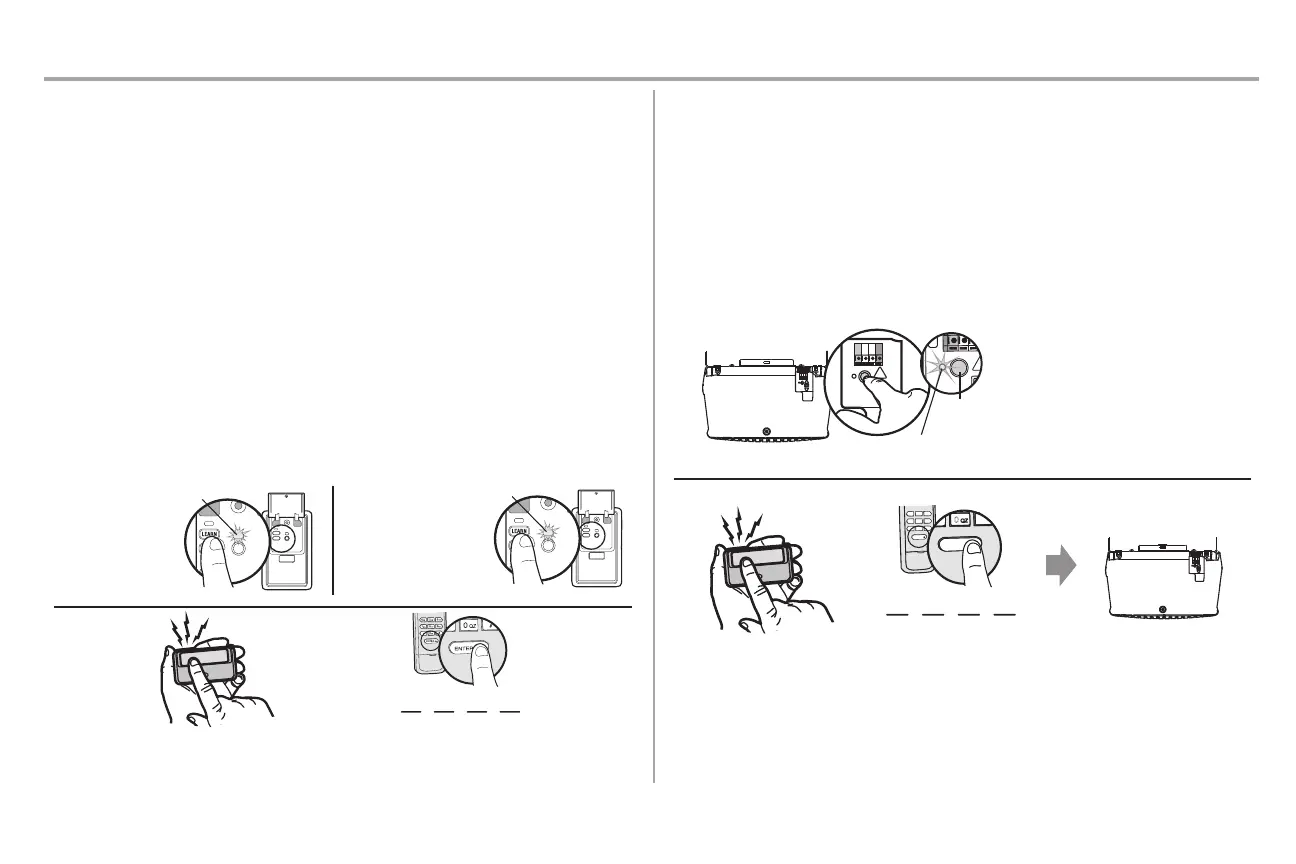
1. Press the LEARN button on the door control to enter Programming Mode.
2. Press the LEARN button again, the LED will flash once.
3. Remote Control:
Press the button on the remote control that you wish to operate your garage door.
Keyless Entry:
Enter a 4-digit personal i dentification number (PIN) of your choice on the keyless entry keypad.
Then press the ENTER button.
The garage door opener lights will flash (or two clicks will be heard) when the code has been
programmed. Repeat the steps
for progr
amming additional remote controls or keyless entry devices.
The command LED
will flash once.
The command LED will
flash once again.
2
OR
? ???
3
TO ADD, REPROGRAM, OR CHANGE A REMOTE CONTROL/KEYLESS ENTRY PIN
US ING THE LEARN BUTTO N
1. Press and immediately release the Learn button.
2. Remote Control:
Press and hold the button on the remote control that you wish to use.
Keyless Entry:
Enter a 4-digit personal i dentification number (P IN) of your choice on the keyless entry keypad.
Then press the ENTER button.
The garage door opener lights will flash (or two clicks will be heard) when the code has been
programmed. Repeat the steps for programmin g additional remote controls or keyless entry devices.
OR
????
4
GHI
5
JKL
7
P
RS
8
TUV
9
WXY
0
QZ
*
#
0
QZ
*
#
6
MNO
“click”
“click”
LEARN LED
LEARN
Button



 To Next Page