34
Operation
Multi-Function Control Panel (continued)
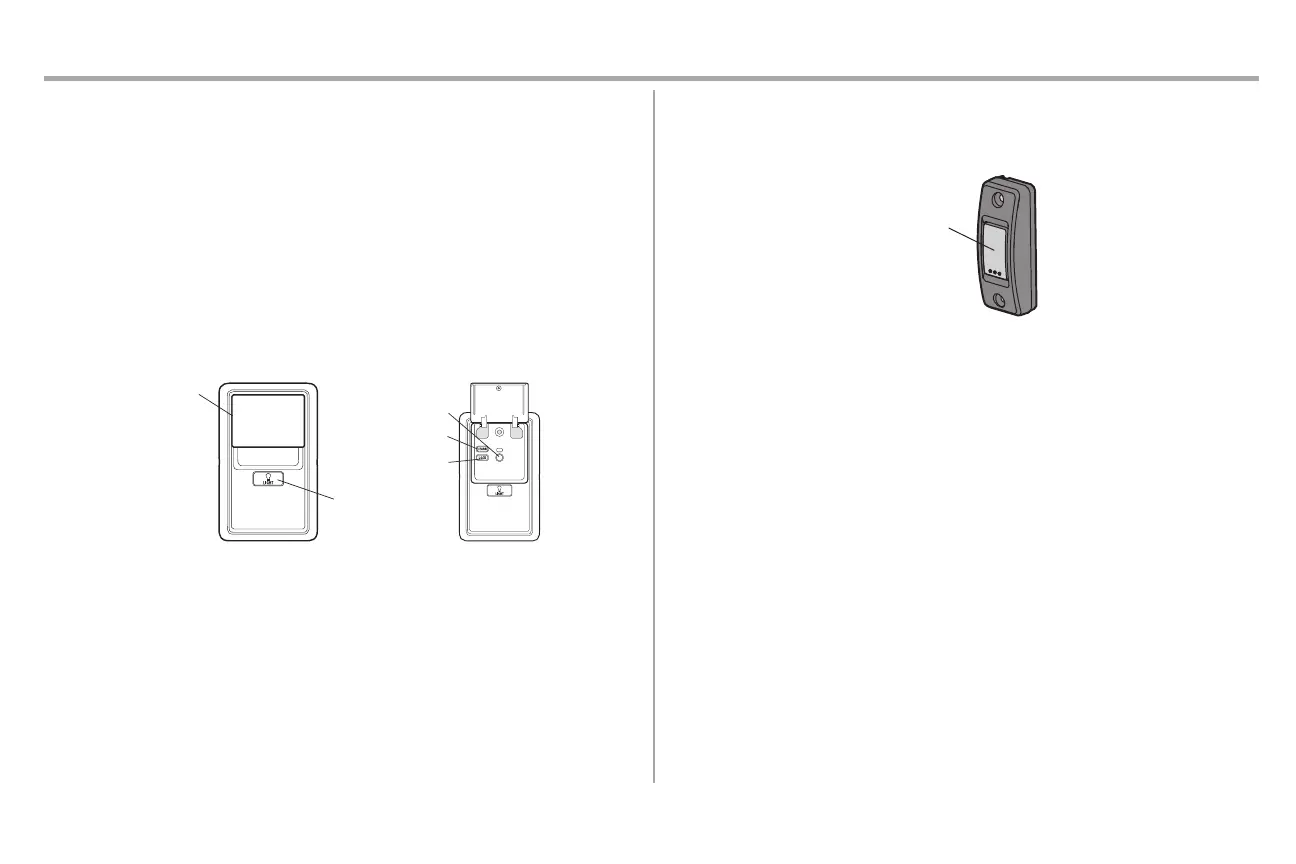
LOCK
The LOCK feature is designed to prevent activation ofthe garage door opener from remote controls
while still allowing activation from the door control and keyless entry. This feature is useful for added
peace of mind when the home is empty (i.e.vacation).
l Activate: Pressand hold the LOCK button for 2 seconds. The command LED will flash as long
as the lockfeature is activated and your handheld remote control will notoperate your door at
this time.
l Deactivate: Press and hold the LOCK button again for 2 seconds.The command LEDwill stop
flashing and normal operation will resume.
PROGRAM
Any compatible remote controls or wirelesskeyless entrycan be programmed to the garage door opener
by pressing the Learn button.
Push Bar
LIGHT Button
LOCK Button
Command LED
LEARN Button
Using the Push Button Door Control
SYNCHRONIZE THE DOOR CONTROL: To synchronize the door control to the garage door opener,
press the push button until the garage door opener activates(it may take up to 3 presses).



 To Next Page