14
ADJUSTMENTS
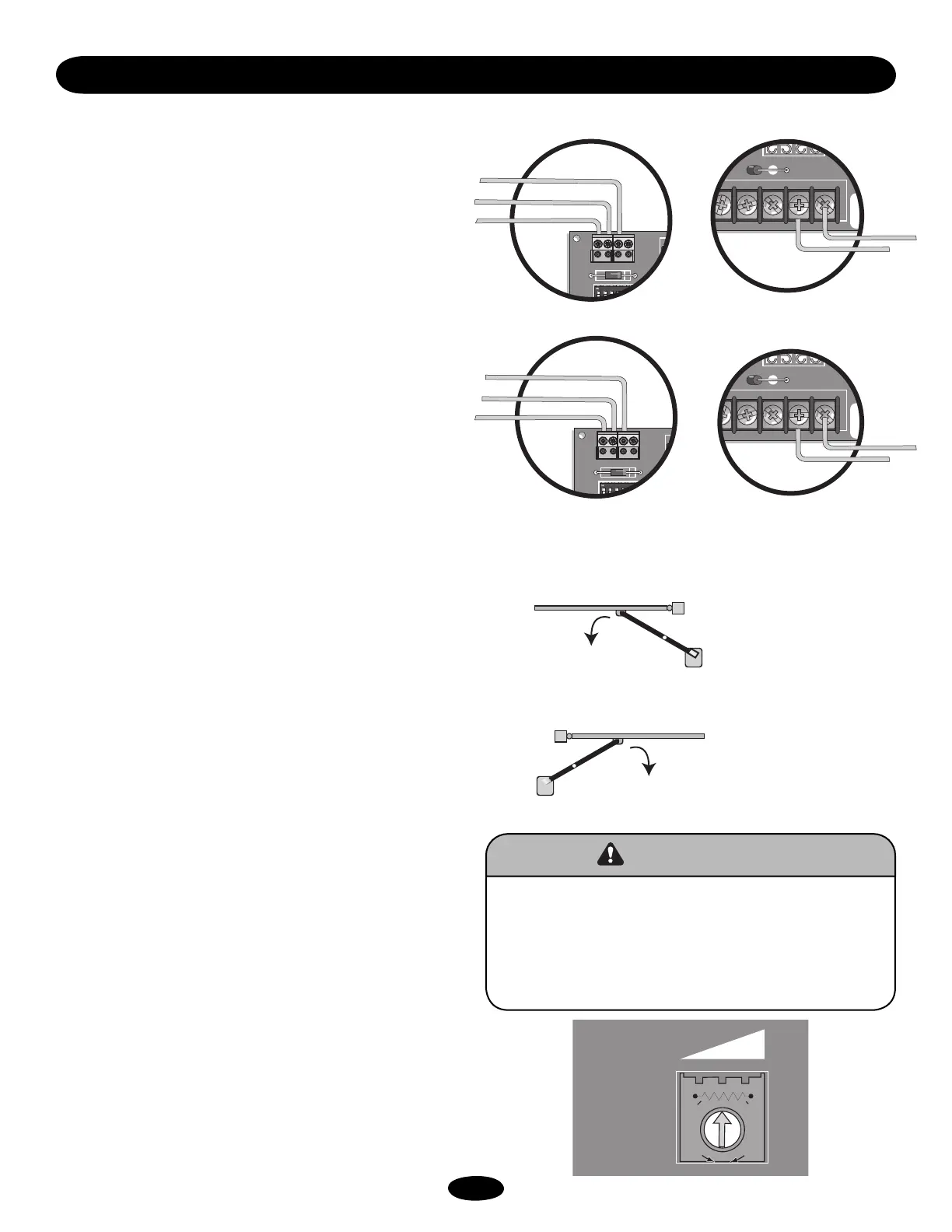
RIGHT OR LEFT HAND OPERATION
UNIT SHIPS AS RIGHT-HAND
Method 1: No longer used as of August 16, 2003. The S1-7
switch will be redefined.
Method 2: Reverse the BLUE and ORANGE wire from the
motor and at J4 from the limit switches. With this method DO
NOT switch S1-7 to the ON position – leave in OFF position.
RIGHT HAND OPERATION the motor (J4) and limit switch (J2)
wires will be BLUE then ORANGE.
NOTE: Right hand operation is the default setting from the
factory.
LEFT HAND OPERATION the motor (J4) and limit wires (at J2)
will be ORANGE then BLUE.
As a RIGHT HAND OPERATOR the LIMIT SWITCH closest to the
gear box is the CLOSE LIMIT.
As a LEFT HAND OPERATOR the LIMIT SWITCH closest to the
gear box is the OPEN LIMIT.
LIMIT SWITCH ADJUSTMENTS
Disconnect power from operator. In order to adjust limit nuts, the
detent plate must be pushed down to allow free movement.
Spinning the nut closer to the switch will cause the gate to stop
sooner when approaching that switch. Spinning it away will delay
the nut in reaching that switch. With power disconnected,
(batteries and ac power) gate can be pushed open and closed to
assist in limit switch adjustments. After initial settings connect
power then run gate open and close to fine tune settings.
Remember to set the fast run timer (page 12) to allow gate to run
at the fast speed for as much of the gate travel as possible, but
still ensuring that it will slow down just before reaching the
closed position.
INSTANT REVERSE DEVICE (IRD1)
The reverse device is an internal circuit that continuously
monitors the motor's current for increased draw. This operator
has been shipped with the IRD1 set to a typical setting that will
likely move the gate from limit to limit. If necessary, the
sensitivity of this device can be adjusted by turning the IRD1 to
the right (CW, more sensitive) or left (CCW, less sensitive) in
small increments.
ADJUSTMENT
While running the gate open and closed, verify the gate travels as
expected. Verify that the operator reverses off a rigid obstruction
located 1' from both the open and closed limit. If the operator
does not reverse, adjust the IRD1 CW (more sensitive) in small, 1
hour increments until the gate reverses off the 1' obstruction. The
gate should continue to travel from the open and closed limits as
expected. If the gate did not complete the full open and closed
travel, the IRD1 setting should be incremented CCW (less
sensitive) in small, 1 hour increments until the gate travels the
full distance. Verify that the operator reverses off a rigid
obstruction located 1' from both the open and closed limit.
Seasonal ambient temperature changes may make IRD1
adjustments necessary. If during the setup, a double entrapment
condition occurs, refer to the troubleshooting section to reset the
gate.
24VAC XFMR
F3
MOV
AT+ MOTOR
MOTOR
OF FUSE
24VAC XFMR
F3
MOV
BAT+ MOTOR
MOTOR
OF FUSE
AUX LIMITS
1
J2
S1
12345678
S2
1
D1
Ø
AUX LIMITS
1
J2
S1
12345678
S2
1
D1
Ø
To reduce the risk of SEVERE INJURY or DEATH,
• After ANY adjustments, verify that the operator reverses off
a rigid obstruction located 1' from both the open and close
limits.
• Test instant reverse device (IRD1) monthly.
• Adjustments MUST be made by qualified service personnel.
IRD1
C7
12
93
2
1
5
4
10
8
7
11
6
M
O
R
E
S
E
N
S
I
T
I
V
E
L
E
S
S
S
E
N
S
I
T
I
V
E
RIGHT HAND OPERATION
NOTE: Unit ships out as a right hand (default wiring setup).
RIGHT HAND OPERATION
LEFT HAND OPERATION
LEFT HAND OPERATION
Righthand operation is viewed from
the same side of the gate as the
operator with the operator to your
right.
Lefthand operation is viewed from
the same side of the gate as the
operator with the operator to your
left.
Operator
Open
Gate
Operator
Open
Gate
Blue
Green
OR
AUX. LIMITS
(Open & Close Limits)
AUX. LIMITS
(Open & Close Limits)
Orange
Blue
Green
Orange
Blue
Orange
Blue
Orange
ATTENTION
AVERTISSEMENT AVERTISSEMENT
AVERTISSEMENT
WARNINGWARNING
CAUTION
WARNING
WARNING
PRECAUCIÓN
ADVERTENCIA
ADVERTENCIAADVERTENCIA








 To Next Page