4
|
ß Back to CONTENTS ß Back to CONTENTS
|
5
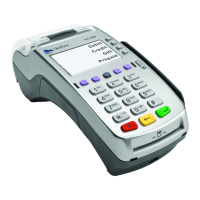
HOT KEY FUNCTIONS
Press the hot keys
beneath the display
to navigate your
terminal’s menus.
LOCATION FUNCTION
First Hot Key
Far Left
Down Arrow - press to scroll
down to the next menu.
Up Arrow - press to scroll up
to the previous menu.
Press the yellow [BACK]
!key to toggle between the
directional arrows.
Third Hot Key
Middle Right
Gift Card - press to initiate a
gift card transaction.
Fourth Hot Key
Far Right
Reports - press to access
available reports.
NAVIGATING YOUR TERMINAL
Refer to this section
to find and begin the
transaction or
function you wish
to use.
BEGIN A SALE
Swipe the card; or select Sale, manually enter the card
number and then press [ENTER] to begin a sale transaction.
Your terminal will guide you through the process.
(Note: Debit cards must be swiped.)
BEGIN OTHER TRANSACTIONS
Use the [ARROW] hot key at the main menu or idle prompt to
navigate to the transaction type you wish to perform. Scroll
through the menu and press the corresponding [F] key when
your desired transaction appears on the terminal display.
REPRINT A RECEIPT
Use the [ARROW] hot key at the main menu to navigate to the
Reprint option. You will be prompted to select last receipt, or
enter criteria to search for another receipt to reprint.
ACCESS CLERK SETUP
Use the [ARROW] hot key at the main menu to navigate to the
Clerk Setup option.
ACCESS REPORTS
Press [REPORTS] to access the Reports menu. Scroll to the
desired report or report category, then press the corresponding
[F] key and follow the prompts to view or print your report.
EDIT AUTO SHIFT TIMES
If you are in auto shift mode, use this procedure to edit the start
and end shift times. Press [1] at idle to access the Shift menu.
MANUAL SHIFT CLOSE
If you are in manual shift mode, use this procedure to close the
current shift and start a new shift. Press [1] at idle to access the
Shift menu.


 To Next Page