EN
| Intelect
®
Legend 2 - Service Manual DOMESTIC 39
REPAIR OPERATION
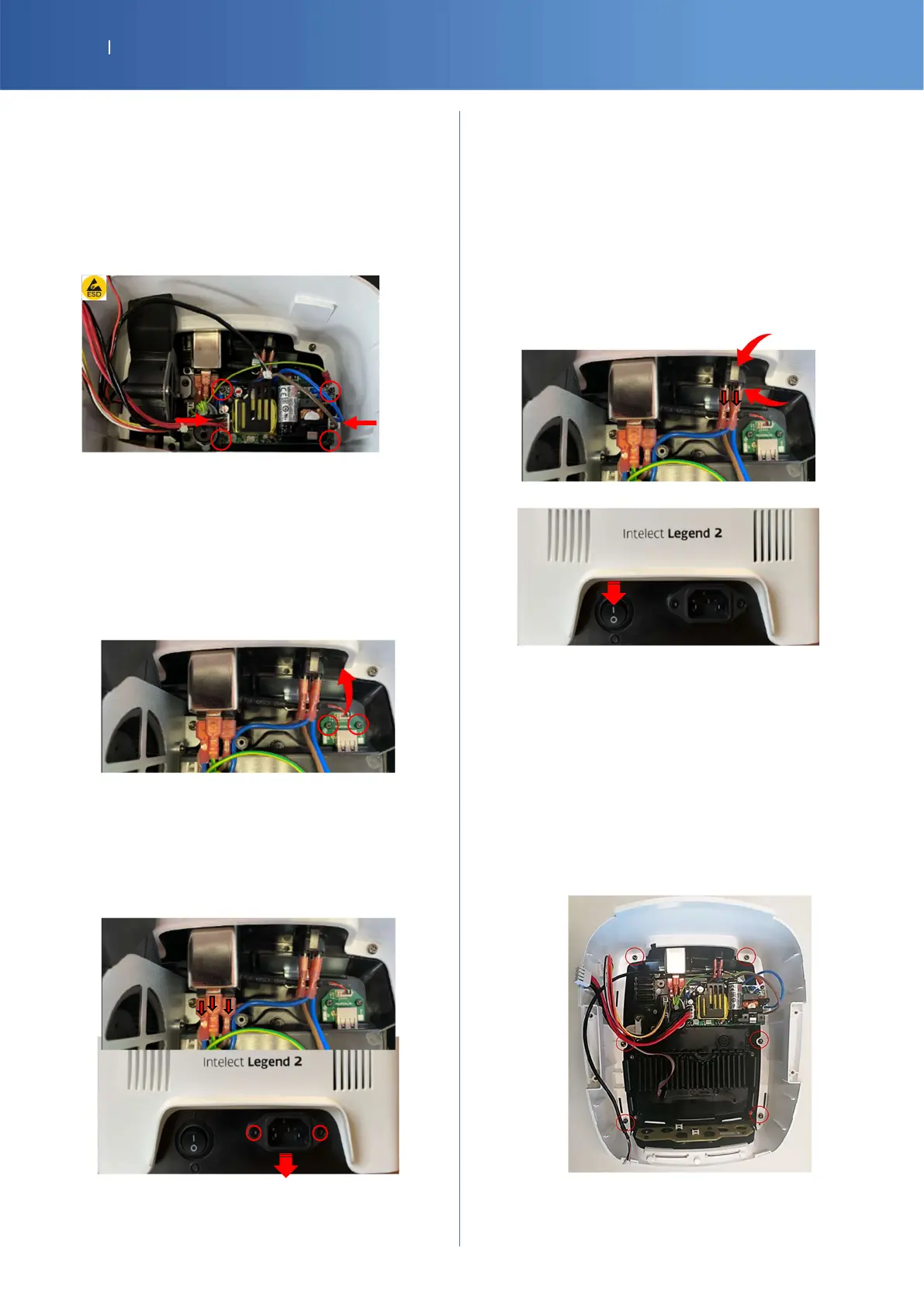
POWER SUPPLY
SP-14-1123 POWER SUPPLY 24V100W
14-1043-SP M3X8 TORX SCREW x 5
SP-14-1055 IL2 CABLE ROCKER TO POWER SUPPLY
SP-14-1057 IL2 CABLE POWER SUPPLY TO CTRL PCBA
Unplug the 2 connectors and unscrew the 4 screws (Torx
T10)
Protected by Fuses T4A/250V.
USB PORT
SP-14-1052 IL2 INTERNAL USB CABLE
SP-G16-0120 G16 USB HOLDER PCBA
14-1040-SP KB30X6 PLASTIC TORX SCREW x 5
Unplug the USB cable and unscrew the 2 screws on the
USB holder (Torx T10)
MAINS POWER CONNECTOR
SP-47152 POWER CONNECTOR
SP-14-1010 IL2 CABLE ROCKER TO POWER ENTRY
SP-14-1039 IL2 GROUND CABLE TO POWER SUPPLY
SP-14-1053 KB30X6 CONICAL TORX SCREW x 5
Disconnect the 3 rockers and unscrew the 2 screws of the
connector outside (Torx T8)
ON/OFF SWITCH
27151-SP SWITCH 20MM BK
SP-14-1010 IL2 CABLE ROCKER TO POWER ENTRY
SP-14-1055 IL2 CABLE ROCKER TO POWER SUPPLY
Disconnect the 4 rockers and press the 2 plastic tabs to
unlock and remove the switch.
MAIN BODY WHITE
14-1044-SP M4X8 TORX SCREW x 5
SP-14-3789 IL2 4CH MAIN BODY WHITE
OR
SP-G16-4153 IL2 2CH MAIN BODY WHITE
Cut the cable tie and remove 6 screws (Torx T20)















 To Next Page