EXPLODED VIEWS AND SERVICE PARTS LISTS
EN
| Intelect
®
Legend 2 - Service Manual DOMESTIC 49
FINAL TEST
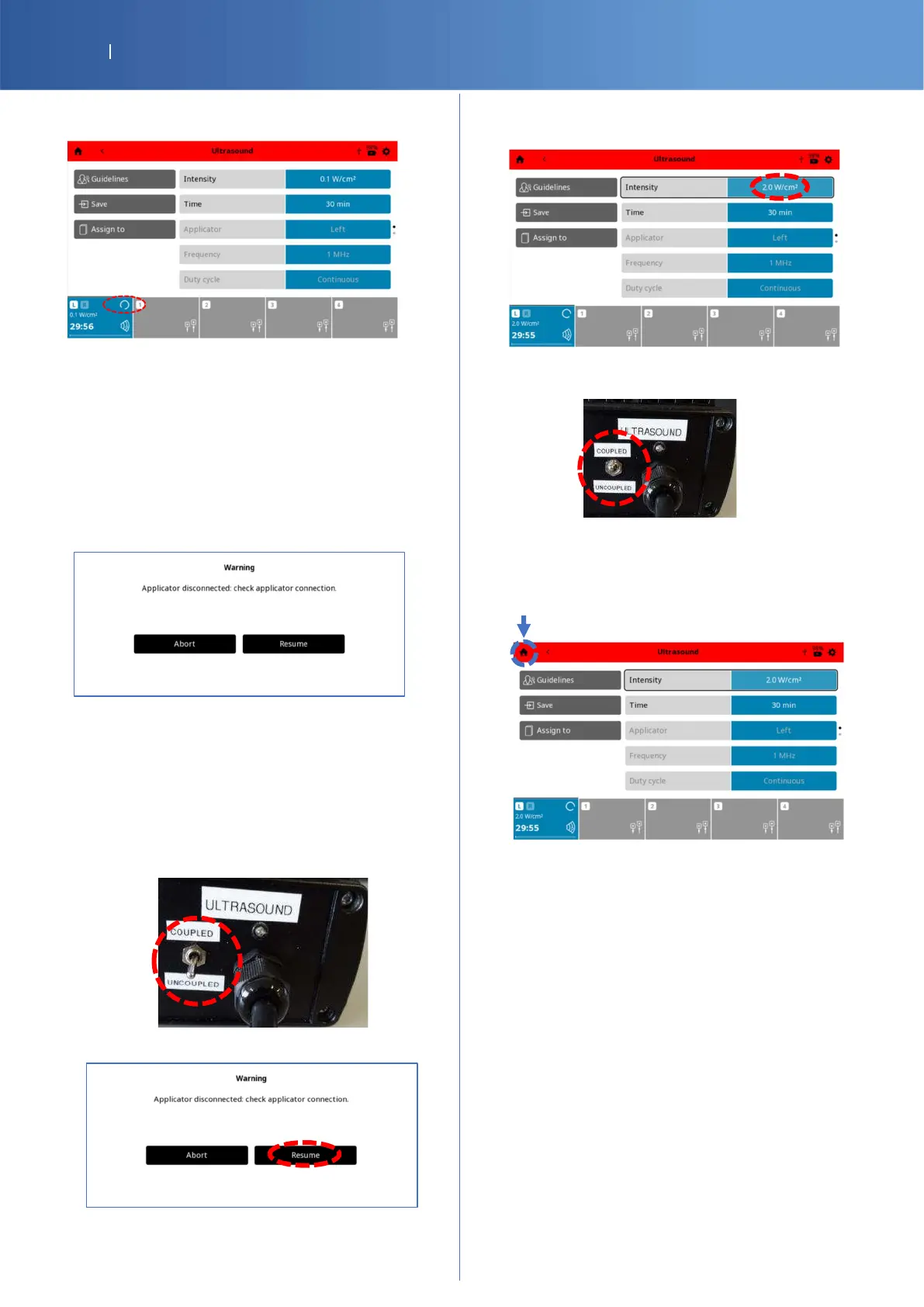
You should have the Ultrasound status channel
“Running”.
Let the program “Running” for 15 seconds and
verify that there is not pause or any popped
error.
Check Pass/Fail the tracker sheet §5 if the
program runs without problem.
Simulation of applicator disconnection
Remove the Ultrasound connector from the
device, the advice “Applicator disconnected:
check applicator connection” is displayed.
Check Pass/Fail the tracker sheet §6 if
“Applicator disconnected” is displayed.
Resumption of the Ultrasound program
Put back the Left Ultrasound connector into the
device.
Set the G16 Test Load switch ULTRASOUND to
“UNCOUPLED”.
Press “Resume” button.
Select the field intensity and increase again with
the knob until 2.0 W/Cm2.
Set the G16 Test Load switch ULTRASOUND to
“COUPLED”.
Check Pass/Fail the tracker sheet §7 if the test is
resumed.
Press “Home“ logo to return to home menu.















 To Next Page