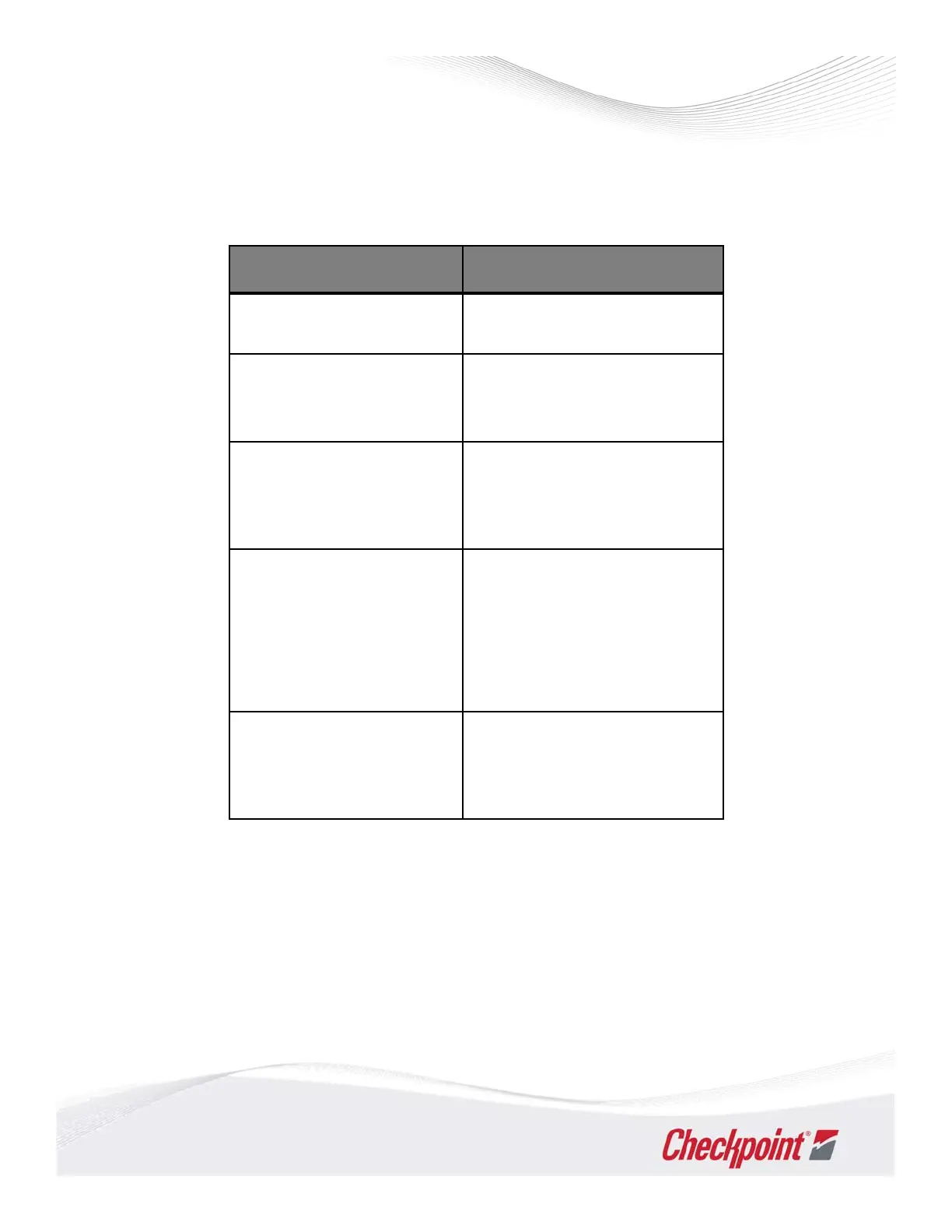
Thepurposeofthistable istoexplainsstepstotroubleshootCPiD‐RFissues.
TheproblemcolumndescribesthenoticeablesymptomswhichindicateCPiD‐RFisnot
functioningatitsbest.Sometimesthesolutionisobvious,forexample,removenearbytags,
buttheaction(s)columngivesyouaformalapproachtosolvinganyproblem.Thestepsallow
youtoidentifytheissueandpreventit
fromoccurringagain.
CounterpointECO
ThisproductversionisbasedontheCPiD‐RF.SomefeaturesarenotavailableontheECO
versionoftheproduct,namelyInterlockandiVerify.Normaldeactivationprocedureswill
applytoCounterpointECO.ContactCheckpointforadditionalinformationonapplications.
27
CounterpointIntelligentDeactivator‐RF(CPiD‐RF)
Troubleshooting
Problem Action(s)
GreenpowerLEDisnoton. ConfirmDCplugandACpowercord
arebothsecure.
Functionislost(orreduced
deactivation).
Checkconnections;confirm
antenna(s)arepluggedin.ConfirmSW
1(Power)isOFF.
Statuslightisteal. CPiD‐RFmayneedtobeauto‐tuned:
resetunitbypressingbutton. View
Status LEDwhen
re‐testingforagood
result.
Systemisconstantly
alarming.
Removetaggeditemswithin3ft
(0.9m)ofthepad.Tryreducingthe
receivergain(SW4,5,6).Another
Deactivatorcouldbetooclosetothe
pad.Tryturningtheotherdeviceoff
ormovingitfurtheraway.
Statuslightisblinkingred.
(This
indicatesamis‐tunecondition.)
Confirmthereisnothinglayingontop
oftheantenna.Removenearbymetal
objectsandthenreset.



 To Next Page