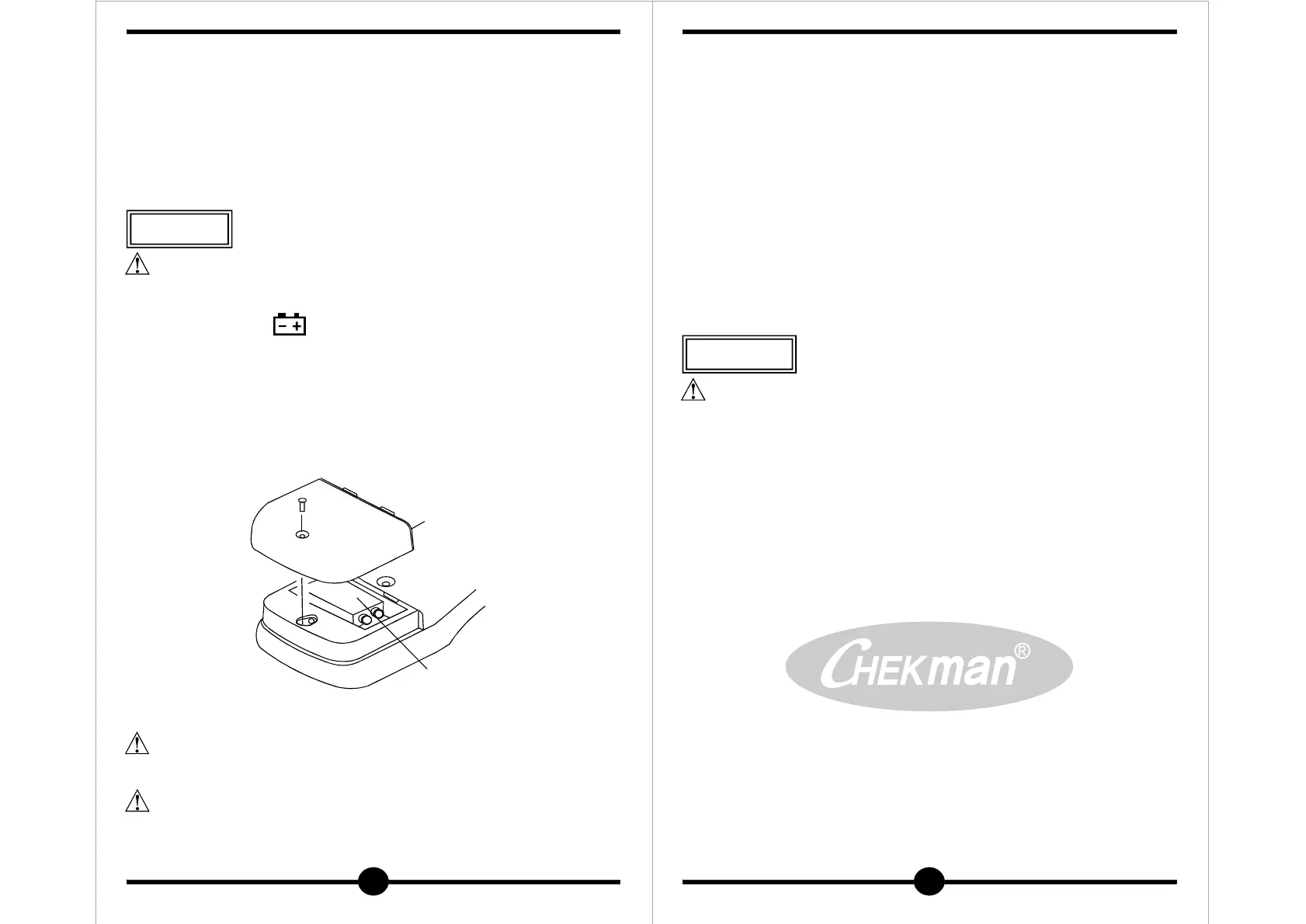
BATTERY
COVER
BATTERY
9V NEDA
1604
21
건전지 교환
Fig-7. Battery replacement
1) Disconnect test leads from any live source, turn the rotary
switch to OFF, and remove the test leads from the input terminals.
2) The battery cover is secured to the bottom case by a screw.
Using a screwdriver, remove the screw from the battery cover
and remove the battery cover.
3) Remove battery and replace with a new equivalent 9V battery.
4) Replace the battery cover and reinstall the screw.
경 고
●
●
●
측정 중에 건전지 케이스를 분리하면 전기적인 충격을 입을 수 있으니
반드시 측정을 중지한 후 분리하십시오.
사용중 화면에 " "가 나타나면 건전지를 교환하십시오.
케이스를 분리하기 전에 테스트 리드를 회로로부터 분리하고 기능
스위치를 " "에 두십시오.
드리이버로 후면 아래 부분의 건전지 케이스의 나사 1개를 푸십시오.
건전지 케이스를 분리하고 NEDA1604나 6F22 9V 건전지로 교환
하여 건전지 케이스를 덮고 나사로 고정합니다.
OFF
①
②
8. Maintenance
WARNING
Before open the battery case, disconnect both test lead and never
uses the mater before the battery case is closed.
CAUTION
To avoid contamination or static damage, do not touch the circuit
board without proper static protection.
● If the meter is not going to be used for a long time, take out
the battery and do not store the meter in high temperature or
high humidity environment.
● When take current measurement, keep the cable at the center
of the clamp will get more accurate test result.
● Repairs or servicing not covered in this manual should only by
qualified personal.
Periodically wipe the case with a dry cloth and detergent.
Do not use abrasives or solvents on this instruments.
●
●
REMARK
CLEARING
경 고
청소할 때는 솔벤트나 시너, 알코올 등 화공품으로 세척하지 마시고,
부드럽고 마른 천 등으로 청소해 주십시오.
고열의 장소나 습기가 많은 곳, 진동이 심한 곳은 피하여 보관하십시오.
22
유지 및 보수


 To Previous Page