11
5. Description of Functions(기능상의 특징)
1) Function Switch(기능 스위치)
Turn this switch for power on and power off and selection of
desired range.
알맞은 기능 레인지를 선택하며 전원을 켜거나 끕니다.
2) Auto power off(자동 전원 잠금 기능)
Power is automatically turned OFF, clearing every display,
approx. 30min. After the last operation.
To operate of tester again, press the " " switch or afterHOLD
turning function switch to OFF position, reapply power.
마지막 사용 후 30분이 지나면 전원은 자동적으로 꺼지며, 다시 동작을
시킬 는 " "스위치를 누르거나 기능 스위치를 " "로 선택한때 HOLD OFF
후 알맞은 기능 레인지에 놓으면 됩니다.
3) HOLD(데이터 홀드)
When this switch is pressed, the data display at that time
continues(" " lights on the display appears).
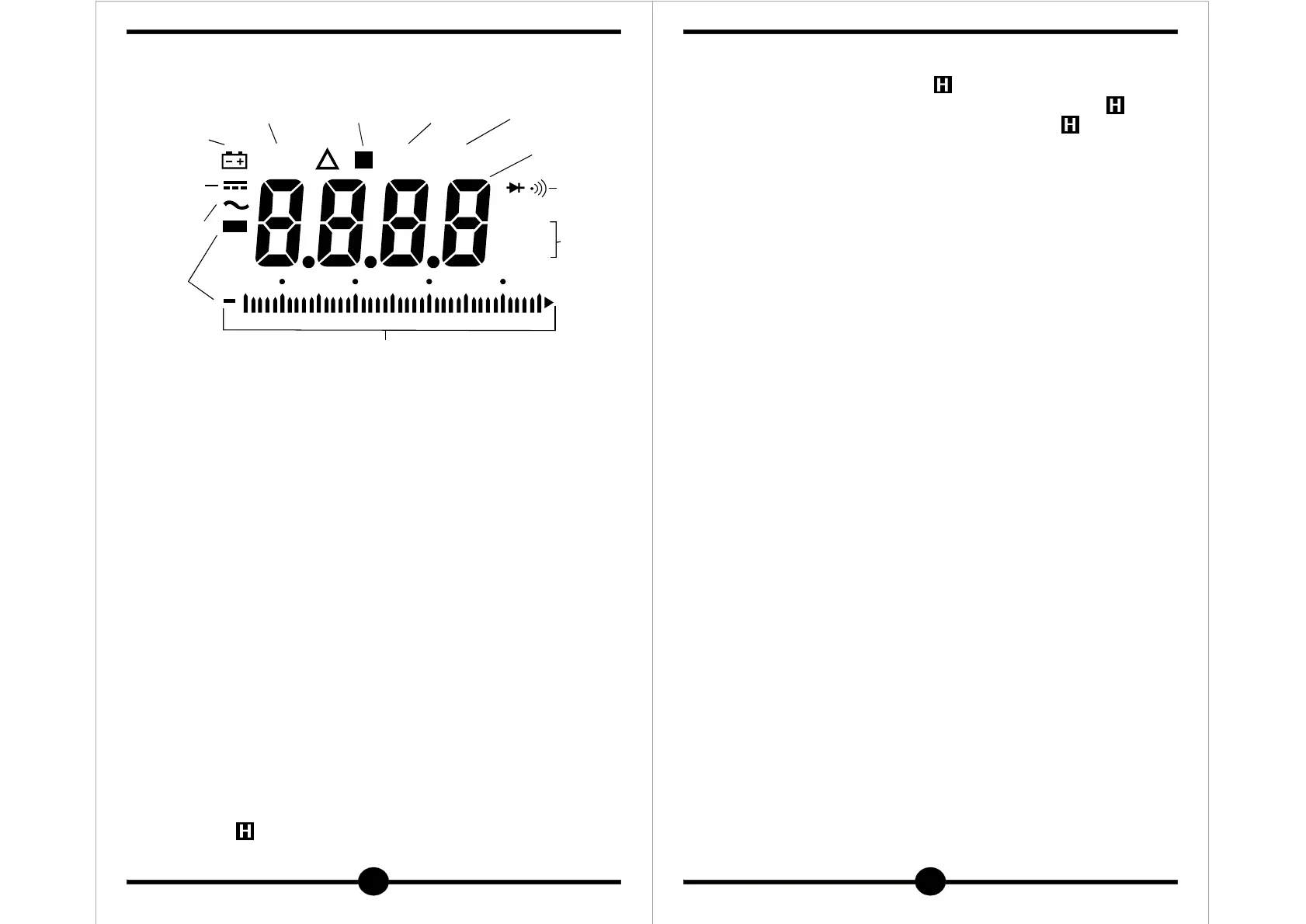
DC
Measurement
display
Manual
range
display
Data
hold
display
AC
measurement
display
Checking
continuity
display
Minus
polarity
High speed
bar graph
Battery
discharge
warning
Numeral
data
display
Ω
MAN MAX MIN
MK
Hz
H
mAV
300 10 20
Maximum
Value
measurement
display
Minimum
Value
measurement
display
Unit
display
40
12
Switch is pressed again, the hold status is canceled and you can
return to the measuring status.(" " on the display disappears.)
이 스위치를 누르면 그때의 수치를 정지된 상태로 보여줍니다.(" " 표시가
나타남) 다시 누르면 현재 측정 수치가 그대로 나타납니다. (" " 표시가 사라짐)
4) RANGE(레인지 홀드)
Pressing ths switch once sets the manual mode and the range is
fixed. Once the manual mode is set, the range moves each time
this switch is pressed.
Checking the unit on the display and the place of decimal point,
select a desired range.
To return to the auto mode, keep pressing ths switch until " "MAN
on the display disappears.
이 스위치를 누르면 수동모드로 전환되며(" " 표시가 나타남)MAN
다시 이 스위치를 눌러 소수점을 원하는 대로 옮길 수 있으며, 자동모드로
전환시킬 때는 " " 표시가 없어질 때까지 스위치를 누릅니다.MAN
5) MAX/MIN (최대/최소 값) TK-1000A
▶
Pressing MAX/MIN switch lights up MAN/MIN on display and always
displays minimum value of present measurement.
Repressing MAX/MIN switch puts out MAN/MIN and, instead, lights
up MAN/MAX on display.
In this status, maximum value of present measurement is display.
Pressing MAX/MIN switch again puts out MAN/MAX, canceling
this fuction.
●Bar graph does not show maximum/minimum value, but shows
input value itself.
●When minimum/maximum value measurement mode is set
during auto range operation, light up R.H on display and the
range is automatically replaced by manual range.
이 스위치를 누르면 " " 모드로 전환되어 화면에 " "가 표시MAN MAN/MIN
되며, 현재 측정되고 있는 최소 값을 나타냅니다.
다시 이 스위치를 누르면 " "이 사라지고 " "가 표시MAX/MIN MAN/MAX
되며, 현재 측정되고 있는 최대 값을 나타냅니다.
다시 한번 이 스위치를 누르면 이 기능은 사라집니다.
●바 그래프는 최대/최소 값을 나타내는 것이 아니라 현재 입력되고 있는
값을 나타냅니다.
●최대/최소 값 모드에서 " " 스위치를 누르면 자동적으로 원상태로RANGE
복귀됩니다.


 To Next Page