14
9-10 ATC Setting
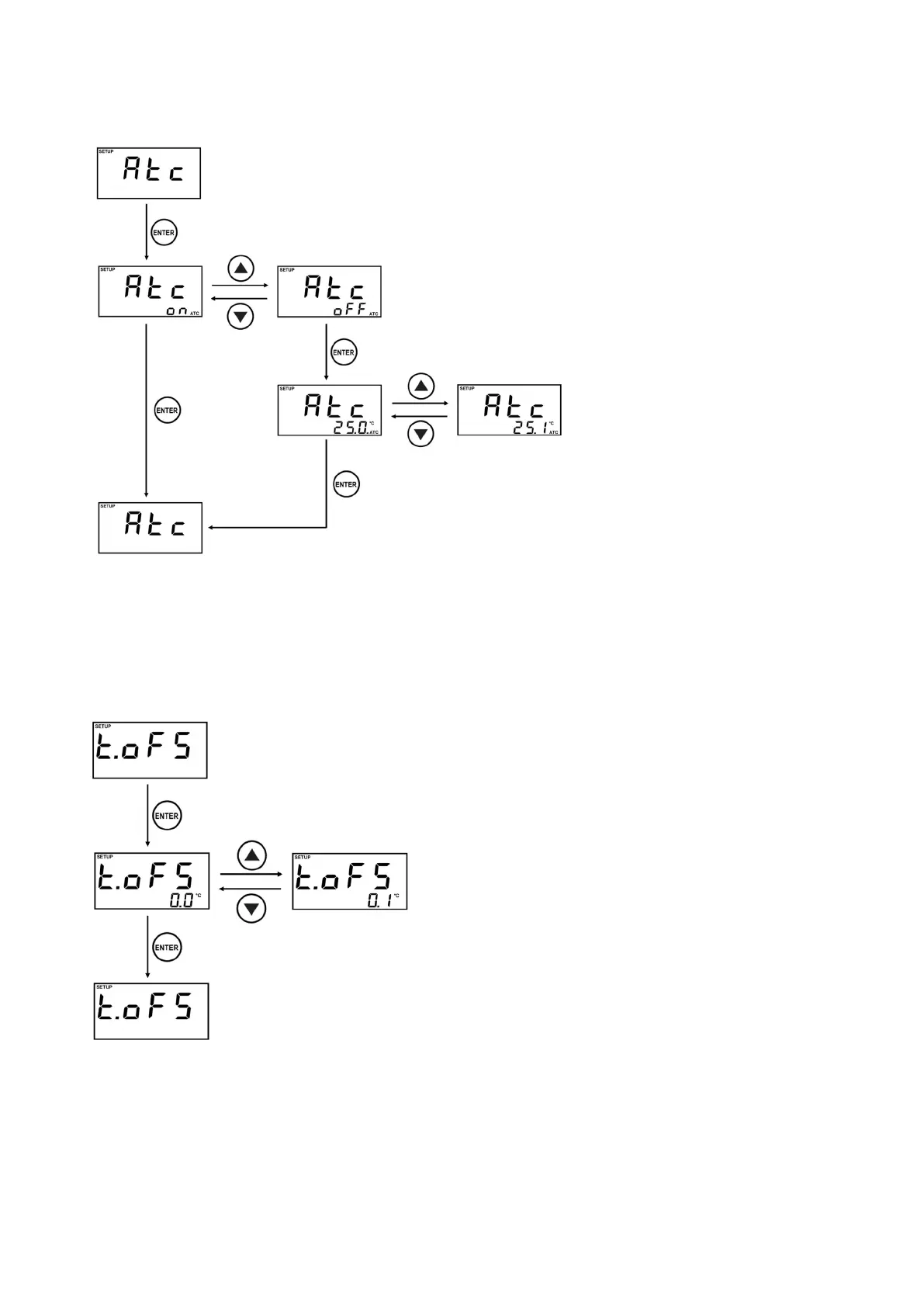
Atc is Automatic Temp. Compensation setting
menu.
You can select ATC after entering the Setting
display.
on or oFF can be changed by
▲
,
▼
key.
When selecting on, ATC setting is immediately
completed and ATC is displayed as Measuring
Mode.
When selecting oFF, set the temperature by
manual.
The temperature setting value can be changed
by
▲
,
▼
key. (Unit : 0.1
℃
, Range : 0.0~50.0
℃
)
Finish the setting by pressing ENTER Key.
The temperature setting value is displayed as
the present temperature.
9-11 Temp. Offset Setting
t.oFS is Temp. Offset setting menu.
Present setting value is displayed, while you
enter the Setting display.
Temp. Offset value can be changed by
▲
,
▼
key.
(Unit : 0.1
℃/
0.1
℉
, Range : -5.0~5.0
℃/
-9.0~9.0
℉
)
Finish the setting by pressing ENTER Key.
The present temperature is displayed after
offsetting it as much as setting value.
※
It is only operated when Automatic Compensation
is on.
※
If temperature sensor is not connected, it will be
not operated.



 To Next Page