Need help?
Do you have a question about the Cherry DW 9000 SLIM and is the answer not in the manual?
Status LED indicates battery charge and Bluetooth or wireless connection status.
Switch to select between wireless (RF), Bluetooth (BT), or off modes.
Warning about choking hazard from small parts for children under 3 years.
Instructions for connecting the wireless desktop via Bluetooth to a PC or laptop.
Instructions for connecting the wireless desktop using the USB receiver.
Steps to resolve common issues with the wireless desktop, including connection problems.
 General
| Certification | cURus CE FCC WHQL |
|---|---|
| Frequency band | 2.4 - 2.4835 GHz |
| Numeric keypad | Yes |
| Pointing device | No |
| Device interface | RF Wireless + Bluetooth |
| Keyboard language | Swiss |
| Recommended usage | Universal |
| Keyboard key switch | - |
| Keyboard form factor | Full-size (100%) |
| Connectivity technology | Wireless |
| Keyboard number of keys | 111 |
| Form factor | Ambidextrous |
| Scroll type | Wheel |
| Buttons quantity | 6 |
| Movement detection technology | Optical |
| Storage temperature (T-T) | -20 - 60 °C |
| Operating temperature (T-T) | 0 - 40 °C |
| Operating relative humidity (H-H) | 0 - 85 % |
| Receiver type | Nano receiver |
| Receiver weight | 3 g |
| Number of products included | 1 pc(s) |
| Receiver dimensions (WxDxH) | 14.5 x 6.5 x 19 mm |
| Wireless receiver interface | USB Type-A |
| Package depth | 170 mm |
| Package width | 570 mm |
| Package height | 45 mm |
| Package weight | 1000 g |
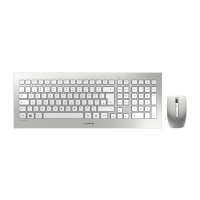
| Product color | Silver, White |
| Keyboard style | Straight |
| Cable length | 1.2 m |
| Wireless range | 10 m |
| Charging source | Micro-USB B |
| Battery capacity | 650 mAh |
| Power source type | Battery |
 Weight and Dimensions
| Mouse weight | 90 g |
|---|---|
| Keyboard weight | 650 g |
| Mouse dimensions (WxDxH) | 62.5 x 33.5 x 99 mm |
| Keyboard dimensions (WxDxH) | 440 x 130 x 15 mm |

 To Next Page