Chevrolet Corvette Owner Manual (GMNA-Localizing-U.S./Canada/Mexico-
14622938) - 2021 - CRC - 9/22/20
144 Infotainment System
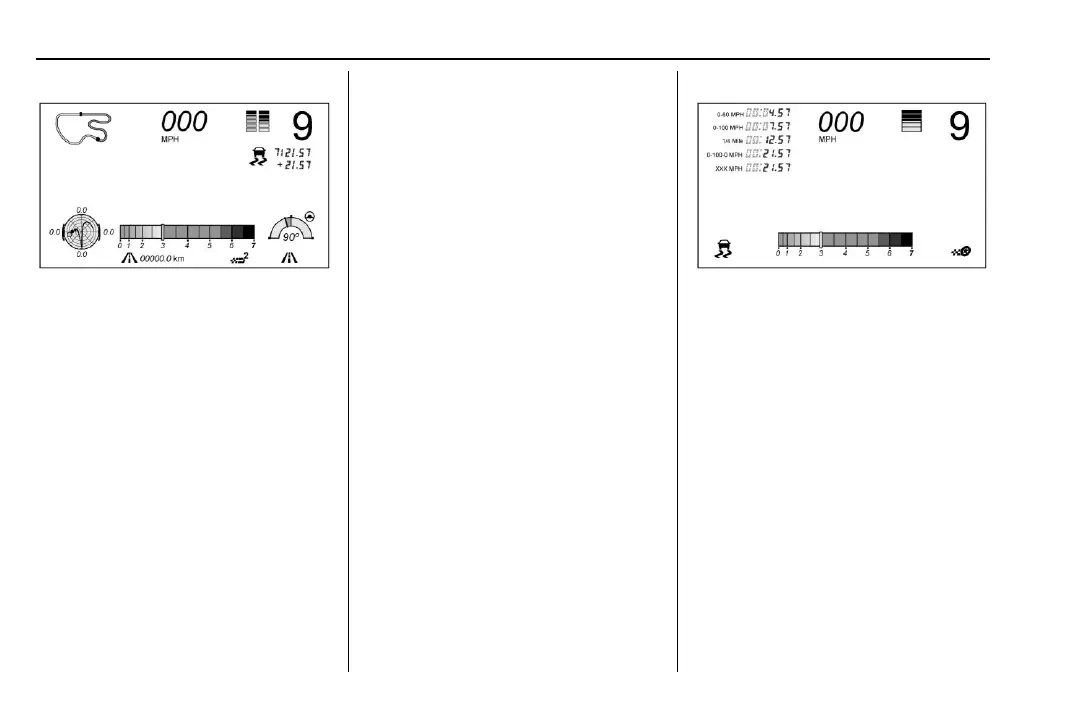
Track:
Displays these vehicle metrics:
.
Vehicle Speed: Same as Sport.
.
GPS Tracking Map: Shows the vehicle’s
current position relative to a known
route.
.
Engine Revolutions Per Minute (rpm): The
vertical line and triangle show current
rpm’s. As the rpm’s increase, the backfill
follows.
.
Transmission State (Current Gear): Same
as Sport.
.
Friction Bubble Graphic: Lateral and
longitudinal G-Forces are displayed as a
dot within a bubble. A red dot displays
when the vehicle starts braking and turns
green when the vehicle accelerates. The
dot is white when the vehicle is not
moving. A white dot is the default.
.
Brake and Throttle Graphic: Displays
the percentage value of brake and
throttle pedal position from 0–100%.
.
Steering Angle: The graphic fills from the
center to the left or right depending on
the direction of steering. The numerical
steering angle displays below the graphic.
.
Active Handling Active Indicator: The
graphic only displays if the active
handling systems are activated.
.
Performance Traction Management (PTM)
Mode: Displays the current PTM mode.
The options are Wet, Dry, Sport 1, Sport 2,
or Race.
.
Current Lap Time: Displays the elapsed
lap time if the finish line is defined and
the vehicle has crossed the defined finish
line at least once.
.
Event Odometer: This displays the
distance driven since the recording began.
.
Drive Mode: Displays the vehicle’s current
drive mode.
Timing:
Displays these vehicle metrics:
.
Vehicle Speed: Same as Sport.
.
Engine Revolutions Per Minute (rpm):
Same as Sport.
.
Transmission State (Current Gear): Same
as Sport.
.
0–100 km/h (0–60 mph), 0–200 km/h
(0–100 mph), 400 m (1/4 th mi), and
0–200–0 km/h (0–100–0 mph): The timer
starts recording as soon as the vehicle
accelerates. As the vehicle passes each
speed and distance milestone, it is
displayed on the overlay.
.
Throttle Position: Displays the percentage
of throttle applied from 0–100%.
.
Active Handling Active Indicator: The
graphic only displays if the active
handling systems are activated.















 To Next Page