EasyManua.ls Logo

Chevrolet Light - Controls and Jnstrumenls

Chevrolet Light
107 pages
Print Icon
To Next Page IconTo Next Page
To Previous Page IconTo Previous Page
Loading...
CONTROLS AND INSTRUMENTS
The
type,
location
and
operation
of
instruments
and
con-
trols
vary
on
different
models
and
makes
of
vehicles;
therefore,
regardless
of
the
experience
an
owner
or
driver
may
have
had
it
is
advisable
to
familiarize
one's
self
with
the
instruments
and
controls,
and
their
use
before
driving
this
new
truck.
The
locations
of
the
various
instruments
and
controls
are
shown
in
figures 1
and
2.
Instrument
Group
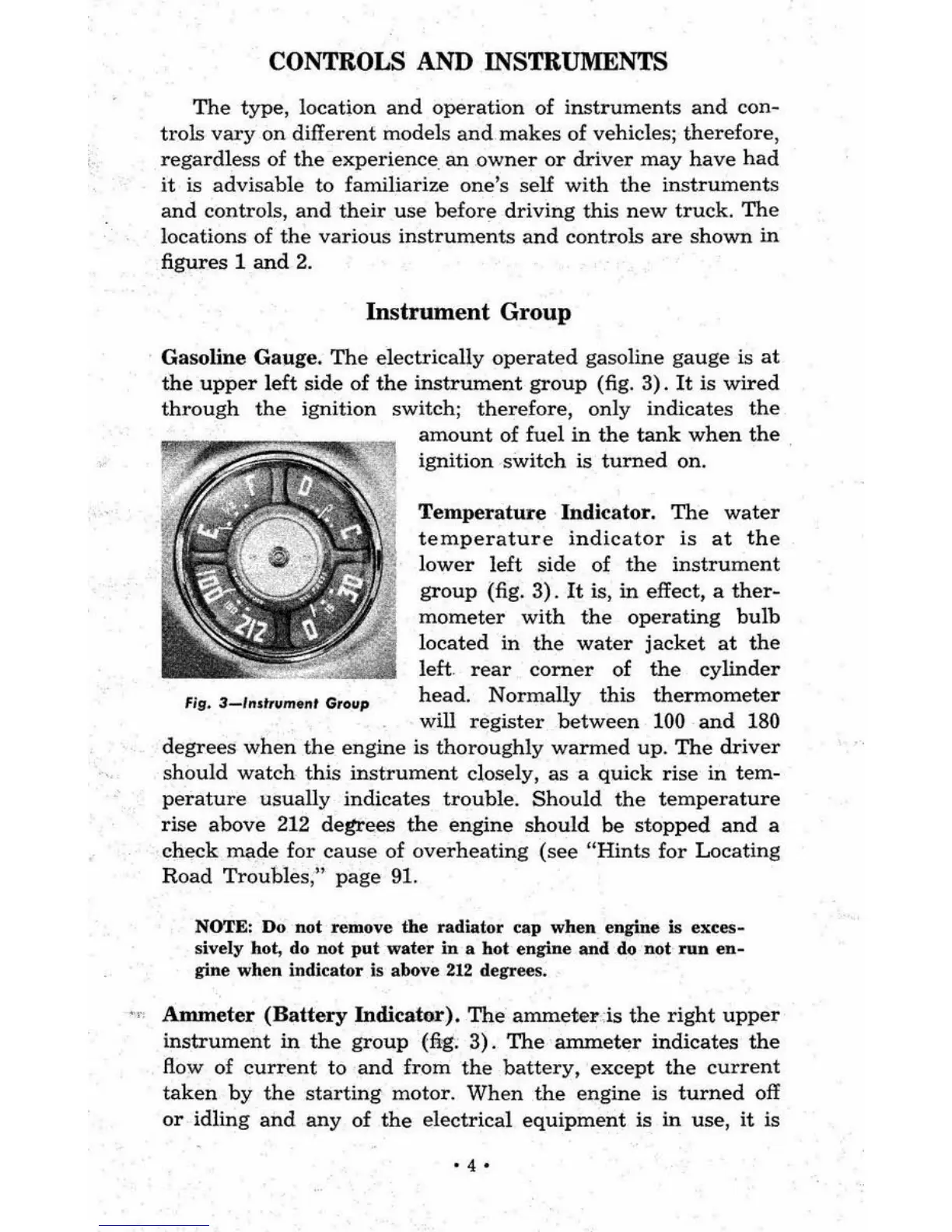
Gasoline
Gauge.
The
electrically
operated
gasoline
gauge
is
at
the
upper
left
side
of
the
instrument
group
(fig.
3).
It
is
wired
through
the
ignition
switch;
therefore,
only
indicates
the
fig.
3-J'''tfllmtnt
Grollp
amount
of
fuel
in
the
tank
when
the
ignition
switch
is
turned
on.
Temperature
Indicator.
The
water
temperature
indicator
is
at
the
lower
left
side
of
the
instrument
group
(fig.
3).
It
is,
in
effect, a
ther-
mometer
with
the
operating
bulb
located
in
the
water
jacket
at
the
left.
rear
corner
of
the
cylinder
head.
Normally
this
thermometer
will
register
between
100
and
180
degrees
when
the
engine
is
thoroughly
warmed
up.
The
driver
should
watch
this
instrument
closely,
as
a
quick
rise
in
tem-
perature
usually
indicates
trouble.
Should
the
temperature
rise
above
212
degrees
the
engine
should
be
stopped
and
a
check
made
for
cause
of
overheating
(see
"Hints
for
Locating
Road
Troubles
,"
page
91,
NOTE: Do not remove
the
radiator
cap
when
engine is
e"ces-
sively hot, do not
put
water
in
a
bot
engine
and
do Dot
run
en-
gine
when
indicator is above
212
degrees .
••
'
Anuneter
(Battery
Indicator).
The
ammeter
-is
the
right
upper
instrument
in
the
group
(fig.
3).
The
anuneter
indicates
the
flow
of
current
to
and
from
the
battery,
except
the
current
taken
by
the
starting
motor.
When
the
engine
is
turned
off
or
idling
and any
of
the
electrical
equipment
is
in
use,
it
is
'4'

Related product manuals