Page 9SKU 66604 For technical questions, please call 1-800-444-3353.
UNPACKING
When unpacking, check to make sure all of the parts shown on the Parts List in this
manual are included. If any parts are missing or broken, please call Harbor Freight
Tools at the number shown on the cover (and at the bottom of each page) of this manu-
al as soon as possible.
CONTROL PANEL FEATURES
Symbology
V~
Volts Alternating Current
A
Amperes
n
0
xxxx/min.
No Load Revolutions per Minute
(RPM)
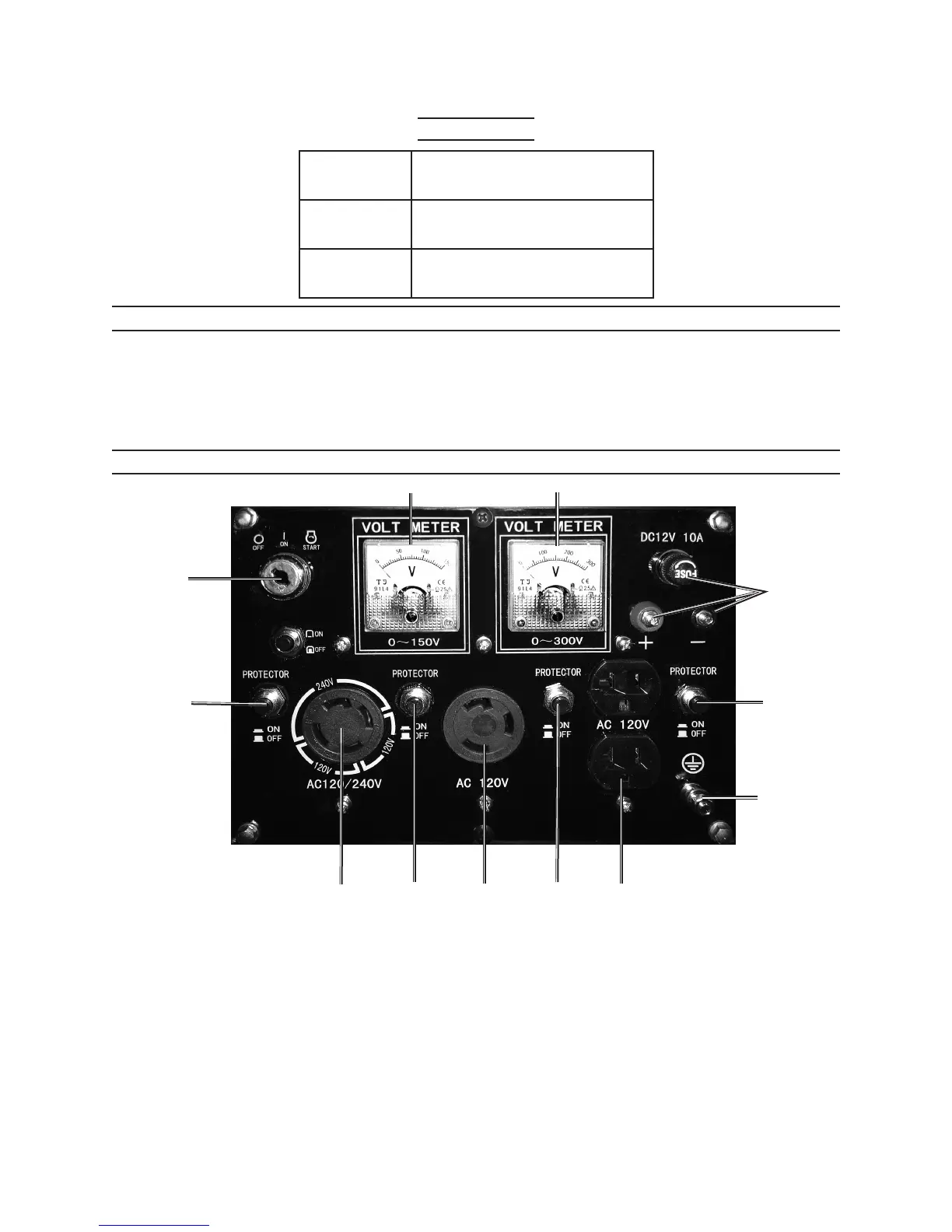
Engine Switch (2): 1. Used to start and stop the Engine. To start, insert the Engine
Switch Key and turn to the right to its “START” position. Then immediately
release the Key. To turn off the Engine, turn the Key all the way to the left to its
“OFF” position. Always remove the Key from the Engine Switch when the unit is
not in use.
(See Figure A, above.)
Outlet Sockets (8, 10, 10B): 2. The Generator features three Outlet Sockets with
which to power tools and equipment. The type and voltage of the Outlet Sockets
are as follows:
2
3
5 5
5
6
9
81010B
7 7
FIGURE A
REV 09l


 To Next Page