Chapter 3 Repairs 89
Maintenance manual
2016/02
AlveoPC
1. Remove the Alveograph's casing (see op. A1-1).
2. Remove the RLP pressure board (see op. A6-3) and the
expansion chamber (see op. A4-2).
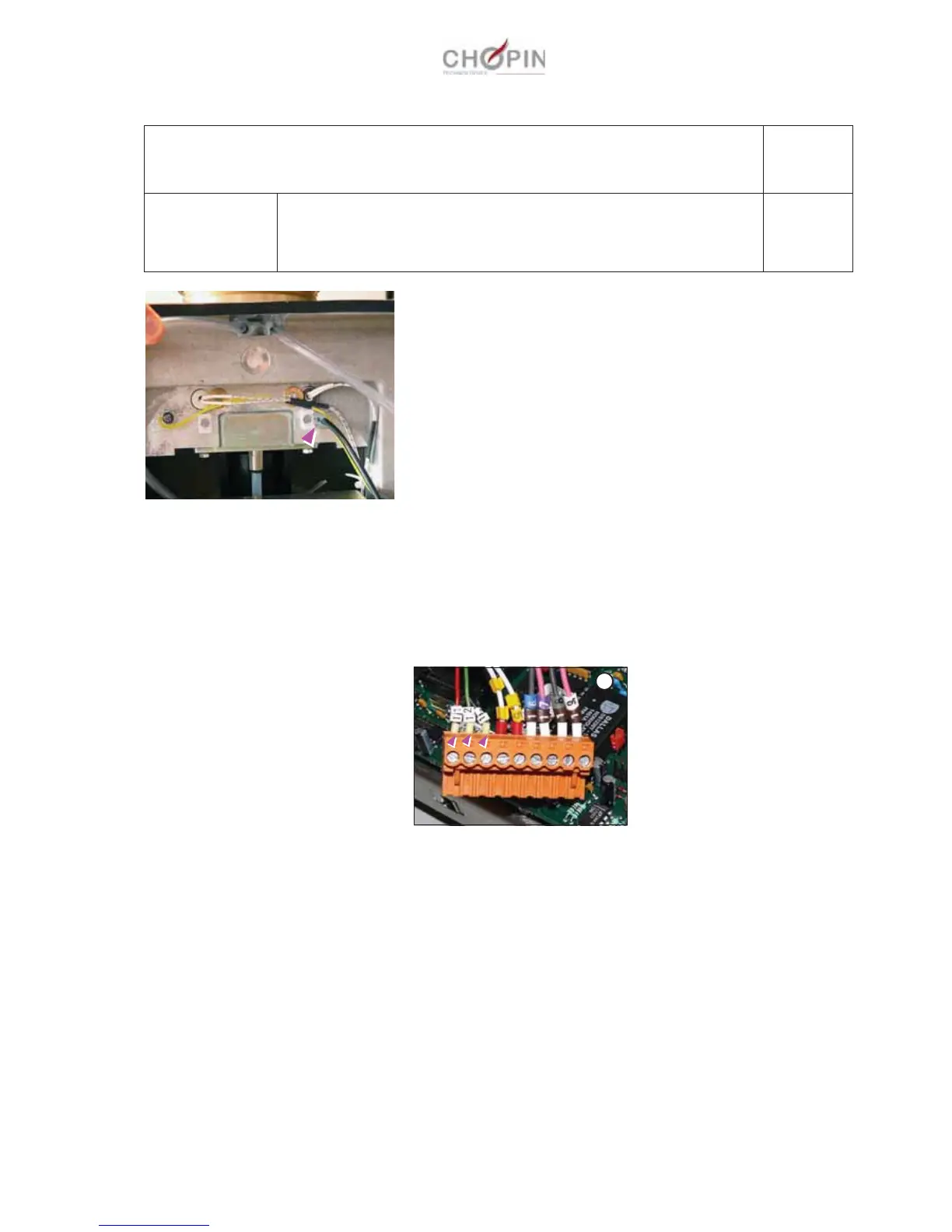
3. Disconnect the temperature sensor's wires (11 12 and 13)
from the CPU board connector, noting their position (A).
4. Remove the silicone mastic maintaining the temperature sen-
sor.
5. Extract the temperature sensor then make sure to remove all
traces of silicone mastic.
6. Coat the new sensor with silicone heat dissipation mastic.
7. Place the sensor in the unit and secure it with translucent sili-
cone mastic (glue it to the base of the unit) and rewire the sen-
sor.
8. Put the hood back on.
9. Calibrate the sensor (see op. A10-1).
A5: Alveo unit
Operation A5-4 Replacing the temperature sensor
Page: 1/1
Consumables:
Tools:
Silicone heat dissipation mastic.
Translucent silicone mastic, Rubson or equivalent.
-
A


 To Next Page