Chord Electronics
2go | User manual
6
5.2 Status LEDs
2go uses three LEDs to communicate feedback:
• 2go status LED
E
• Network status LED
C
• Charge status LED
F
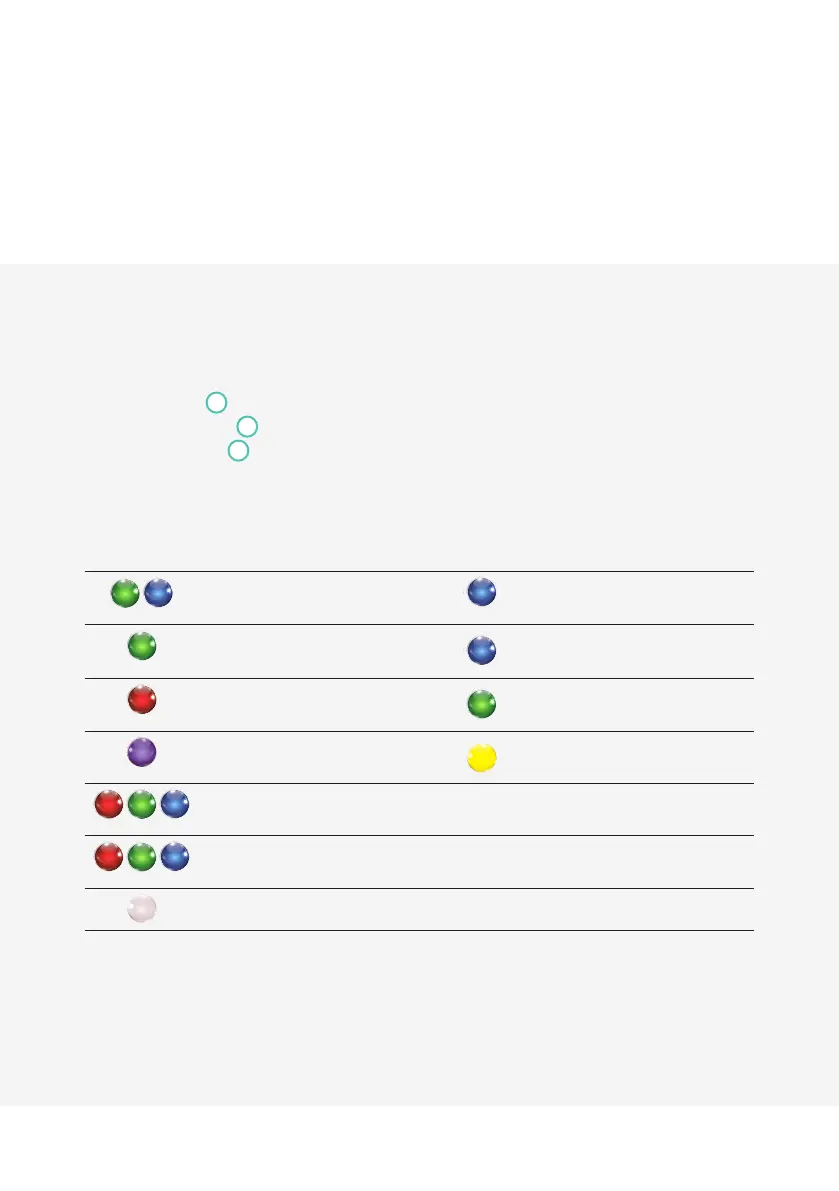
These LEDs emit various colours to communicate 2go’s status:
2go status LED Network status LED
Flashing
2go is in Hotspot mode and is available as
a Wi-Fi connection for an external device.
Flashing
2go is searching for a known Wi-Fi
network.
Flashing
2go has successfully read the inserted
MicroSD card.
2go has established a Wi-Fi connection.
Flashing
2go cannot read the inserted MicroSD
card.
2go has established an Ethernet
connection.
Flashing
2go has successfully paired via Bluetooth. 2go is booting.
Flashing fast
Refreshing SD card database.
Flashing slowly
2go is updating its firmware.
2go is charging.


 To Next Page