Need help?
Do you have a question about the Chord Hugo 2 and is the answer not in the manual?
Safety guidelines including avoiding water, proper cleaning, and no user-serviceable components.
Information about the three-year warranty and how to register the device online for support.
Overview of the Hugo 2's advanced transportable DAC/headphone amplifier and its technology.
Details about the various buttons, ports, and indicators (A-M) on the Hugo 2 device.
Instructions on how to switch on the device and its charging process using a USB charger.
Explanation of LED colour indicators for charging status and battery level.
Describes the various digital inputs (Micro USB, optical, coaxial, Bluetooth) and analogue outputs.
Visual representation and labels for all connection ports including RCA, headphone, coaxial, and optical.
Instructions on how to pair a Bluetooth device using the pairing code 0000.
How to control volume, including preset volume mode for amplifiers.
Explanation of coloured LEDs indicating the sample rate of the digital file being played.
Describes the four-stage filtering system and its purpose to reduce digital noise.
How to select between digital inputs (USB, Coax, Optical, Bluetooth) using the INPUT button.
Explanation of the three-stage crossfeed function to emulate a speaker listening environment.
How to adjust the device's brightness settings using the remote or buttons.
Details the functions of various buttons on the remote control for device operation.
Covers power on/off and volume adjustment buttons on the remote control.
Comprehensive technical details including dimensions, weight, frequency response, and power output.
Specifics on the digital filter settings and their corresponding parameters.
Declaration stating conformity with Radio Equipment Directive (RED) 2014/53/EU standards.
Lists harmonized standards for safety, EMC, and spectrum usage.
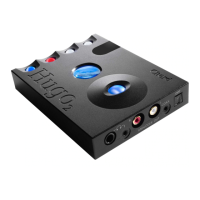
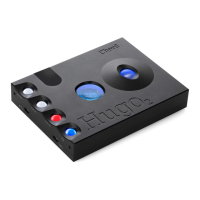
The Hugo 2 is an advanced, transportable DAC (Digital-to-Analogue Converter) and headphone amplifier designed for both home and mobile use. It aims to transform sound quality through its cutting-edge proprietary digital audio technology.
The primary function of the Hugo 2 is to convert digital audio signals into high-fidelity analogue sound, suitable for headphones or external amplifiers. It acts as a central hub for various digital audio sources, processing them to deliver an enhanced listening experience. The device supports a wide range of digital inputs, including Micro USB, optical, coaxial, and Bluetooth, offering versatility in connecting to different audio sources such as computers, smartphones, and dedicated audio players.
A key feature of the Hugo 2 is its advanced four-staged filtering system. This proprietary technology is designed to reduce high-frequency digital noise from the input signal, thereby minimizing distortions and improving overall sound clarity. The filters are categorized as Incisive (neutral), Incisive (neutral) plus high-frequency roll-off (warm), Warmer, and Warmest (plus high-frequency roll-off). These filters are specifically engineered to address noise generated by the input and are not intended to alter the audio signature of the output like a Digital Signal Processor (DSP) or Equalizer.
For headphone users, the Hugo 2 incorporates a three-stage crossfeed function. This feature emulates a speaker listening environment by blending the left and right channels, with settings of 3 dB, 6 dB, and 9 dB, or it can be turned off. This can create a more natural and less fatiguing listening experience, especially with headphones.
The device also supports both PCM (Pulse Code Modulation) and DSD (Direct Stream Digital) audio formats, with automatic sample rate switching. It can handle PCM files from 44.1 kHz to 768 kHz (16-bit to 32-bit) and native DSD playback up to DSD512, ensuring compatibility with a broad spectrum of high-resolution audio content.
Operating the Hugo 2 involves a straightforward interface with several control buttons and indicators. The device features three main control buttons: FILTER, INPUT, and X-PHD, in addition to the POWER button.
To power on the unit, users press and hold the power button. During startup, the device performs a series of checks, indicated by cycling colours on both the power button and the viewing window LEDs. A click signifies that the unit is ready for use.
Volume control is managed via a top-mounted wheel, with the current volume level displayed through a colour-coded LED indicator. Users are advised to set the volume to its lowest level before playback to prevent potential hearing or equipment damage. The Hugo 2 also offers a preset volume mode, which sets the output to 3 V, suitable for connecting to external amplifiers. This mode is activated by pressing the X-PHD button when the device is first switched on, and the volume wheel turns purple to indicate its activation. The device remembers this setting until deactivated, either by manually adjusting the volume or switching the device off.
The sample rate of the digital file being played is indicated by coloured LEDs visible through the viewing window on top of the unit, providing a visual cue of the audio quality.
Input selection is performed by pressing the INPUT button sequentially, with a corresponding colour change indicator. The coaxial mini-jack input supports 'Dual data mode' when used with the Hugo M Scaler (upscaler), allowing for 768 kHz files to be input as two separate (L and R) 384 kHz data streams. This mode is automatic and requires a specific dual-data digital coaxial cable. For Bluetooth connectivity, users select the Bluetooth input and use the pairing code '0000'.
The Hugo 2 offers two user-adjustable brightness settings for its LEDs, catering to different lighting environments. This can be adjusted using the 'dim' button on the accompanying remote control or by simultaneously pressing the 'Filter' and 'X-PHD' buttons on the device.
The device is designed for portability, featuring an internal battery that provides approximately 12+ hours of playback time. Charging is done via a Micro USB charging port, using the supplied 2 A wall charger. A full charge takes approximately eight hours with the 2 A charger, though charging times will be longer with lower current chargers (a minimum 1 A charger is required). The power button's colour indicates the charging status and battery level percentage. The Hugo 2 can be used while charging and can remain connected to its wall charger indefinitely. After 24 hours of continuous charging, it automatically enters 'Intelligent Desktop Mode' for efficient power management. The device will automatically shut down after 15 minutes of inactivity, unless in Intelligent Desktop Mode. If the batteries are fully depleted, the device will not turn on and requires 30 minutes of charging before it can be powered up.
The Hugo 2 comes with a remote control that mirrors many of the device's functions, including power, input selection (USB, Coax 1, Coax 2, Optical, Bluetooth), mute, volume control, crossfeed selection, filter selection, and light dimming. The remote requires 2x AAA batteries.
The Hugo 2 is designed for user-friendly maintenance, primarily focusing on external care and adherence to safety guidelines.
For cleaning the casework, users are advised to use a clean microfibre cloth and avoid spraying cleaning products directly onto the device. This helps preserve the finish and prevents liquid ingress.
The device does not contain any user-serviceable components. Users are explicitly warned against attempting to open, dismantle, or apply internal third-party devices, as doing so will void the warranty. This emphasizes the importance of professional service for any internal issues.
The Hugo 2 benefits from a three-year warranty covering defects in materials and workmanship under fair wear and tear. Batteries are covered for 18 months. Users are encouraged to register their device online for optimal aftersales support. In the event of a warranty claim, contact with the supplying dealer is recommended.
A separate safety document is included in the box, providing additional important safety information that users should review. It is crucial to prevent the device from coming into contact with water or other liquids to avoid damage.
 General
| Product color | Black |
|---|---|
| Frequency range | 20 - 20000 Hz |
| Output impedance | 0.025 Ω |
| Channel separation | 135 dB |
| Peak power per channel | - W |
| Signal-to-Noise Ratio (SNR) | 126 dB |
| Total Harmonic Distortion (THD) | 0.0001 % |
| Battery life | 7 h |
| Charging time | 4 h |
| Number of batteries supported | 2 |
| Headphone connectivity | 3.5mm |
| Cables included | Micro-USB |
 Weight and Dimensions
| Depth | 130 mm |
|---|---|
| Width | 100 mm |
| Height | 21 mm |
| Weight | 450 g |

 To Next Page