Operating Manual Freeze Dryer ALPHA 1-2 LDplus LDplus Control System • 43
To deactivate the timer, select an infinite set value ( ).
As an option, it is possible to change over to the next phase
automatically when the preselected time is over.
This applies only to a phase change from:
• Freezing Warm-up vacuum pump
• Main drying Final drying
The option can be activated under Menu -> Options ->
Settings -> Automatic phase change.
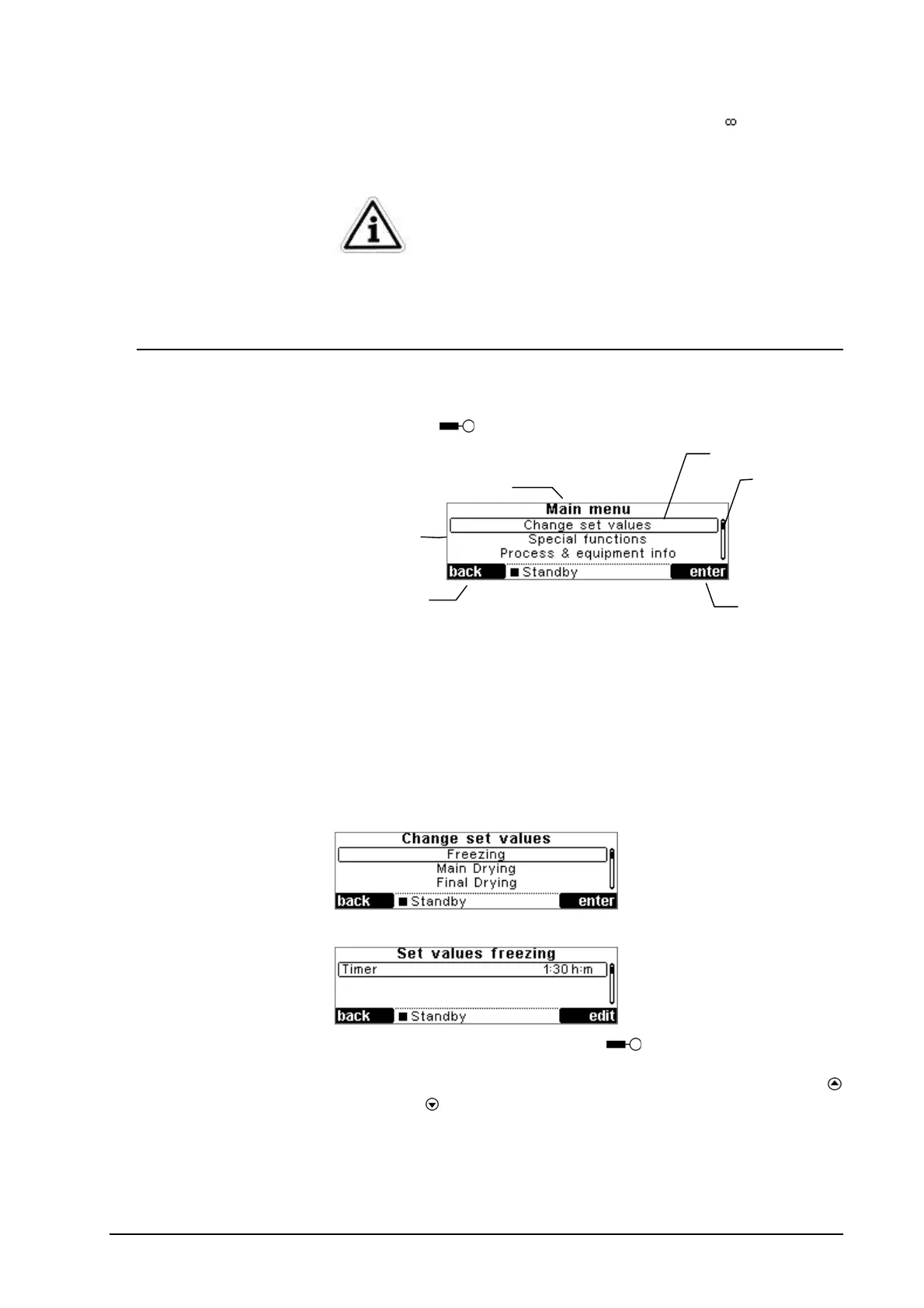
5.7. Main menu
The main menu can be activated by pressing the right-hand
softkey Menu
in the active values window.
The following section explains all menu items in detail:
5.7.1. Change set values
Used to define the phases “freezing”, “main drying” and “final
drying”.
First select the phase.
Select the set value using the focus.
Press the right-hand softkey Edit
to start the editing mode.
The focus is displayed in an inverted manner. You can now
change the set value within a permissible range using the “up”
and “down”
keys.
Softkey for
opening a
menu item
Scrollbar
Menu title
Softkey fo
quitting the
menu
Focus
Menu list


 To Next Page