EasyManua.ls Logo

Chroma 63802 - Page 101

Default Icon
198 pages
Print Icon
To Next Page IconTo Next Page
To Previous Page IconTo Previous Page
Loading...
Local Operation
3-73
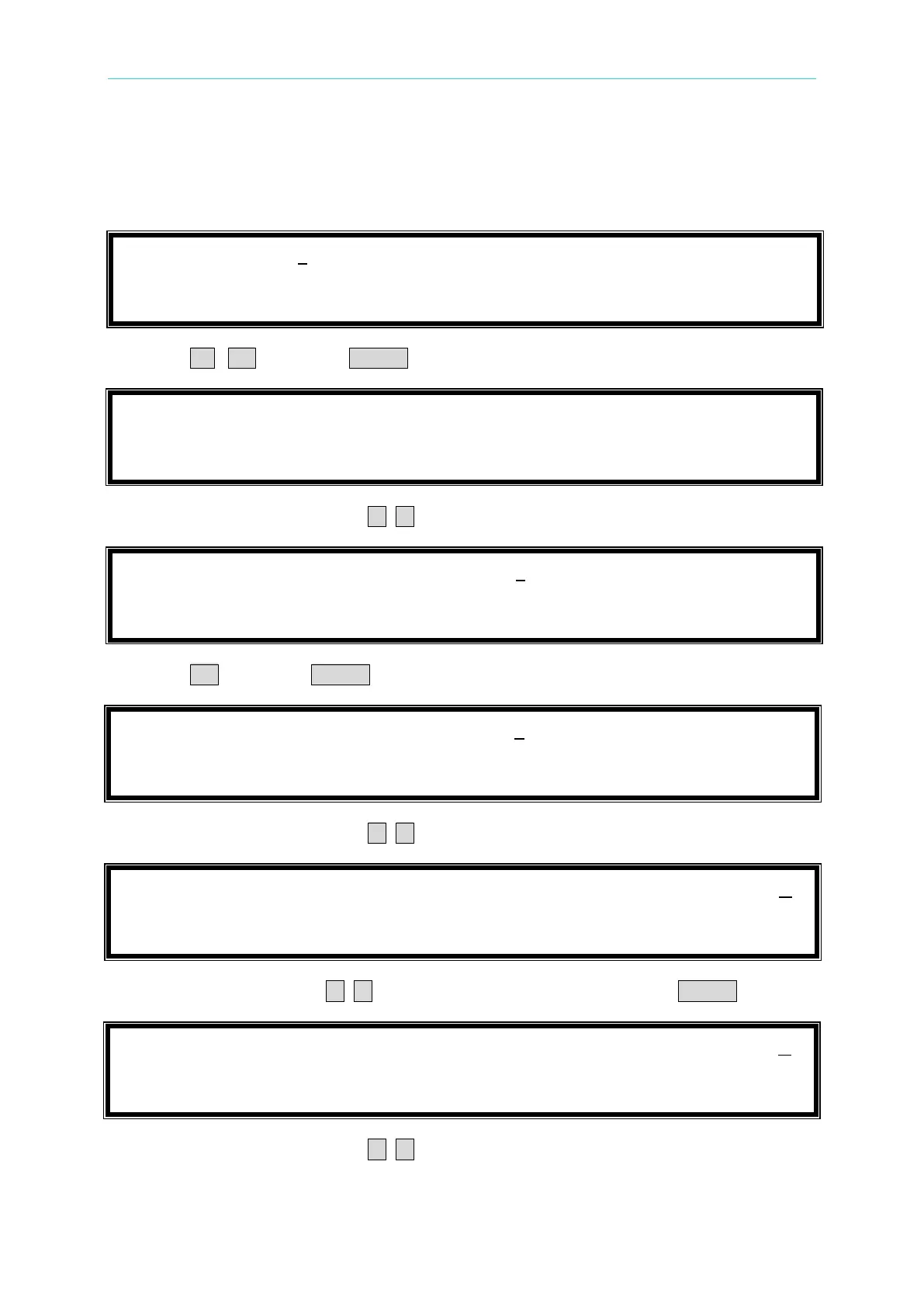
The procedures of setting I
set
= 15.00, CF = 2.000, LINE SYNC = NO, F = 50, I
p
(max) = 39.0,
Timeout = 00:00:10, and Cutoff V = 11.5, are described as below:
1. Move the cursor to the command line of “I
set
=”.
I
s
e
t
=
1
5
.
0
0
C
F
=
1
.
4
1
4
L
I
N
E
S
Y
N
C
=
N
O
F
=
1
2
0
I
p
(
m
a
x
)
=
5
0
.
0
T
I
M
E
O
U
T
=
0
0
:
0
0
:
0
0
C
U
T
O
F
F
V
=
5
0
.
0
0
0
2. Press 1 , 5 then press ENTER to change the value to 15.00”.
I
s
e
t
=
1
5
.
0
0
C
F
=
1
.
4
1
4
L
I
N
E
S
Y
N
C
=
N
O
F
=
1
2
0
I
p
(
m
a
x
)
=
5
0
.
0
T
I
M
E
O
U
T
=
0
0
:
0
0
:
0
0
C
U
T
O
F
F
V
=
5
0
.
0
0
0
3. Move the cursor by pressing ( , ) to the command line of CF=”.
I
s
e
t
=
1
5
.
0
0
C
F
=
1
.
4
1
4
L
I
N
E
S
Y
N
C
=
N
O
F
=
1
2
0
I
p
(
m
a
x
)
=
5
0
.
0
T
I
M
E
O
U
T
=
0
0
:
0
0
:
0
0
C
U
T
O
F
F
V
=
5
0
.
0
0
0
4. Press 2 then press ENTER to change the value to 2.000”.
I
s
e
t
=
1
5
.
0
0
C
F
=
2
.
0
0
0
L
I
N
E
S
Y
N
C
=
N
O
F
=
1
2
0
I
p
(
m
a
x
)
=
5
0
.
0
T
I
M
E
O
U
T
=
0
0
:
0
0
:
0
0
C
U
T
O
F
F
V
=
5
0
.
0
0
0
5. Move the cursor by pressing ( , ) to the command line of LINE SYNC =”.
I
s
e
t
=
1
5
.
0
0
C
F
=
2
.
0
0
0
L
I
N
E
S
Y
N
C
=
N
O
F
=
1
2
0
I
p
(
m
a
x
)
=
5
0
.
0
T
I
M
E
O
U
T
=
0
0
:
0
0
:
0
0
C
U
T
O
F
F
V
=
5
0
.
0
0
0
6. Press the direction key ( , ) to change the item to NOthen press ENTER.
I
s
e
t
=
1
5
.
0
0
C
F
=
2
.
0
0
0
L
I
N
E
S
Y
N
C
=
N
O
F
=
1
2
0
I
p
(
m
a
x
)
=
5
0
.
0
T
I
M
E
O
U
T
=
0
0
:
0
0
:
0
0
C
U
T
O
F
F
V
=
5
0
.
0
0
0
7. Move the cursor by pressing ( , ) to the command line of F=”.

Table of Contents

Related product manuals