Local Operation
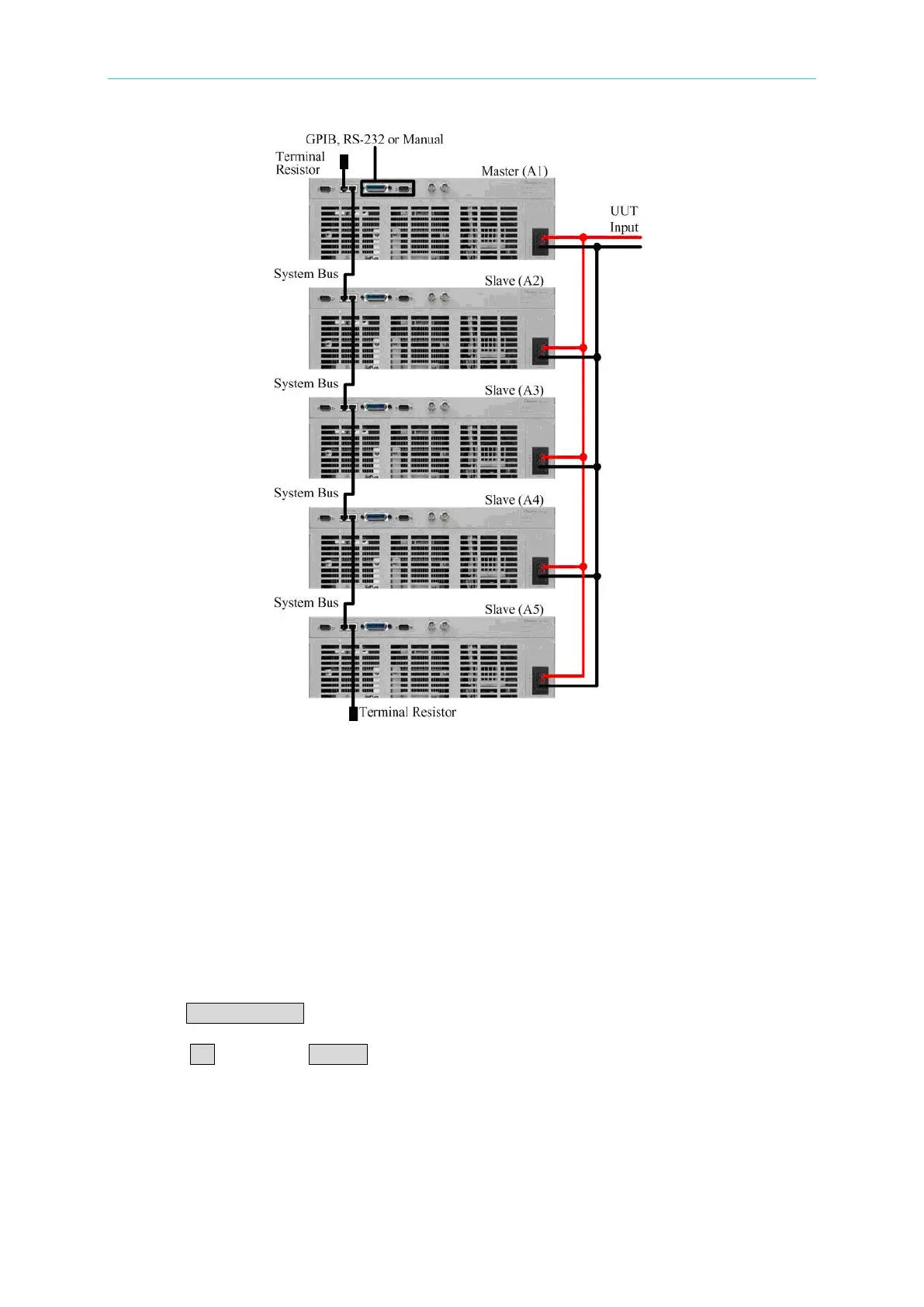
Figure 3-18 Parallel Connection
Under parallel mode, master and slave can be determined by the POSITION setting 1~5.
When POSITION = 1, this indicates the current AC Load unit is set as the master unit, when
POSITION = 2~5 this indicates that the current AC Load unit is set as a slave unit. The
TOTAL UNIT setting on the master unit is required to be set to ensure the load rating of the
paralleled AC Loads.
When setting the AC Load for parallel operation, the slave units need to be set up firstly
before the master unit is set to ensure the correct TOTAL UNIT setting on the master unit.
Below is an example of setting up three AC Load units in parallel.
Select an AC Load and set it as the first slave unit (A2).
1. Press CONF./LOCAL key.
2. Press 7 , then press ENTER to enter “PARALLEL MODE”.



 To Next Page