EasyManua.ls Logo

Chroma 63802 - Page 64

Default Icon
198 pages
Print Icon
To Next Page IconTo Next Page
To Previous Page IconTo Previous Page
Loading...
Programmable AC/DC Electronic Load 63800 Series Operation & Programming Manual
3-36
R
s
=
0
.
0
2
L
s
=
1
1
0
C
=
2
3
0
0
R
L
=
5
0
0
0
.
0
0
P
H
A
S
E
=
9
0
I
p
(
m
a
x
)
=
1
0
U
N
I
T
:
,
u
H
,
u
F
,
,
A
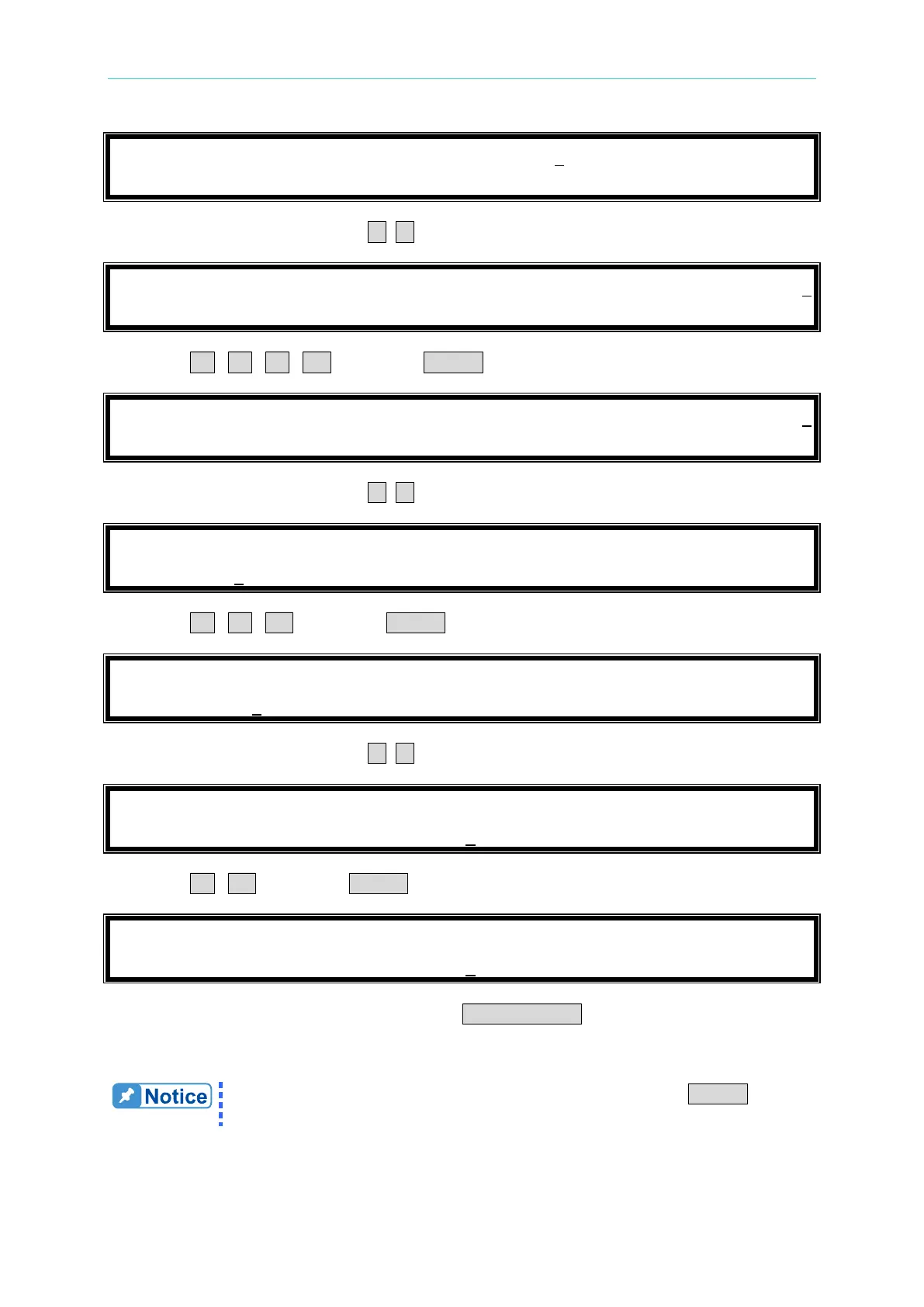
7. Move the cursor by pressing ( , ) to the command line of “R
L
=”.
R
s
=
0
.
0
2
L
s
=
1
1
0
C
=
2
3
0
0
R
L
=
5
0
0
0
.
0
0
P
H
A
S
E
=
9
0
I
p
(
m
a
x
)
=
1
0
U
N
I
T
:
,
u
H
,
u
F
,
,
A
8. Press 3 , 6 , 0 , 0 then press ENTER to change the value to 3600”.
R
s
=
0
.
0
2
L
s
=
1
1
0
C
=
2
3
0
0
R
L
=
3
6
0
0
.
0
0
P
H
A
S
E
=
9
0
I
p
(
m
a
x
)
=
1
0
U
N
I
T
:
,
u
H
,
u
F
,
,
A
9. Move the cursor by pressing ( , ) to the command line of PHASE=”.
R
s
=
0
.
0
2
L
s
=
1
1
0
C
=
2
3
0
0
R
L
=
3
6
0
0
.
0
0
P
H
A
S
E
=
9
0
I
p
(
m
a
x
)
=
1
0
U
N
I
T
:
,
u
H
,
u
F
,
,
A
10. Press 1 , 8 , 0 then press ENTER to change the value to 180”.
R
s
=
0
.
0
2
L
s
=
1
1
0
C
=
2
3
0
0
R
L
=
3
6
0
0
.
0
0
P
H
A
S
E
=
1
8
0
I
p
(
m
a
x
)
=
1
0
U
N
I
T
:
,
u
H
,
u
F
,
,
A
11. Move the cursor by pressing ( , ) to the command line of “I
p
(max)=”.
R
s
=
0
.
0
2
L
s
=
1
1
0
C
=
2
3
0
0
R
L
=
3
6
0
0
.
0
0
P
H
A
S
E
=
1
8
0
I
p
(
m
a
x
)
=
1
0
U
N
I
T
:
,
u
H
,
u
F
,
,
A
12. Press 3 , 0 then press ENTER to change the value to 30.0”.
R
s
=
0
.
0
2
L
s
=
1
1
0
C
=
2
3
0
0
R
L
=
3
6
0
0
.
0
0
P
H
A
S
E
=
1
8
0
I
p
(
m
a
x
)
=
3
0
U
N
I
T
:
,
u
H
,
u
F
,
,
A
13. After setting the parameter of the load, the LOAD ON/OFF key should be pressed to turn
on the load, so that the load can sink the current. (For the detailed information please refer
section
3.4.5.)
If there is error during the procedure of inputting value, press CLEAR to clear
the value at any time and then input again.

Table of Contents

Related product manuals