EasyManua.ls Logo

Chroma 63804 - CP Mode

Default Icon
198 pages
Print Icon
To Next Page IconTo Next Page
To Previous Page IconTo Previous Page
Loading...
Local Operation
3-69
3.17.3 CP Mode
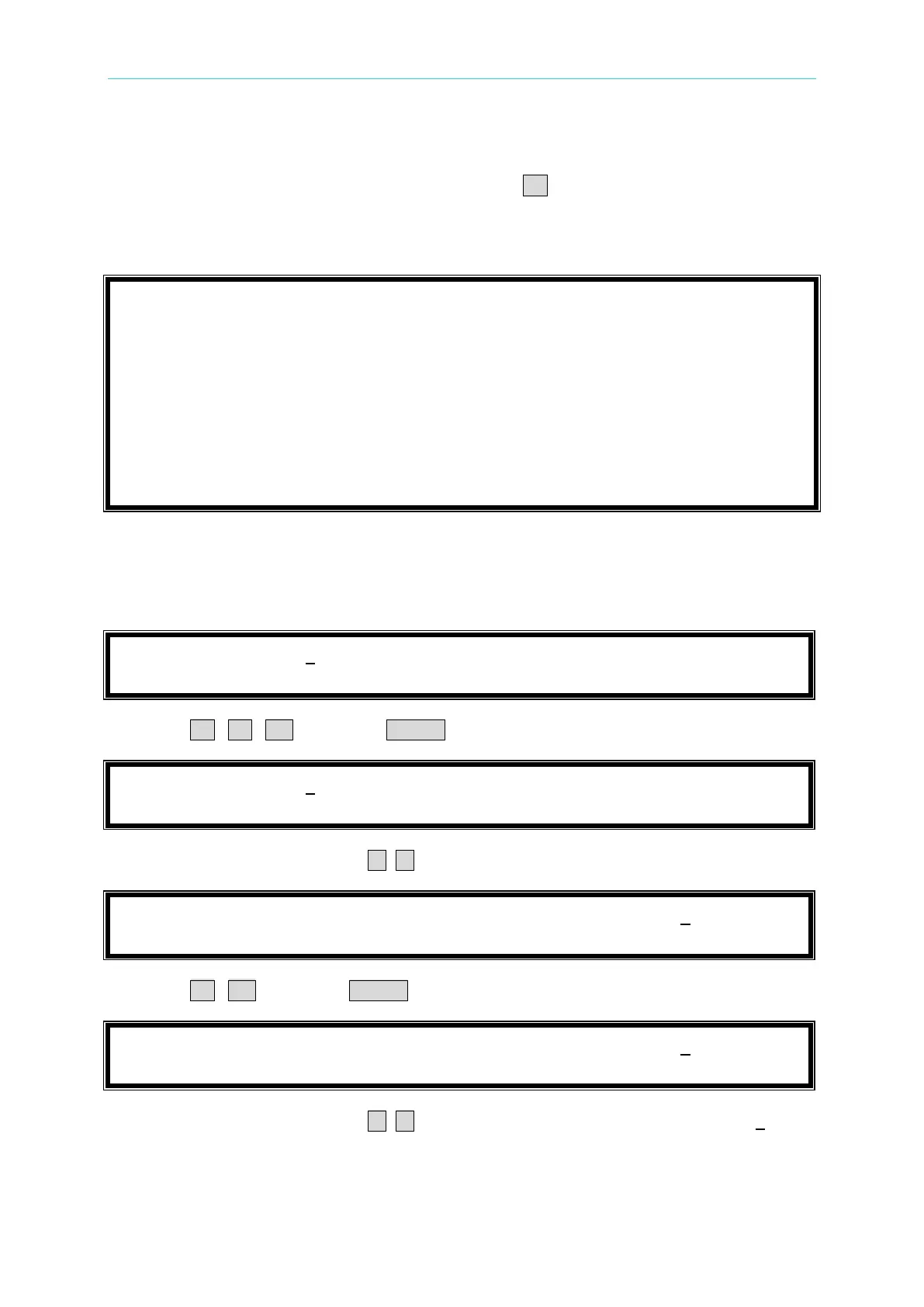
Under timing mode to enter CP timing mode press the CP key.
In this mode the loading power (P
set
), maximum current value I
p
(max), as well as the timeout
time and cutoff voltage of the UUT can be set.
P
s
e
t
=
1
0
0
.
0
0
W
I
p
(
m
a
x
)
=
5
0
.
0
A
T
I
M
E
O
U
T
=
0
0
:
0
0
:
0
0
C
U
T
O
F
F
V
=
5
0
.
0
0
0
V
= 0
. 0
0
T
=
0
0
: 0 0 : 0
0 : 0
0
0
m
s
H
O
L
D
U
P
D
C
The procedures of setting P
set
= 300.00, I
p
(max) = 16.0, Timeout = 00:10:15, and Cutoff V =
9.5, are described as below:
1. Move the cursor to the command line of “P
set
=”.
P
s
e
t
=
1
0
0
.
0
0
W
I
p
(
m
a
x
)
=
5
0
.
0
A
T
I
M
E
O
U
T
=
0
0
:
0
0
:
0
0
C
U
T
O
F
F
V
=
5
0
.
0
0
0
2. Press 3 , 0 , 0 then press ENTER to change the value to “300.00”.
P
s
e
t
=
3
0
0
.
0
0
W
I
p
(
m
a
x
)
=
5
0
.
0
A
T
I
M
E
O
U
T
=
0
0
:
0
0
:
0
0
C
U
T
O
F
F
V
=
5
0
.
0
0
0
3. Move the cursor by pressing ( ◄, ► ) to the command line of “I
p
(max)=”.
P
s
e
t
=
3
0
0
.
0
0
W
I
p
(
m
a
x
)
=
5
0
.
0
A
T
I
M
E
O
U
T
=
0
0
:
0
0
:
0
0
C
U
T
O
F
F
V
=
5
0
.
0
0
0
4. Press 1 , 6 then press ENTER to change the value to “16.0”.
P
s
e
t
=
3
0
0
.
0
0
W
I
p
(
m
a
x
)
=
1
6
.
0
A
T
I
M
E
O
U
T
=
0
0
:
0
0
:
0
0
C
U
T
O
F
F
V
=
5
0
.
0
0
0
5. Move the cursor by pressing ( ◄, ► ) to the command line of “TIMEOUT=00:00:00”.

Table of Contents