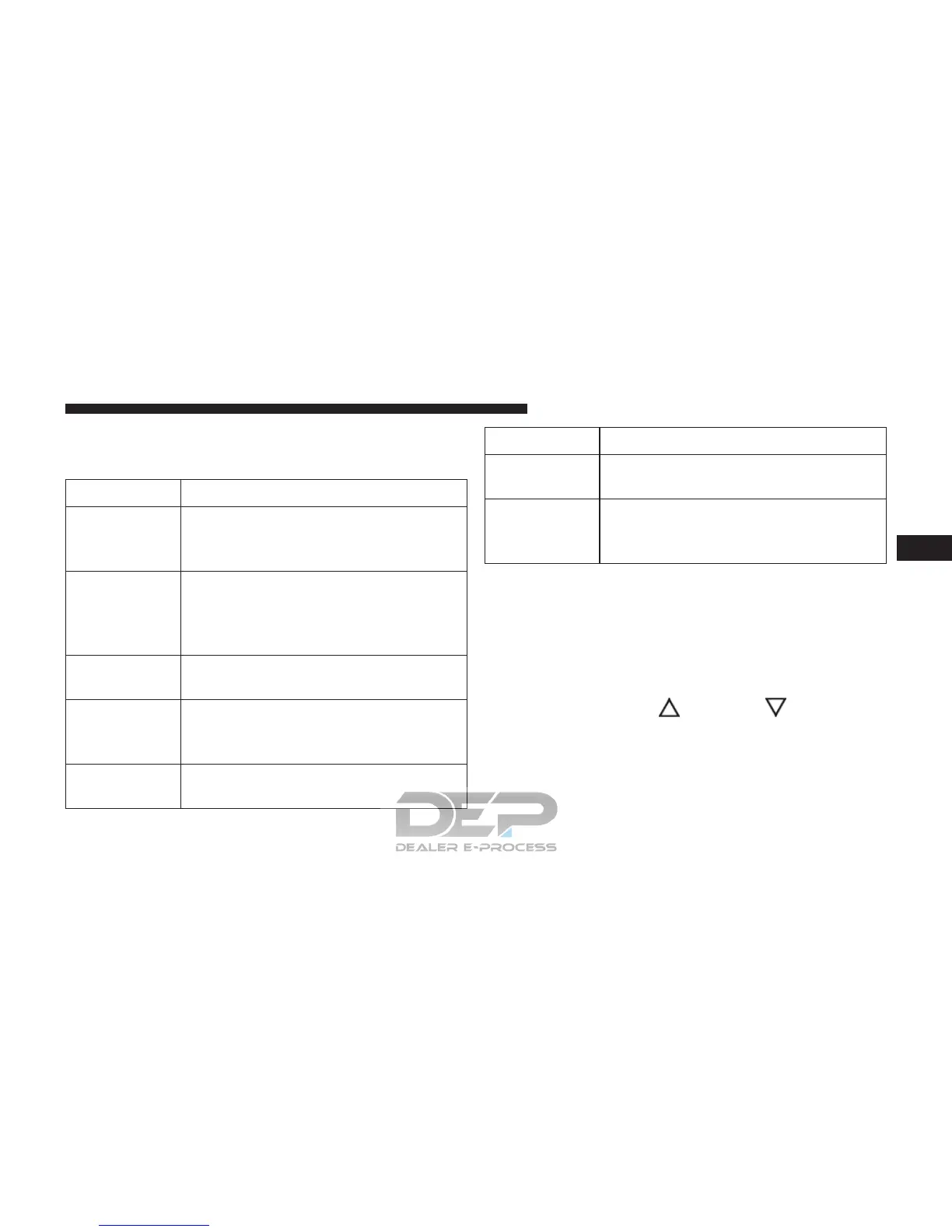
With KeySense in use there will be multiple associated
messages shown in the following table:
Setting Cluster Display Message
None – With
vehicle igni-
tion ON
“KeySense in use. Max vehicle speed
set to xx MPH/or km/h”
Max Vehicle
Speed
• “Max speed reached. KeySense in
use” supported by a chime
• “Approaching max speed xx
MPH/km” supported by a chime
Start Up Fuel
Alert message
“Range to empty xxx miles or km”
Early Low
Fuel Alert
Message
“Fuel Low”
ParkSense “Feature cannot be disabled. Key-
Sense in use”
Setting Cluster Display Message
Blind Spot “Feature cannot be disabled. Key-
Sense in use”
Forward Col-
lision Warn-
ing
“Feature cannot be disabled. Key-
Sense in use”
EVIC/DID Display Menu Items
NOTE: The EVIC/DID menu items display in the center
of the instrument cluster. Menu items may vary depend-
ing on your vehicle features.
Speedometer
Push and release the UP
or DOWN arrow button
until the Speedometer Menu displays in the EVIC/
DID. Push and release the OK button to toggle be-
tween MPH and km/h.
4
GETTING TO KNOW YOUR INSTRUMENT PANEL 219















 To Next Page