INSTRUMENT CLUSTER
DISPLAY
Your vehicle is equipped with an instrument cluster
display, which offers useful information to the
driver. With the ignition in the STOP/OFF position
(and the key removed, for vehicles with mechanical
key), opening/closing of a door will activate the
display for viewing, and display the total miles or
kilometers in the odometer. Your instrument cluster
display is designed to display important information
about your vehicle’s systems and features. Using a
driver interactive display located on the instrument
panel, your instrument cluster display can show you
how systems are working and give you warnings
when they are not. The steering wheel mounted
controls allow you to scroll through and enter the
main menus and sub-menus. You can access the
specific information you want and make selections
and adjustments.
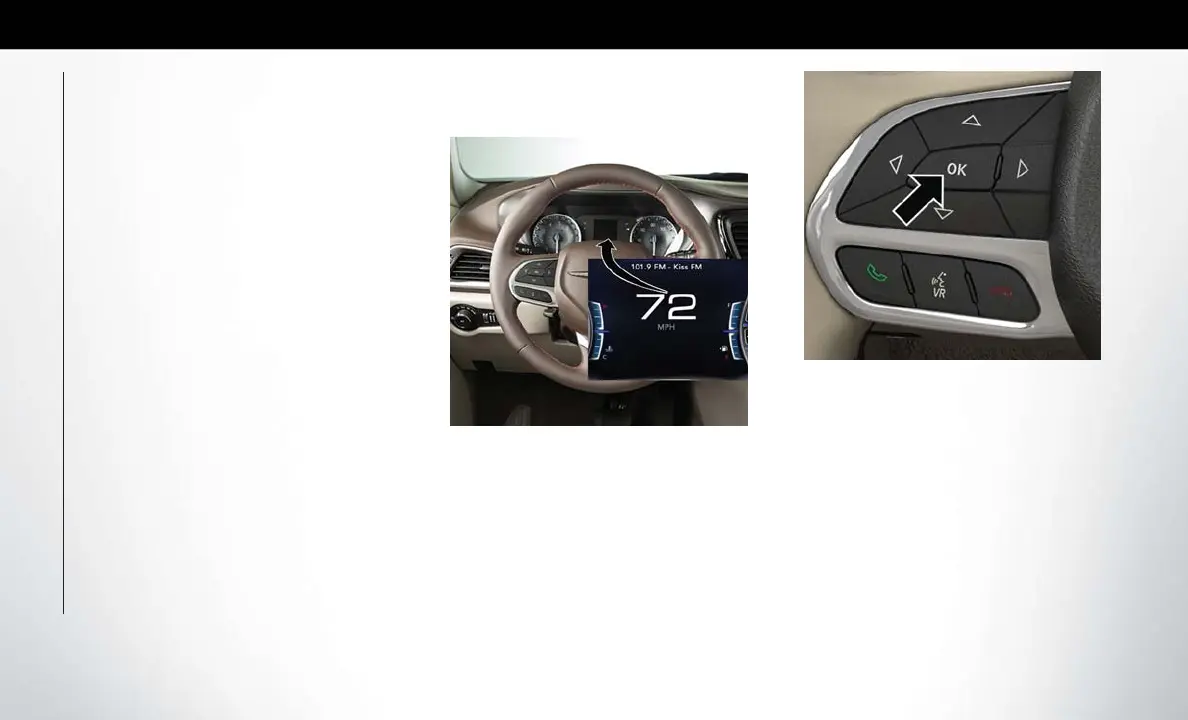
Instrument Cluster Display Location
And Controls
The vehicle’s instrument cluster is equipped with an
instrument cluster display (base or premium clus-
ter), which offers useful information to the driver.
With the ignition in the STOP/OFF position,
opening/closing of a door will activate the instru-
ment cluster display for viewing, and display the
total miles or kilometers in the odometer.
The instrument cluster display controls allows the
driver to select information by pushing the direc-
tional buttons mounted on the steering wheel:
• Up Arrow Button
Push and release the up arrow button to scroll
upward through the Main Menu items.
• Down Arrow Button
Push and release the down arrow button to scroll
downward through the Main Menu items.
• Right Arrow Button
Push and release the right arrow button to access
the information screens or submenu screens of a
main menu item.
Instrument Cluster Display
Instrument Cluster Display Controls
GETTING TO KNOW YOUR INSTRUMENT PANEL
78















 To Next Page