Vectic
EN-9
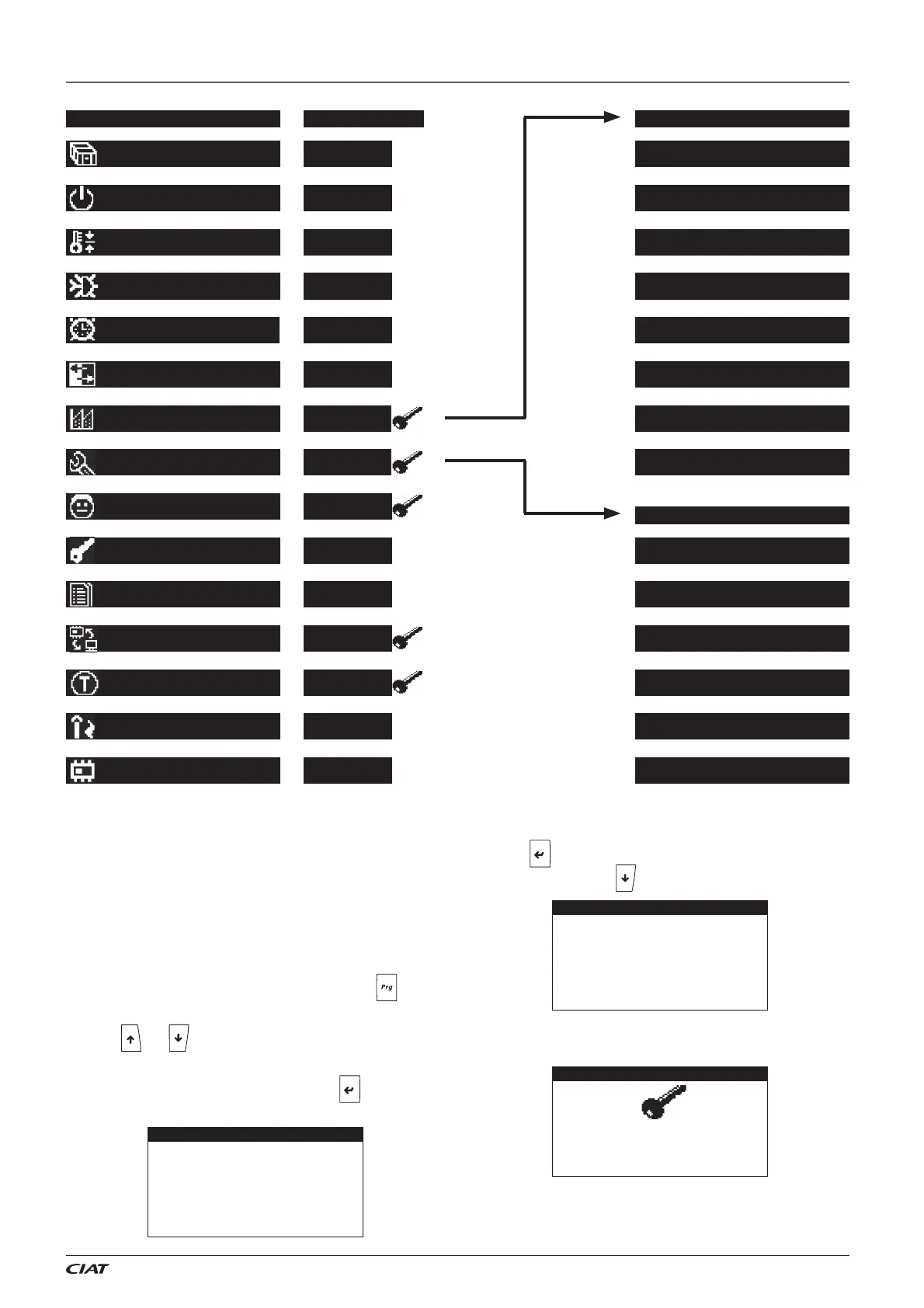
3 - MENU STRUCTURE IN THE VECTICGD GRAPHICAL TERMINAL
Level 3
Level 2
3.1. Access levels
3 levels of access are confi gured for access to the parameters
screens: level 1 (no password), level 2 (with password) and level
3 (with password).
Level 3 password allows access to all level 2 screens.
Change in the level of access
From the initial screen of the terminal, by pressing the key, the
MAIN MENU is acceded.
The keys and enable navigating through the menu until the
Group of screens: 10. Access Levels is reached.
This group of screens is accessed by pressing
. The following
screen is displayed:
Press the
key until the cursor is placed on the desired access
level. Then, press on the
key.
The screen to enter the password is visualised. If this password is
needed, please consult.
The terminal comes back to the level 1 after a period of inactivity of
10 minutes. The change of level can also be done from one screen
of this menu.
Access level NA01
CURRENT LEVEL : 1
Selection Level 2:
Selection Level 3:
Access level NA01
CURRENT LEVEL : 1
Selection Level 2:
Selection Level 3: ->
NA05
Enter level 3
password:
0000
02.Unit On/Off
01.Unit Status
04.Summer/Winter
03.Setpoint
06.Input/Output
05.Clock/Scheduler
08.Service par.
07.Manufacturer par
10.Access Levels
09.User par.
12.BMS Config.
11.Alarms History
14.Burner/Boiler
13.Test Mode
15.Versions
Main menu Access level Manufacturer menu
Service menu
Level 1
Level 1
Level 1
Level 1
Level 1
Level 1
Level 1
Level 1
Level 1
Level 1
Level 2
Level 2
Level 3
a.Unit Config.
b.Defrost Config.
c. Compressor Config.
d. Regulation Config.
e.Safety Config.
f. Alarm Config.
g. EEV Config.
h.Initialization
a.Configuration
b.EEV Setpoints
c.Plug-fan
d.Calibration
e.Simulation
f.Working Hours


 To Next Page