How to Diagnose System Error Codes
When the System Error indicator light is lit, perform the following diagnostic to identify the System Error code. The System Error
light MUST BE ILLUMINATED before testing.
If the SYSTEM ERROR LED is lit:
1. If unit is currently ON (if the LED above on/off is lit), tap the on/off button once to turn it OFF.
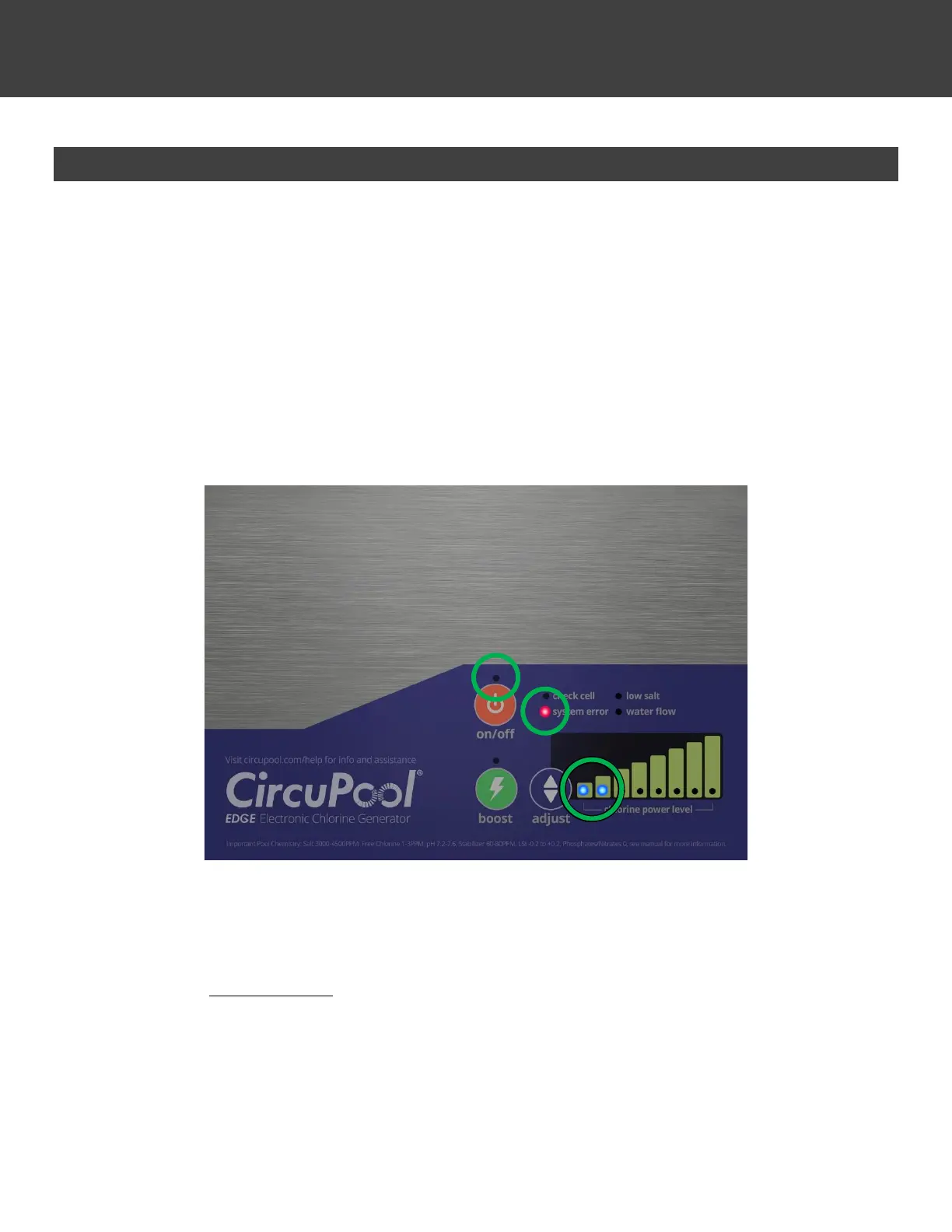
2. The unit will go OFF, but the System Error light will remain ON. To get the Error Code, count the number of LED
lights that are lit on the “chlorine power level” graph (anywhere from 1 to 7 will be lit).
3. This count is the System Error Code currently indicated. Proceed to the corresponding section for that System
Error code. In the example below, System Error code 2 is shown.
Example of System Error Code 2 - the unit is OFF (no LED above on/off), the system error LED is lit, and 2 power LED’s are lit.
Note: Some critical System Errors (2, 4, 5, 6, 7) may result in automatic shut-down of the Control Module. In these cases,
the ON/OFF indicator will already be off with the System Error light on, and the corresponding number of LED lights will
already be shown on the power graph. If the Control Module is turned back on, it will continue to shut off and return to
the System Error state, showing the number of LED lights that correspond with the specific error code.



 To Next Page