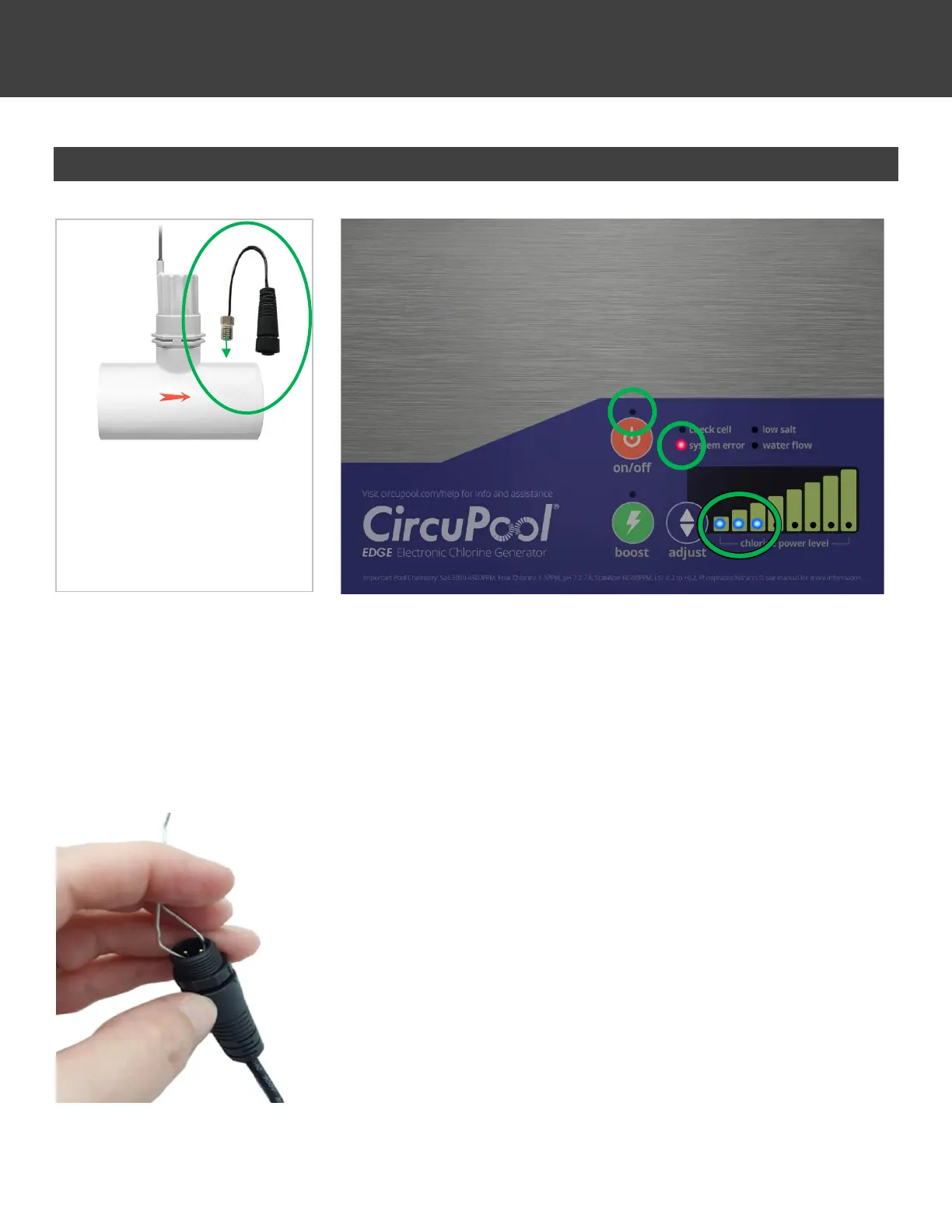
System Error 3 – Temperature Sensor Connections
If a System Error 3 is illuminated, check and fix these issues before proceeding which will commonly cause this error.
• Check Temperature Sensor connection to make sure the wire is not broken or loose, and that cable connections
are free of corrosion; wipe clean if necessary.
If there is no visible damage to the Temperature Sensor or cable connection, proceed with additional troubleshooting.
You will need a small metal wire, paper clip, or other similar object to serve as a “jumper” to complete the circuit:
1. Disconnect the Temperature Sensor cable connection.
2. Tap the “Adjust” button on the Control Module until all 8 LED’s are on.
3. Wait about 45 seconds to allow the system to ramp up internally.
4. Press and hold the “Boost” button for about 3 seconds until the “water flow” light
comes on.
5. Tap the “Adjust” button twice to get the “check cell” light.
6. At this point there should be 7 LED’s on the power graph.
7. Touch the ends of your jumper to the male prongs on the Temp Sensor connector.
8. With the jumper securely touching both prongs, count the power graph LED’s:
▪ If 8 LED’s show, the Temp Sensor itself is bad and needs replacement.
▪ If only 7 LED’s still show, there is electronics damage and the Control Module
needs replacement.
The Temperature Sensor is located
on the tee-fitting of the Flow Sensor;
it is the silver nut screwed into the
body of the fitting.



 To Next Page