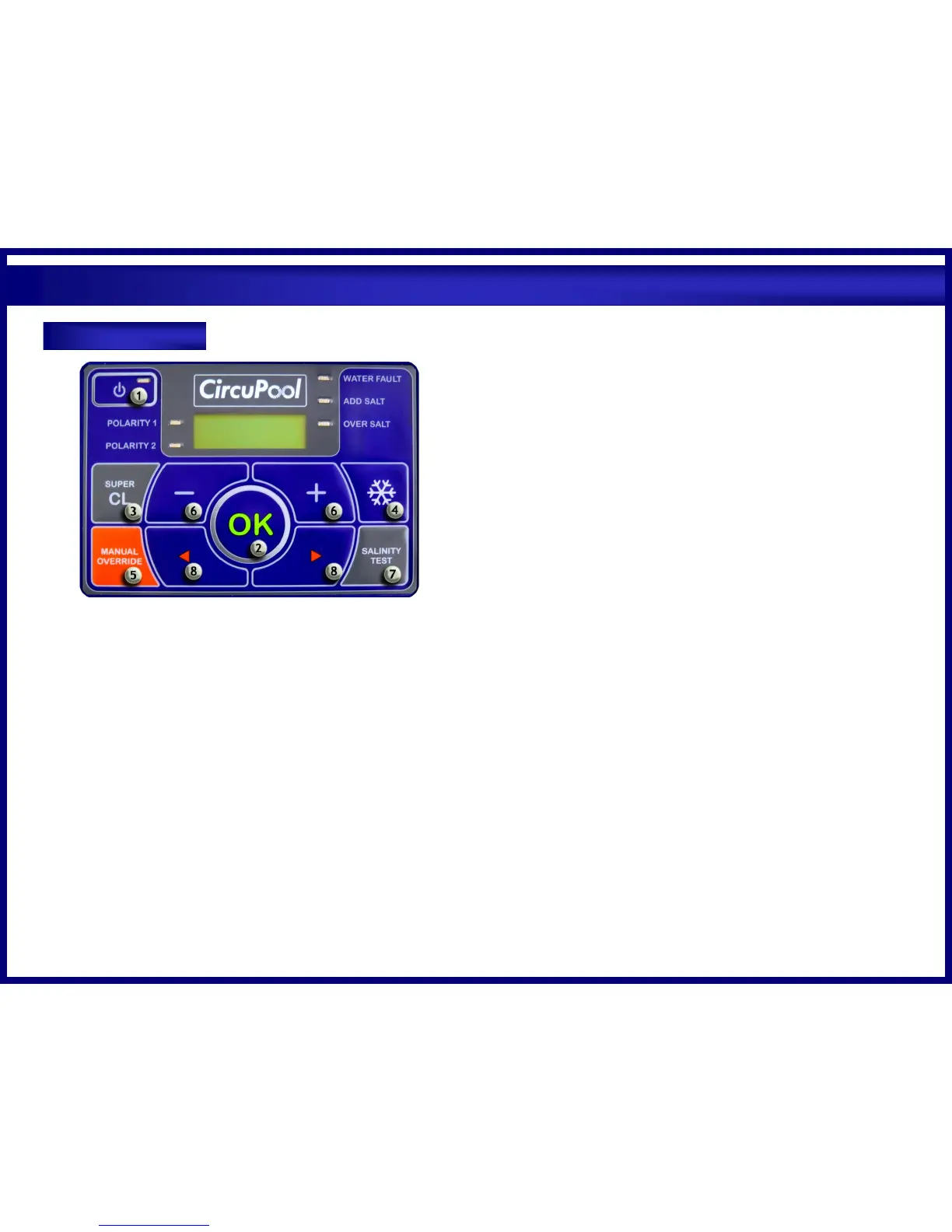
1) On / Off
For normal operation, the system should be left in the “On” position. In this
position, the CircuPool RJ Series will produce chlorine according to the desired
output %. When using an external timer to provide power, the system will
return to the last settings entered each time power is restored.
2) OK Button
Holding this button in for 5 seconds will open a menu that accesses the internal
timer settings and choice of language. Pressing once selects desired setting.
a. Language: Use arrows to change the language setting.
b. Which Timer to Use: External is the standard setting. For specific
situations, the Internal timer can run the unit independently of your
pump timer, follow the steps below:
i. Use the arrow keys to change it from external to internal timer
and press OK to accept the setting.
ii. Enter both ON and OFF times (see procedure below for setting
clock). Note: programmed times cannot overlap. Pump operation
must be ensured during run times.
iii. Ensure correct time on clock.
iv. Press OK to accept the settings
c. Setting the Clock: Use the arrows to change the digits and the plus/minus
buttons to move the cursors from hours to minutes.
3) SuperChlor
a. When you have an abnormally high bather load, a large amount of rain, or
a cloudy water condition which needs an extra amount of purification to
be introduced, simply press the SUPERCHLOR button. This electronically
“super chlorinates” the water for 24 hours, or until the power has been
turned off.
4) Winter Mode (non-freezing climates only)
a. During periods of decreased chlorine demand due to lower temperatures,
it is advisable to activate the WINTER MODE. Simply press once, and the
Winter Mode will accordingly reduce the chlorine output of the shown
percentage by approximately half. Reducing chlorine output during
periods of low activity will help maximize the life of the cell.
5) Manual Override
a. This button allows you to temporarily override the internal timer (if used),
without having to change the unit’s settings. Press once to enter manual
operation. When ready to return to normal automation, simply press the
button again.
6) Chlorine Output Levels
a. Pressing the + or – buttons with change the CHLORINE PRODUCTION in
10% increments.
7) Salinity Test
a. Press this button to recall the last salinity test. Each time the unit is
powered up, it performs several self-checks and a salinity test that takes
about 4 minutes. The keypad is disabled during these tests. After the
testing is complete, the salinity status will appear in the display. The
reading on Polarity One may differ from Polarity two. This reading may
also vary somewhat from independent tests done at the pool store or at
poolside. Most electronic testers are subject to a variation of about
fifteen percent. The CircuPool unit works well in a wide salinity range so a
great deal of precision is not required. High salt conditions will not harm
your CircuPool unit. With rain and backwashing, your pool’s salinity will
gradually diminish. Simply add a 40 lb. bag of salt whenever your salinity
level is low. TIP: When adding large quantities of salt, start with an
independent test of the existing salinity level and add in portions,
retesting at each stage.
8) Left and Right Arrows
a. Pressing the arrows will enable navigation through the menu options.



 To Next Page