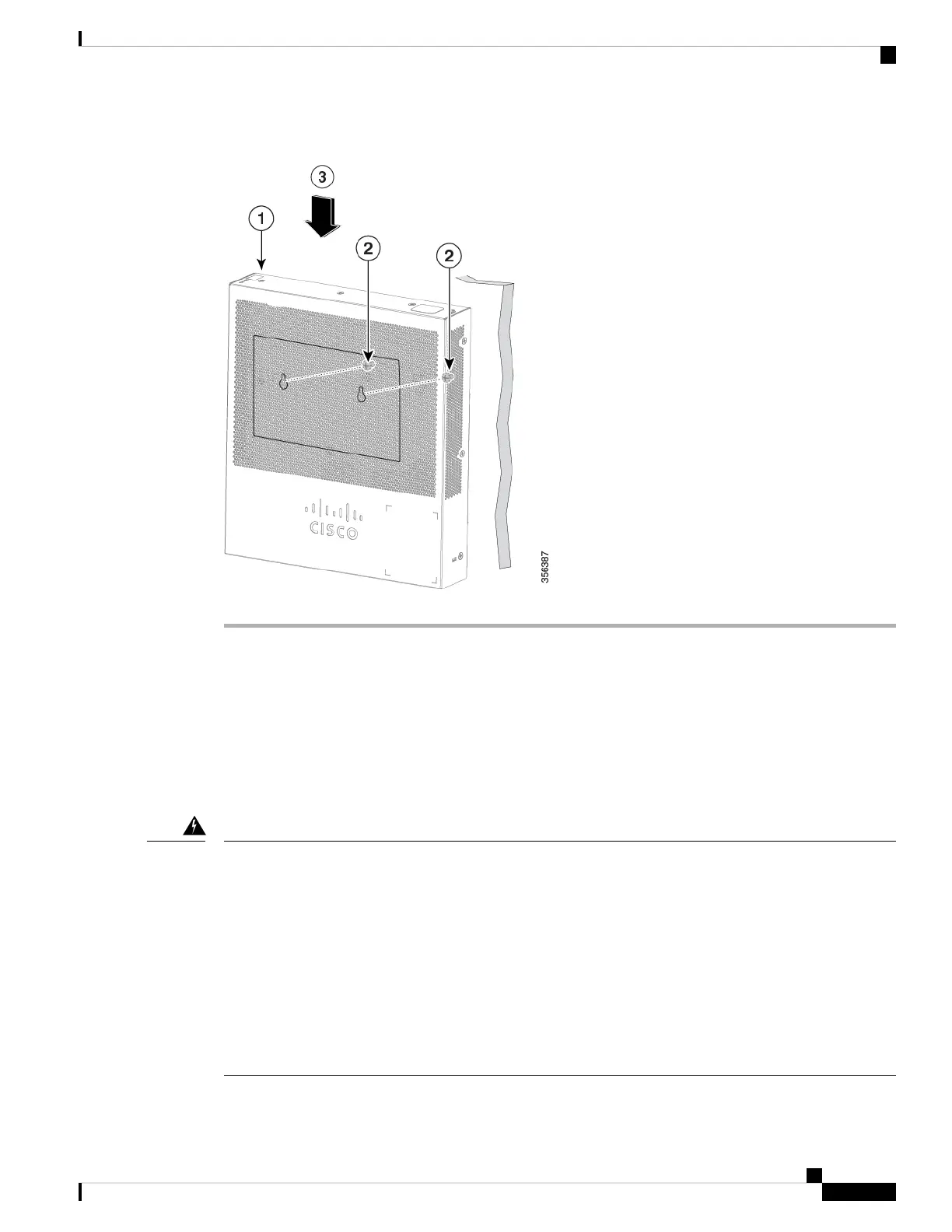
Figure 14: Installing the Switch on a Wall
In A Rack
Installing the switch in a rack requires an optional bracket kit that is not included with the switch. You can
order these kits from your Cisco representative:
• 19-inch rack-mounting brackets (RCKMNT-19-CMPCT=)
• 23- and 24-inch rack-mounting brackets (RCKMNT-23-CMPCT=)
To prevent bodily injury when mounting or servicing this unit in a rack, you must take special precautions to
ensure that the system remains stable. The following guidelines are provided to ensure your safety:
• This unit should be mounted at the bottom of the rack if it is the only unit in the rack.
• When mounting this unit in a partially filled rack, load the rack from the bottom to the top with the
heaviest component at the bottom of the rack.
• If the rack is provided with stabilizing devices, install the stabilizers before mounting or servicing the
unit in the rack.
Statement 1006
Warning
Cisco Catalyst 1000 Series 8-Port and 16-Port Switch Hardware Installation Guide
23
Switch Installation
In A Rack



 To Next Page