(Optional) USB Type B to RJ45 adapter
(CAB-CON-USBRJ45)
*
14(Optional) Cable guide
(C9K-CMPCT-CBLE-GRD)
*
7
1
* Item is orderable.
Mounting the Switch
The following sections explain the different mounting options.
Mounting on a Desk or Shelf Without Mounting Screws
Procedure
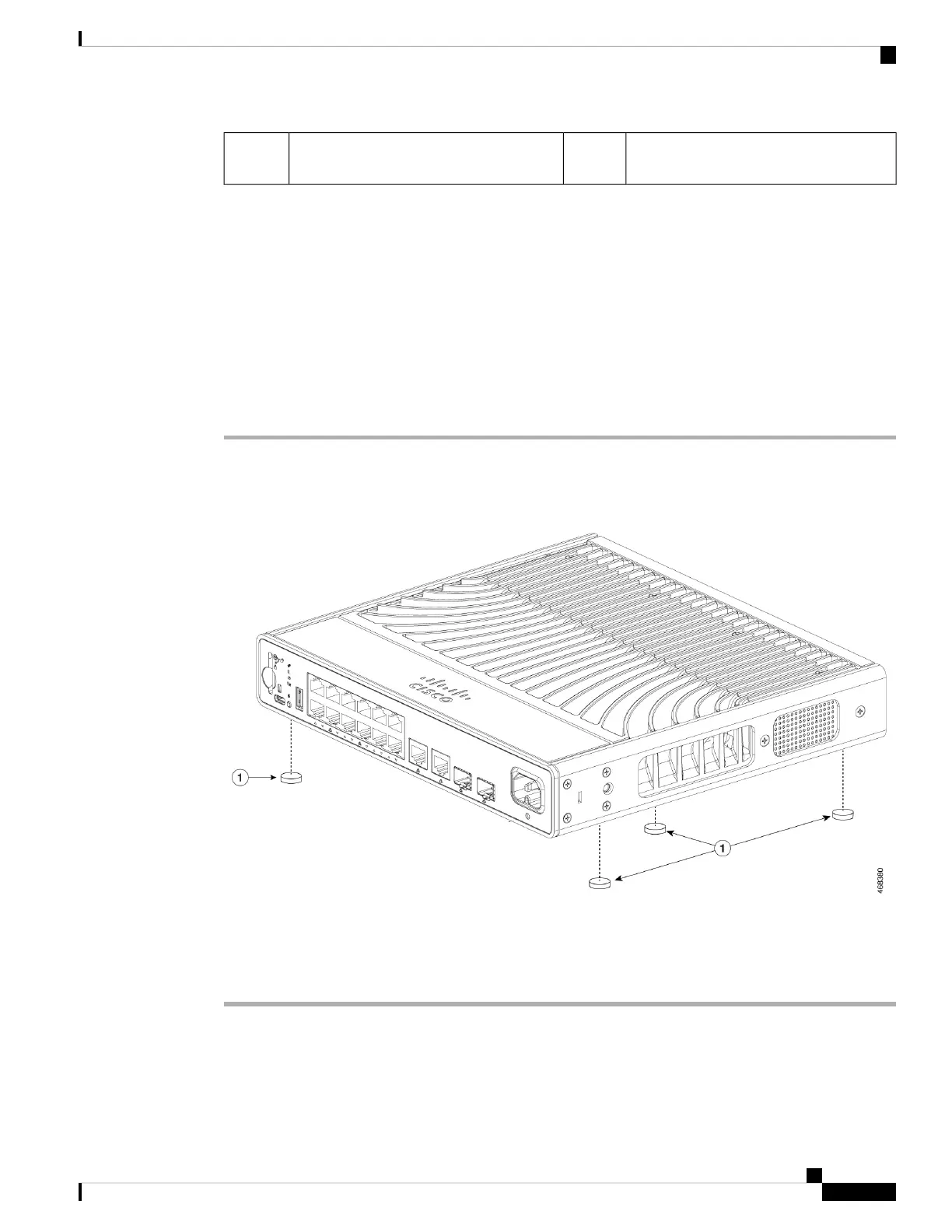
Step 1 Locate the adhesive strip with the rubber feet in the accessory kit.
Step 2 Remove the four rubber feet from the adhesive strip, and attach them to the locations indicated at the bottom
of the unit. This prevents the switch from sliding on the desk or shelf.
We strongly recommend that you attach the rubber feet to the specified location and place the side of
the switch with Cisco logo facing upwards. Doing so helps prevent airflow restriction and overheating.
Note
Step 3 Place the switch on the desk or the shelf.
Installing a Compact Switch
3
Installing a Compact Switch
Mounting the Switch





 To Next Page