10
Chapter 4: Setting up the Wireless-B Media Adapter
Running the Setup Wizard
Wireless-B Media Adapter
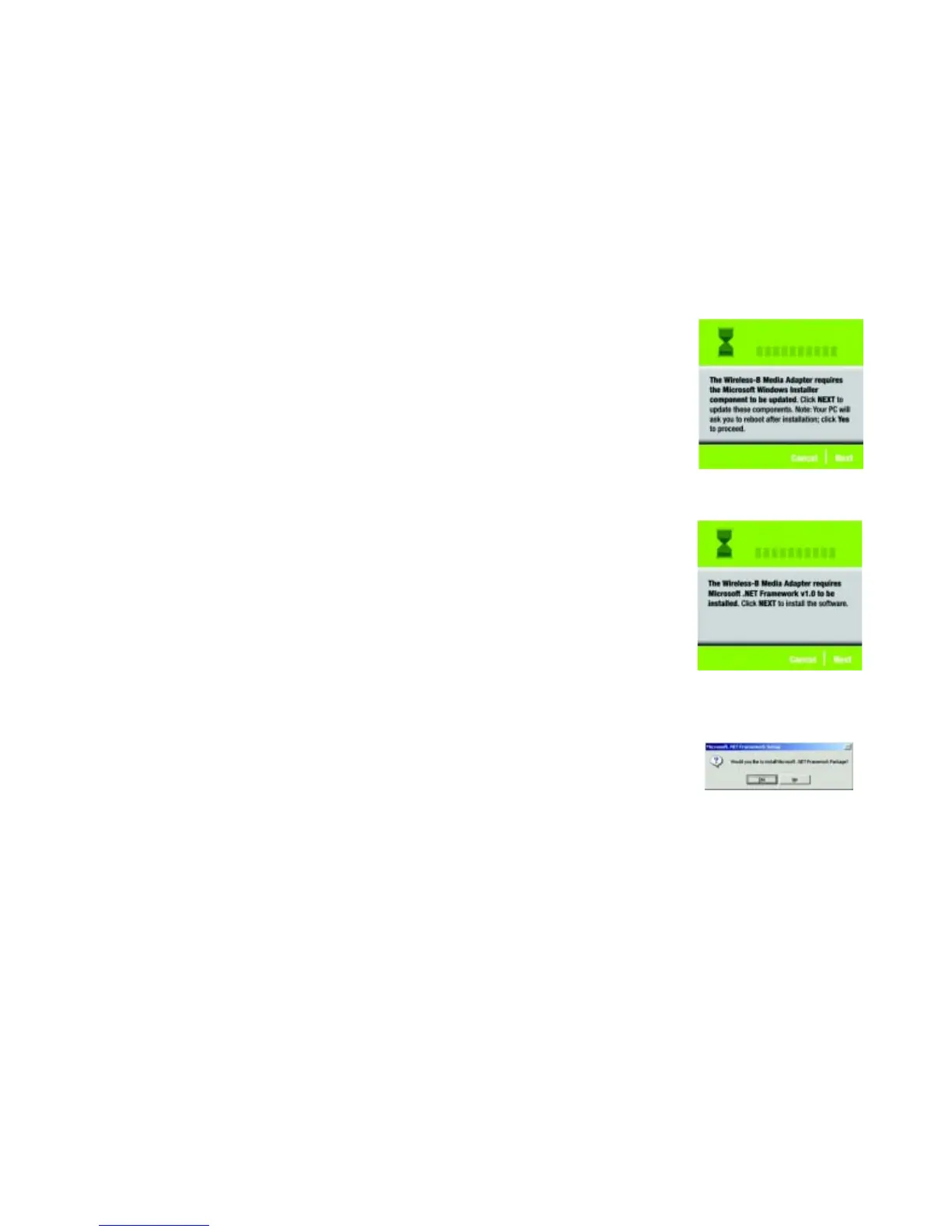
4. If the latest Windows Installer components are not detected on your PC, then you will see Figure 4-3, which
will ask you to update them. Click Next.
After these components are updated, you will be asked to reboot your PC. Click Yes. After the PC reboots, you
will be returned to the screen shown in Figure 4-2. Click Install and proceed to step 5.
5. If Microsoft .NET Framework version 1.0 is not detected on your PC, then you will see Figure 4-4, which will
ask you to install it. Click Next.
6. Windows will ask you if you want to install the Microsoft .NET Framework Package. Click Yes to proceed.
(This may take a few minutes.)
Figure 4-4: Microsoft .NET Framework
Screen
Figure 4-3: Windows Installer Screen
Figure 4-5: Microsoft .NET Framework
Package Screen

 To Next Page
 Loading...