2-6
Cisco Video Surveillance PTZ IP Camera Installation Guide
OL-28954-01
Chapter 2 Installing the Camera
Installing the PTZ IP Camera
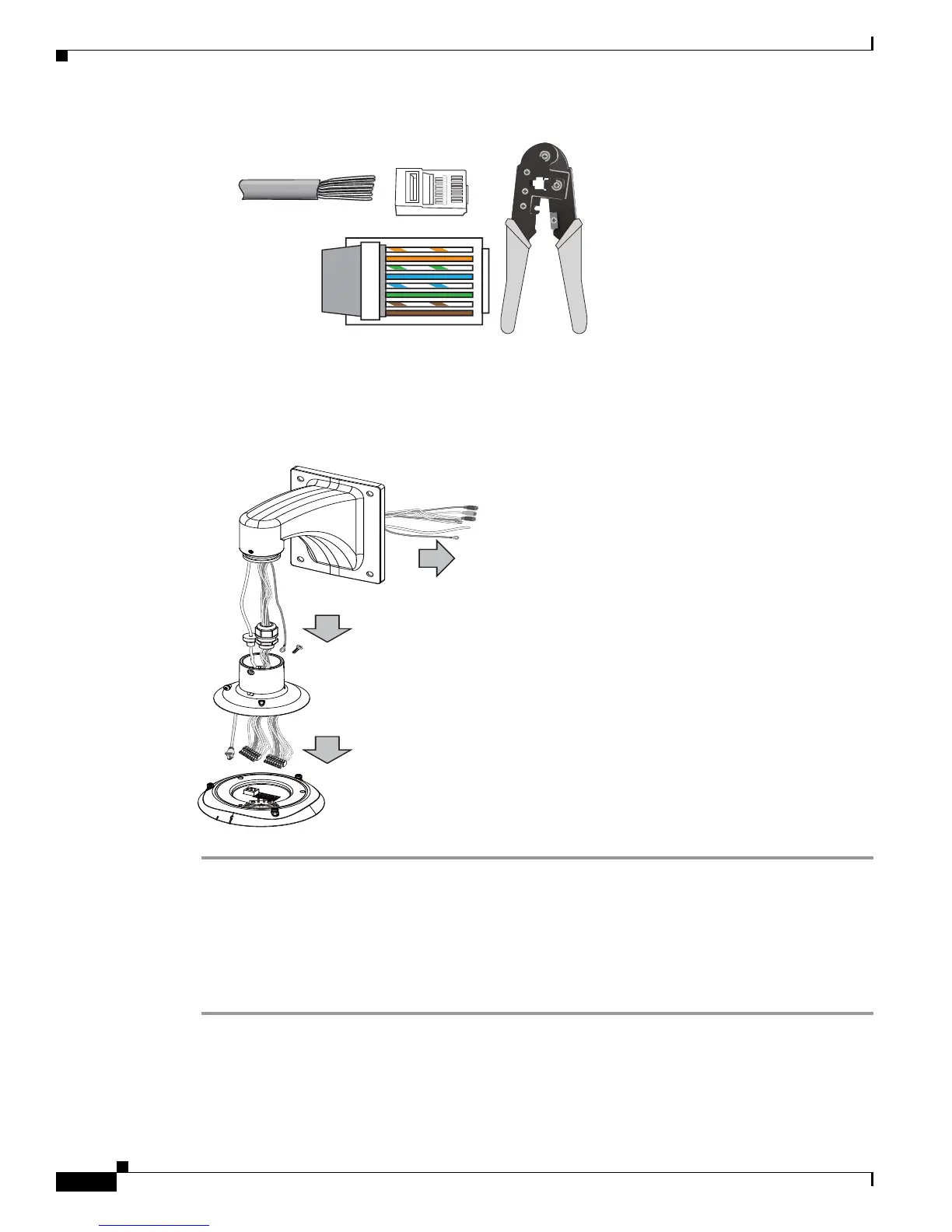
Step 5 Feed the Ethernet cable and I/O wires through the mounting bracket, the openings on the dome cap, and
to the interface section. Attach the rubber seal plug to dome cap for water proofing.
Step 6 Secure the included ground wire to the dome cap, pass it through the mount bracket, and connect the
other end to a grounded conduit later.
Preparing the Camera
Prior to mounting the camera to the wall or ceiling, attach the silica gel packets to the camera using these
steps.
Step 1 Remove the black dome cover of the camera.
Step 2 Turn the camera upside down.
Step 3 Attach the silica gel packets to the inside wall of the camera using the adhesive strips.
o
O
g
B
b
G
br
BR
1
2
3
4
5
6
7
8
o: white/orange stripe
O: orange solid
g: white/green stripe
B: blue solid
b: white/blue stripe
G: green solid
br: white/brown stripe
BR: brown solid













 To Next Page