2-7
Cisco Video Surveillance PTZ IP Camera Installation Guide
OL-28954-01
Chapter 2 Installing the Camera
Installing the PTZ IP Camera
Step 4 Attach the black cover to the camera.
Mounting to the Wall
You can connect the PTZ IP camera to the wall using the following accessories:
• Goose neck for wall mount—CIVS-6KA-GNECK=
• Adaptor—CIVS-PA-PTZADPTR=
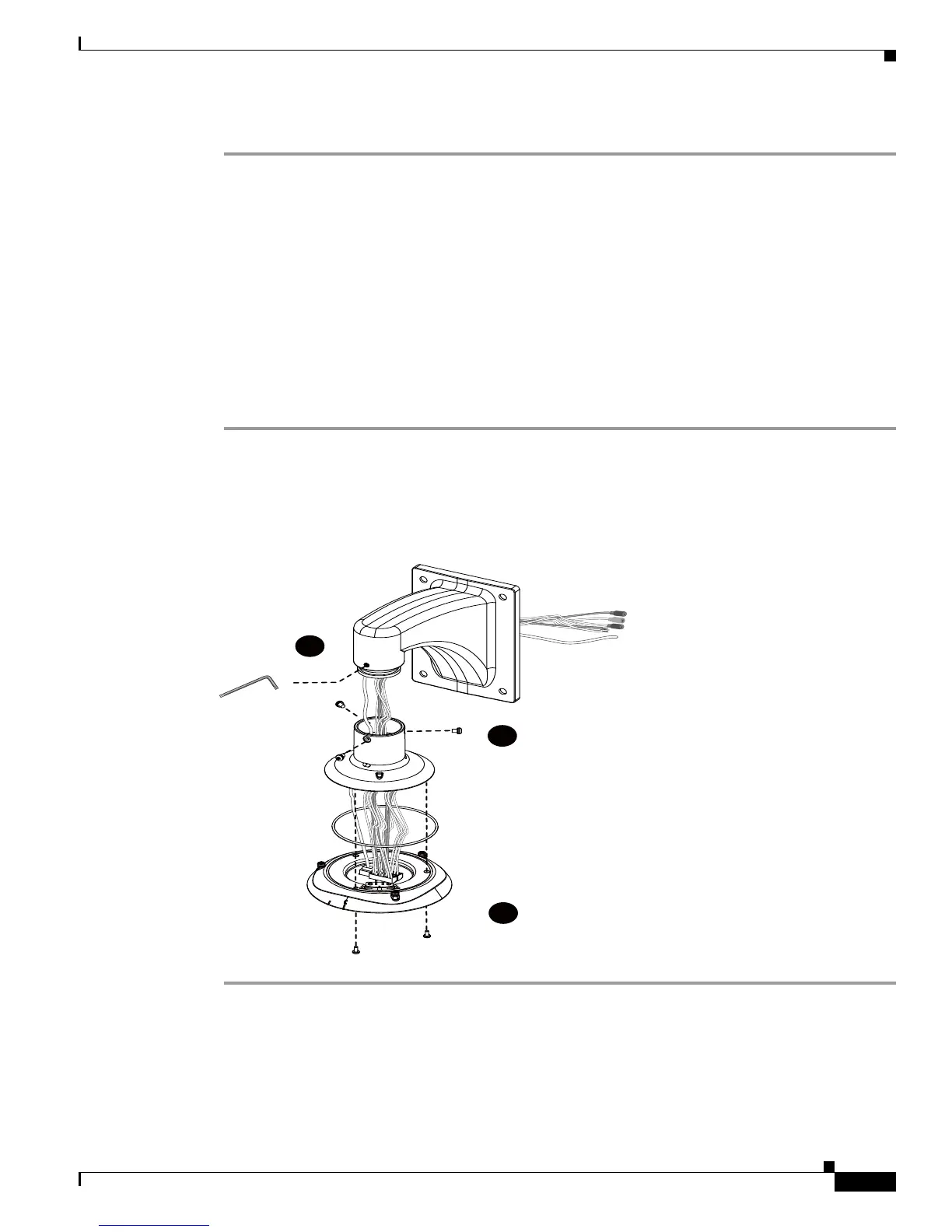
Connecting to the Mount Bracket
Use these steps to connect cables to the mount bracket.
Step 1 Press the seal ring into the groove on canister.
Use the black machine screws (M4x8) to attach the interface section to the dome cap.
Step 2 Secure the dome cap to the mount bracket.
Step 3 Use the included hex wrench to secure the connection.
You can now carry the camera and the top section to the installation site.













 To Next Page