The multiple-fiber push-on (MPO) connectors on the optical QSFP+ or QSFP28 transceivers support network
interface cables with either physical contact (PC) or ultra-physical contact (UPC) flat polished face types.
The MPO connectors on the optical QSFP+ or QSFP28 transceivers do not support network interface cables
with an angle-polished contact (APC) face type.
Note
Procedure
Step 1 Remove the dust plugs from the optical network interface cable MPO connectors. Save the dust plugs for future use.
Step 2 Inspect and clean the MPO connector’s fiber-optic end faces.
Step 3 Remove the dust plugs from the QSFP+ or QSFP28 transceiver module optical bores.
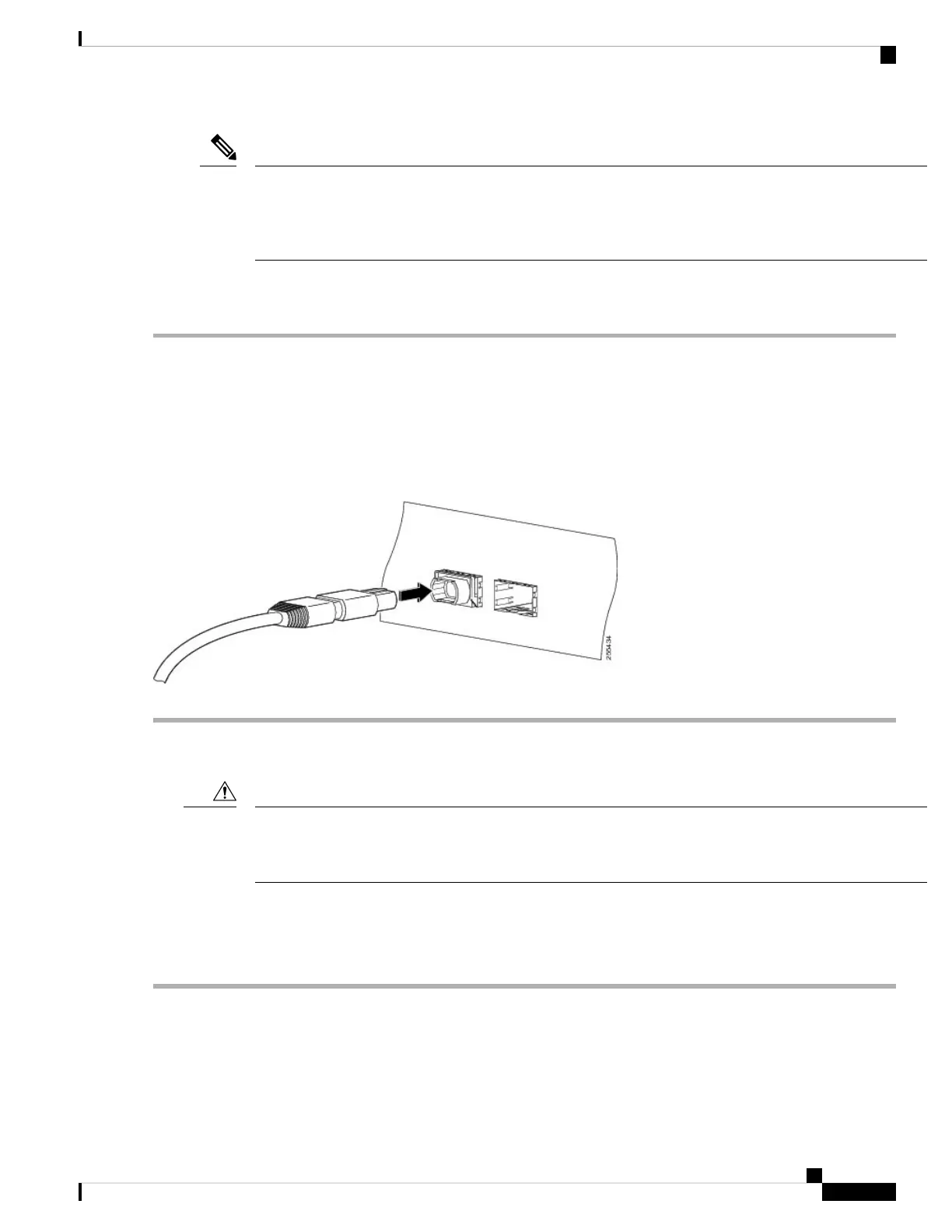
Step 4 Immediately attach the network interface cable MPO connectors to the QSFP+ or QSFP28 transceiver module (see the
figure below).
Figure 14: Cabling a 40-Gigabit QSFP+ or QSFP28 Transceiver Module
Removing the 40-Gigabit QSFP+ or 100-Gigabit QSFP28 Transceiver Module
The QSFP+ or QSFP28 transceiver module is a static-sensitive device. Always use an ESD wrist strap or
similar individual grounding device when handling QSFP+ or QSFP28 transceiver modules or coming into
contact with modules.
Caution
To remove a QSFP+ or QSFP28 transceiver module, follow these steps:
Procedure
Step 1 For optical QSFP+ or QSFP28 transceiver modules, disconnect the network interface cable from the QSFP+ or QSFP28
transceiver connector.
Step 2 For QSFP+ or QSFP28 transceiver modules equipped with a bail-clasp latch (see the below figure, top view):
a) Pivot the bail-clasp down to the horizontal position.
Connect Router to the Network
19
Connect Router to the Network
Removing the 40-Gigabit QSFP+ or 100-Gigabit QSFP28 Transceiver Module




 To Next Page