Chapter 1 Product Overview
Router Overview
1-4
Cisco 831 Router and SOHO 91 Router Hardware Installation Guide
78-14784-02
Back Panel
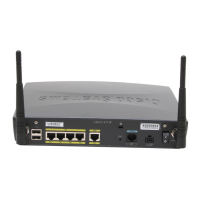
Figure 1-2 shows the back panel of the Cisco 831 router (Figure 1-2 depicts the
back panel of a Cisco 831 router, but the back panel of the Cisco SOHO 91 router
is nearly identical).
Figure 1-2 Cisco 831 Back Panel
1 Ethernet port 4 of the built-in
switch connects to Ethernet
network devices
5 Console port connects to PC or
terminal
2 Ethernet port 3 of the built-in
switch connects to Ethernet
network devices
6 WAN port connects to Internet or
switch
3 Ethernet port 2 of the built-in
switch connects to Ethernet
network devices
7 Input jack connects to power supply
4 Ethernet port 1 of the built-in
switch connects to Ethernet
network devices
8 Power on/off button
82022
ETHERNET 10BASET COMPUTERS (E0)
4
3
2
1
Cisco 831
ETHERNET 10BASET
INTERNET (E1)
+18 VDC
CONSOLE
1
3
5
2
4
6
7
8



 To Next Page
 Loading...