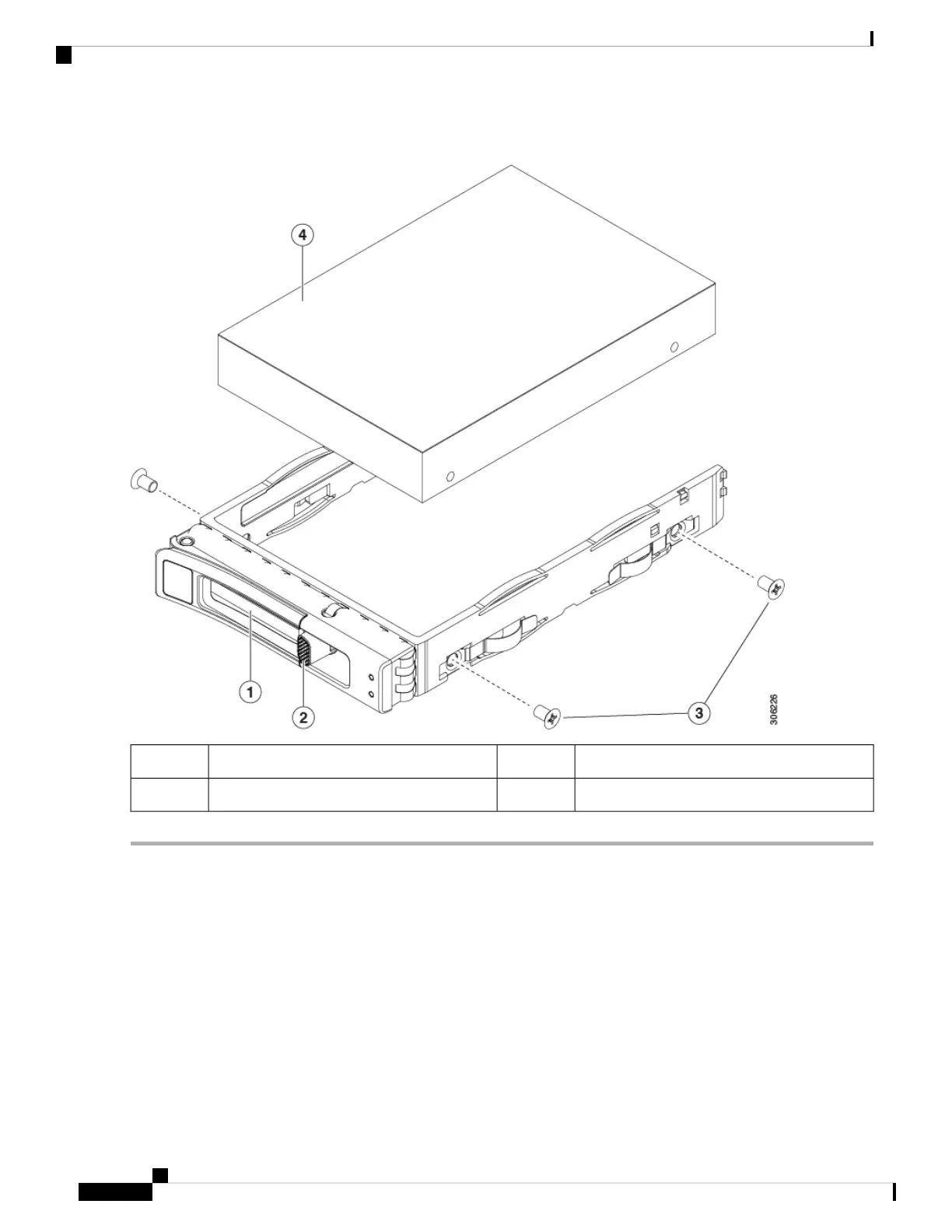
Figure 17: Replacing a Drive in a Drive Tray
Drive tray screws (two on each side)3Ejector lever1
Drive removed from drive tray4Release button2
Replacing a Front-Loading NVMe SSD
This section is for replacing 2.5-inch or 3.5-inch form-factor NVMe solid-state drives (SSDs) in front-panel
drive bays.
Front-Loading NVMe SSD Population Guidelines
The front drive bay support for 2.5-inch NVMe SSDs:
• SE-CL-L3 —Small form-factor (SFF) drives, with 10-drive backplane. Drive bays 1 and 2 support
2.5-inch NVMe SSDs.
Cisco Application Services Engine Hardware Installation Guide
34
Maintaining the Server
Replacing a Front-Loading NVMe SSD










 To Next Page