Spanning Tree
STP Status
Cisco Small Business SLM Series Smart Switches Administration Guide 55
7
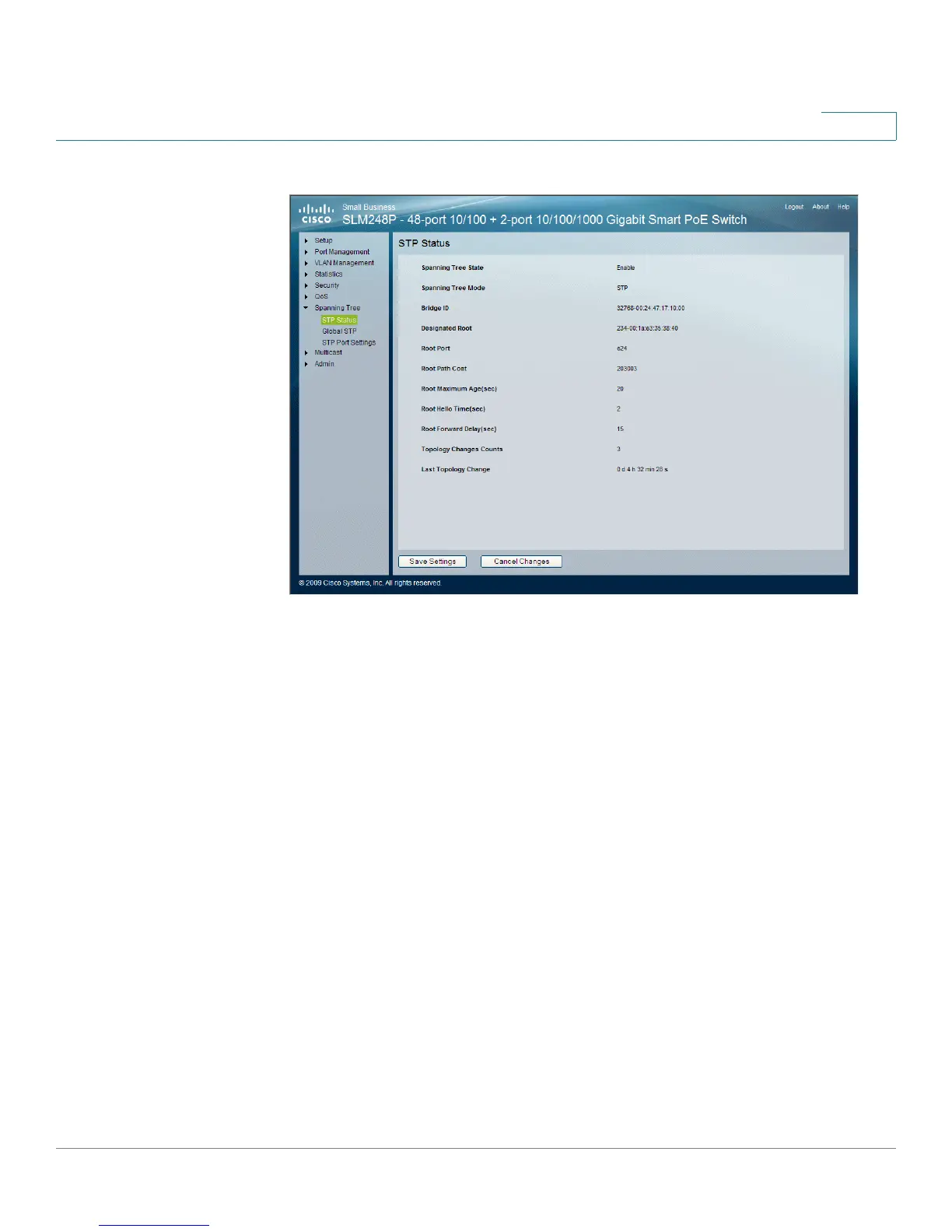
STP Status
The
STP Status
window contains the following fields:
• Spanning Tree State — Indicates if STP is enabled on the device. The
possible field values are:
-
Enabled
— Indicates STP is enabled on the device.
-
Disabled
— Indicates STP is disabled on the device.
• Spanning Tree Mode — Indicates the STP mode by which STP is enabled
on the device. The possible field values are:
-
STP
— Indicates Classic STP is enabled on the device.
• Bridge ID — Indicates the bridge priority and MAC address.
• Designated Root — Identifies the bridge priority and MAC address of the
root bridge.
• Root Port — Indicates the port number that offers the lowest cost path from
this bridge to the Root Bridge. It is significant when the Bridge is not the
Root.
• Root Path Cost — The cost of the path from this bridge to the root.


 To Next Page