Admin
Firmware Upgrade
Cisco Small Business SLM Series Smart Switches Administration Guide 78
9
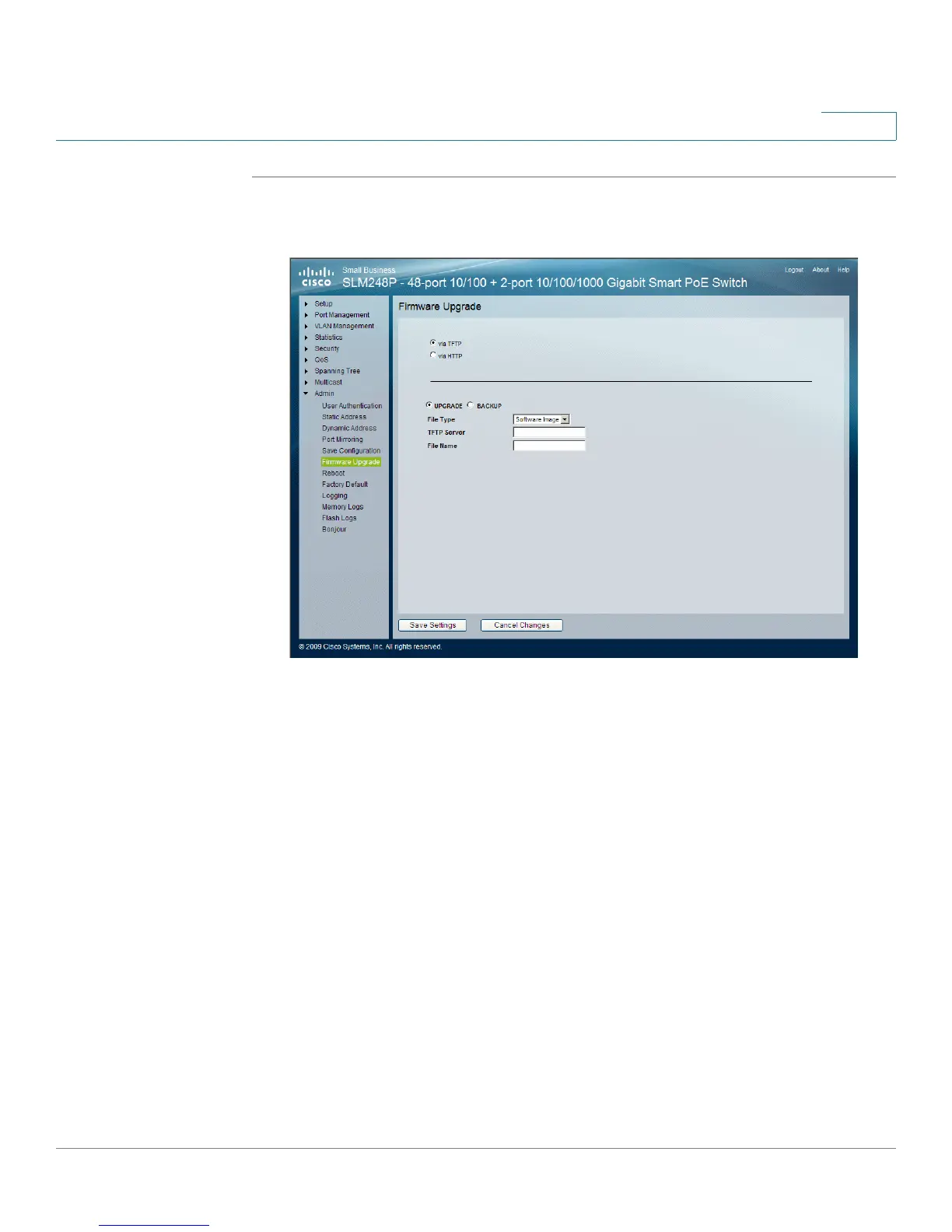
STEP 1 Click Admin > Firmware Upgrade. The
Firmware Upgrade
window appears.
Firmware Upgrade
The
Firmware Upgrade
window
contains the following fields:
• via TFTP — Defines the upgrade through a TFTP Server.
• via HTTP — Defines the upgrade through a HTTP Server.
When
via TFTP
is selected
the following fields are displayed:
• Upgrade — Defines the window functionality as a Firmware upgrade.
• Backup — Defines the window functionality as a Firmware backup.
• File Type — Specifies the destination file type to which to the file is
downloaded. The possible field values are:
-
Software Image
— Downloads the Image file.
-
Boot Code
— Downloads the Boot file.
• TFTP Server — Specifies the TFTP Server IP Address from which files are
downloaded.
• File Name — Specifies the file to be downloaded when using TFTP.


 To Next Page